Walmart Item Spec is the set of rules that defines exactly what product data you must send to Walmart Marketplace, product type by product type. It lists the required, conditional and optional attributes, the allowed values and the formats. You use it to build item setup and maintenance files, either by downloading it or by pulling it through the Item Management API. If your data does not match the spec for your product type, the item will not publish cleanly.
This guide is written for brand and ecommerce teams that manage large catalogs on Walmart. It covers how the spec works, how to find the right product type, where to get the current version, and how to build a workflow that cuts down on rejected items.
TL;DR
- Item Spec defines the product data Walmart requires for each product type. Every item must meet it before it can be published and sold.
- Start with the taxonomy (category, product type group, product type), then pull the requirements for that product type.
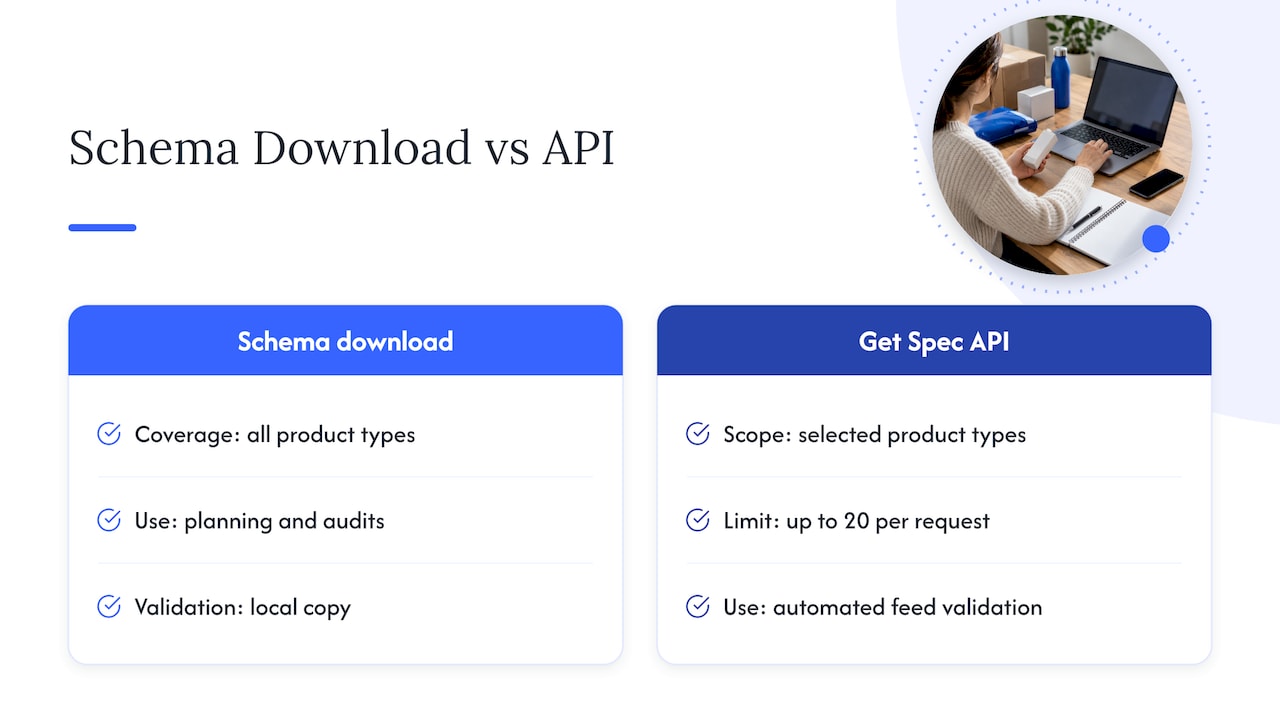
- You can download the full spec for all product types or retrieve up to 20 product types per request through the Get Spec API.
- Walmart releases new spec versions regularly and publishes diff reports, so check what changed before you rebuild feeds.
- If the item already exists in Walmart’s catalog, Offer Setup by Match is the faster route. Full Item Setup is for items Walmart does not currently sell.
What Walmart Item Spec is
Walmart describes its Item Management APIs as the tools sellers use to set up and manage items, including detailed product information, pricing, inventory and restrictions. Items must be published before customers can view and purchase them. Item Spec is the rulebook those tools validate against.
In practice, the spec answers four questions for every product type:
- Which fields are required to create the item?
- Which fields become required only under certain conditions?
- Which values are allowed for each field (for example, a fixed list of colors or a maximum text length)?
- What format does each value need (numbers, URLs, text lengths, units)?
Walmart’s official Item Spec overview says Item Spec supports both single-item and bulk setup and maintenance, and that it is designed to use one specification across Marketplace and Walmart Fulfillment Services (WFS) workflows. That matters for brands running both seller-fulfilled and WFS items, because one set of attribute logic covers both.
Think of the spec as the contract between your product information system and Walmart’s catalog. Your PIM or spreadsheet holds the truth about the product. The spec tells you how that truth has to be shaped before Walmart will accept it.
What Item Spec 5.0 changes
Walmart’s current spec generation is 5.0. According to Walmart’s own Item Spec page, version 5.0 can improve content quality by up to 10%, remove 60% of generic attributes and increase attribute granularity by up to 65%. Those are Walmart’s stated figures, not independent results, so treat them as direction rather than a promise for your catalog.
What the numbers point to is a practical shift: fewer vague catch-all fields and more specific, structured ones. For a seller, that usually means:
- More attributes to fill in per product type, but each one is clearer about what it wants.
- Less room to park important details in a free-text description.
- Better odds that the item shows up in filtered browsing and search, since Walmart positions structured attributes as a way to improve discoverability and listing consistency.
For a deeper look at how attribute completeness feeds Walmart’s quality scoring, see our guide on fixing your Walmart content score with images and attributes.
How to find the right product type
Everything in Item Spec hangs off the product type, so classification is the first step, and a wrong choice here causes problems later. A mismatched product type means you will be filling in the wrong attribute set.
Walmart’s U.S. taxonomy has three levels that matter to sellers, as laid out in its listing requirements documentation: category, product type group and product type. Each product type has its own required attributes and supported values.
The documentation tells sellers to use the Taxonomy API to identify the appropriate product type before retrieving an item specification. The API returns categories, product type groups, product types and descriptions, so you can read the descriptions and confirm the match rather than guessing from a name.
A few habits that help on large catalogs:
- Map once, reuse everywhere. Build a lookup table in your PIM that ties each of your product families to a Walmart product type, and review it when you add a new line.
- Read the descriptions. Similar product types can sit side by side, and the description is the quickest way to see which one fits.
- Keep the taxonomy version in mind. Walmart documents taxonomy retrieval by version, so the tree you pull should line up with the spec version you build against.
Required, conditional and optional attributes
Once you know the product type, the spec tells you what to send. Walmart’s Get Spec documentation explains that a successful response returns a JSON Schema (draft-07) containing required fields, enumerated allowed values, formats, length and numeric constraints, and conditional requirements.
Here is how to read those layers.
Required attributes
These must be present or the item fails. Typical examples are the product identifier, the product name and the brand. Required attributes differ by product type, so never assume the list you used for one product type carries over to another.
Conditional attributes
These become required only when a condition is true. Walmart’s documented examples include:
- A warranty URL or warranty text, depending on how the item is set up.
- Prop 65 warning text, when it applies to the product.
- Safety data sheet requirements for certain aerosol, pesticide or battery conditions.
Conditional rules are where many rejections come from, because the field looks optional until your product triggers the condition. If you sell anything with batteries, aerosols or chemical ingredients, check these rules before you build the feed. For regulated items, confirm the right answer with your compliance or regulatory team, not only the spec.
Optional attributes
Optional does not mean unimportant. Optional attributes often carry the filterable details shoppers use to narrow results, such as size, material, count or compatibility. On a competitive item, filling them in is part of listing quality, not an extra.
Allowed values and formats
The schema lists enumerated values for many fields. If the spec says a field accepts a fixed list, your value has to match it exactly, so map your internal terms (“navy blue”) to Walmart’s accepted values before submission. Length and numeric limits work the same way: a title or description over the limit, or a number in the wrong format, will be rejected.
Where to get the current Item Spec
There are two routes, and most brands end up using both.
Download the full spec
Walmart’s versioning and diff reporting page provides downloadable requirements for 6,700 product types at once, along with the latest and previous versions so you can compare them. The downloads are organized by feed type, including:
- MP_ITEM for Marketplace item setup
- MP_MAINTENANCE for updating existing items
- MP_WFS_ITEM for Walmart Fulfillment Services items
- OMNI_WFS
- Virtual packs
- Bulk item deletion
This route suits merchandising and content teams who work in spreadsheets and need the full attribute list for planning.
Retrieve it through the Get Spec API
The Get Spec API retrieves requirements for one or more selected product types, up to 20 product types per request. The request includes a feedType and a version, while productTypes is optional. Walmart documents the endpoint as a POST to https://marketplace.walmartapis.com/v3/items/spec.
This route suits technical teams or integration partners who validate payloads automatically. Walmart also notes that sellers can download the complete Item Product Type Spec Schema covering all product-type specifications, so you can keep a local copy for validation.
A simple way to choose: use the download for planning and audits, and the API for automated validation inside your feed pipeline.
How spec versions and diff reports work
Walmart’s U.S. marketplace supports the 4.x and 5.x version families, while non-U.S. marketplaces support 5.x only, according to the same listing requirements documentation. New 5.x builds are released regularly. Walmart’s What’s New page logs each release with its version string and the feed types it covers, so it is the place to check for the latest build before you start a large setup project.
The versioning page supplies a recommended version, a previous version and, where applicable, versions marked not recommended. It also provides diff reports comparing the recommended version with the previous one. Walmart says these reports identify changes to product types, attributes, allowed values and item setup requirements. Versions marked Not Recommended are left out of that comparison.
Here is how to use that in a routine:
- When a new recommended version appears, open the diff report for the product types you sell.
- Look for new required attributes, since those can break feeds that worked last month.
- Look for changed or removed allowed values, which can silently invalidate mapped data.
- Update your mapping, test on a small batch, then roll out to the full catalog.
Doing this on a schedule, rather than after a wave of errors, is one of the cheapest forms of catalog insurance. Because the page changes often, always read the current version string there rather than relying on any number printed in an article.
How an item setup file is structured
Walmart’s item setup schema notes explain that MPItem data is split into two objects: Orderable and Visible. WFS submissions additionally use TradeItem data for logistics and critical fulfillment attributes.
- Orderable holds the attributes needed to create an offer, including a primary identifier such as a GTIN. Requirements here can vary by fulfillment channel.
- Visible holds the product content and attributes shoppers see on the page, which differ by product type.
- TradeItem applies to WFS and covers logistics-related data.
This split is useful when you divide work across teams. Operations or catalog managers own identifiers, pricing and fulfillment data. Content teams own the visible attributes, titles and descriptions. Each group can check its own objects against the spec.
Offer Setup by Match or Full Item Setup
According to Walmart’s Item Management API overview, Offer Setup by Match is the primary quick-listing route when the item already exists in Walmart’s catalog. You attach your offer to the existing item. Full Item Setup is for new listings Walmart is not currently selling, and that is where the complete Item Spec requirements apply in full.
For brand owners, this distinction shapes strategy. If you are the brand and your products are being sold already, the content on those existing pages matters a great deal. If you are launching a new product, Full Item Setup gives you control over every attribute from day one. Our Walmart product listing guide for brand owners walks through the surrounding decisions.
A workflow that reduces item setup errors
The fix for most spec errors is process, not heroics. Walmart’s guidance boils down to this: retrieve the schema for the correct feed type, version and product types, then validate required fields, allowed values, formatting, quality constraints and conditional rules before you build item setup payloads. Here is how that looks as a repeatable routine.
- Classify. Use the taxonomy to assign the right product type to every SKU family.
- Pull the spec. Retrieve the schema for that product type, feed type and version, either by download or API.
- Map your data. Match each of your PIM fields to a spec attribute. Flag required attributes you do not have and conditional ones your products might trigger.
- Normalize values. Convert internal terms to Walmart’s allowed values, and set units and formats as specified.
- Validate before you submit. Run your payload against the JSON Schema locally. Catching a missing field here costs minutes. Catching it after rejection costs days.
- Test a small batch. Submit a handful of items per product type, review the results, then scale up.
- Re-check on every new version. Use the diff report to update mappings.
If a launch is on the horizon, pair this with a review of Walmart Marketplace requirements so that account-level standards are not the thing that holds you back after the item setup is clean.
Common mistakes to avoid
- Building one template for several product types and assuming it will pass for all of them.
- Putting variant details in the title because the proper attribute felt like extra work.
- Ignoring conditional rules for items with batteries, warnings or warranties.
- Using an outdated spec version because the feed “worked before.”
- Leaving optional attributes empty on the items that matter most to revenue.
Our perspective on Item Spec
We see Item Spec as a growth lever more than a compliance chore. Brands that treat it as a form to be filled in tend to get items live and then stall. Brands that treat it as the foundation of their Walmart content tend to see cleaner catalogs, fewer rework cycles and better conditions for everything built on top of the listing, from search visibility to advertising.
At Nectar, we approach it the same way across a catalog. We classify every SKU family against the right product type, map attributes from the client’s source data, and check for conditional triggers before anything ships. Our creative team then works from the same attribute logic so that images, A+ content and copy support what the structured data says, rather than contradicting it.
Our aim is a single source of truth for each product that feeds Walmart, Amazon and a brand’s own site, with Walmart’s specific requirements applied at the end rather than reinvented each time. That is how mid-market and enterprise teams can keep hundreds or thousands of items accurate without growing headcount at the same rate.
Dan Katona
Let Nectar handle the catalog work
If your team is stretched across several marketplaces, item setup and maintenance can eat the time you would rather spend on growth. Nectar is a fully managed ecommerce agency for mid-market and enterprise brands on Walmart, Amazon and Shopify. Our Walmart solutions cover catalog and listing management, creative production and advertising under one roof.

If you are expanding into new channels, our marketplace expansion and management service covers setup and ongoing operations. For day-to-day catalog, inventory and compliance work, see our marketplace operations management. Talk to our team about your Walmart catalog.
FAQ
What is a Walmart Item Spec?
It is Walmart’s specification of the product data required to set up and maintain items on Walmart Marketplace. For each product type, it defines required, conditional and optional attributes, allowed values and formats. It supports both single-item and bulk workflows, and covers Marketplace and WFS.
Where can I download the Walmart Item Spec?
Walmart’s versioning and diff reporting page offers downloads of requirements for 6,700 product types at once, by feed type such as MP_ITEM and MP_MAINTENANCE. It also provides the latest and previous versions for comparison. You can alternatively retrieve requirements for specific product types through the Get Spec API.
How many product types can I request through the Get Spec API?
Up to 20 product types per request. The request needs a feedType and a version, and productTypes is optional. If you need everything, download the complete spec schema instead of making repeated calls.
Which Item Spec versions work in the U.S.?
The U.S. marketplace supports the 4.x and 5.x families, while non-U.S. marketplaces support 5.x only. Walmart marks one version as recommended and publishes diff reports against the previous one. Check the What’s New page for the current build before you start a large project.
Do I need Full Item Setup for every product?
No. If the item already exists in Walmart’s catalog, Offer Setup by Match is the primary quick-listing route. Full Item Setup is for new items that Walmart is not currently selling, and it requires the full set of spec attributes for your product type.
Sources
- Item Spec - Walmart Marketplace
- Item Management API overview
- Understanding the requirements for listing an item
- Get item setup requirements
- Item spec: versioning and diff reporting
- What’s new
- Item setup schema key points
Recommended