How to Audit Product Listings for Amazon and Walmart
.webp)

TL;DR:
- Regular product listing audits ensure compliance and optimize visibility across platforms, preventing suppression and sales loss. Prioritizing high-revenue SKUs and addressing platform-specific errors systematically maintains catalog health and drives growth. Building an ongoing, cross-functional audit process transforms listing quality into a key operational discipline rather than a one-time project.
Auditing product listings is the process of systematically reviewing your e-commerce product pages against platform requirements, quality standards, and SEO criteria to identify errors that suppress visibility and reduce sales. On Amazon and Walmart, a single missing attribute or mismatched price can pull a listing from search results entirely. Tools like Amazon Seller Central, Walmart Seller Center, Google Merchant Center, and third-party platforms like FeedOps and LynkPIM make it possible to diagnose these issues at scale. Knowing how to audit product listings correctly, and doing it on a regular cadence, is one of the highest-leverage activities available to any e-commerce manager.
What does a product listing audit checklist cover?
A product data quality checklist covers 30 key fields grouped by function, including titles, attributes, media, identifiers, commercial data, and channel mappings. That scope matters because a gap in any one category can cascade into suppression, poor ranking, or lost Buy Box eligibility. The goal of your product listing checklist is not just completeness. It is governed, validated data that holds up across every platform refresh.
Here are the core categories your checklist must address:
-
Titles: Character count compliance, primary keyword placement, brand name inclusion, and absence of prohibited terms
-
Attributes: Color, size, material, and variant data filled to the platform’s required and recommended fields
-
Media: Minimum image count, resolution standards (at least 1000px on the longest side for Amazon zoom), and video presence for high-velocity SKUs
-
Identifiers: GTIN, UPC, EAN, and ASIN accuracy. Missing or incorrect GTINs are one of the most common causes of feed rejection
-
Commercial data: Price consistency between feed and landing page, availability status, and shipping tier accuracy
-
Brand and category normalization: Standardized brand names and correct category mapping. Inconsistent brand strings undermine identifier logic and trust signals essential for indexing
-
Descriptions and bullet points: Keyword-rich copy that meets character limits and avoids HTML where prohibited
Pro Tip: Run brand normalization before any other fix. If your brand field contains variations like “Nike,” “NIKE,” and “nike inc,” the platform’s indexing logic treats them as separate entities, which fragments your catalog’s authority.
The listing optimization checklist from Nectar covers these categories across Amazon, Walmart, and Shopify with platform-specific field requirements. Use it alongside your internal spec review to catch gaps your team’s familiarity with the catalog might cause you to overlook.

How to audit product listings specifically for Amazon
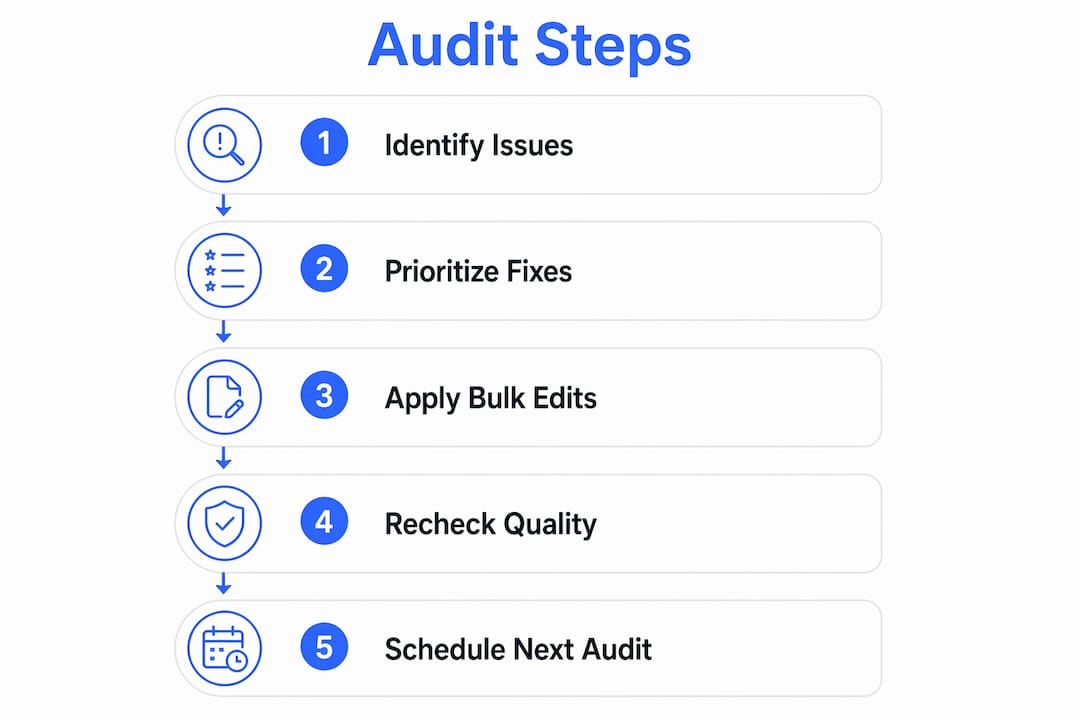
Amazon listing audits follow a clear sequence: SEO quality first, compliance second, creative third. Reversing that order wastes time because a listing with perfect images but a policy violation will stay suppressed regardless of creative quality.
-
Pull your inventory report from Amazon Seller Central. Filter for suppressed listings immediately. Suppressions are revenue losses happening right now, and they take priority over optimization work.
-
Audit titles against Amazon’s style guide for your category. Titles should be 150 to 200 characters, lead with the brand name, and include the primary keyword within the first 80 characters. Avoid promotional language like “best” or “cheapest,” which violates Amazon’s content standards.
-
Review bullet points for keyword coverage and compliance. Each bullet should address a distinct product benefit, stay under 200 characters, and avoid special characters that render incorrectly on mobile.
-
Check backend search terms. The backend keyword field allows up to 250 bytes. Many sellers waste this space with duplicate keywords already in the title. Fill it with synonyms, alternate spellings, and long-tail phrases not present in visible copy.
-
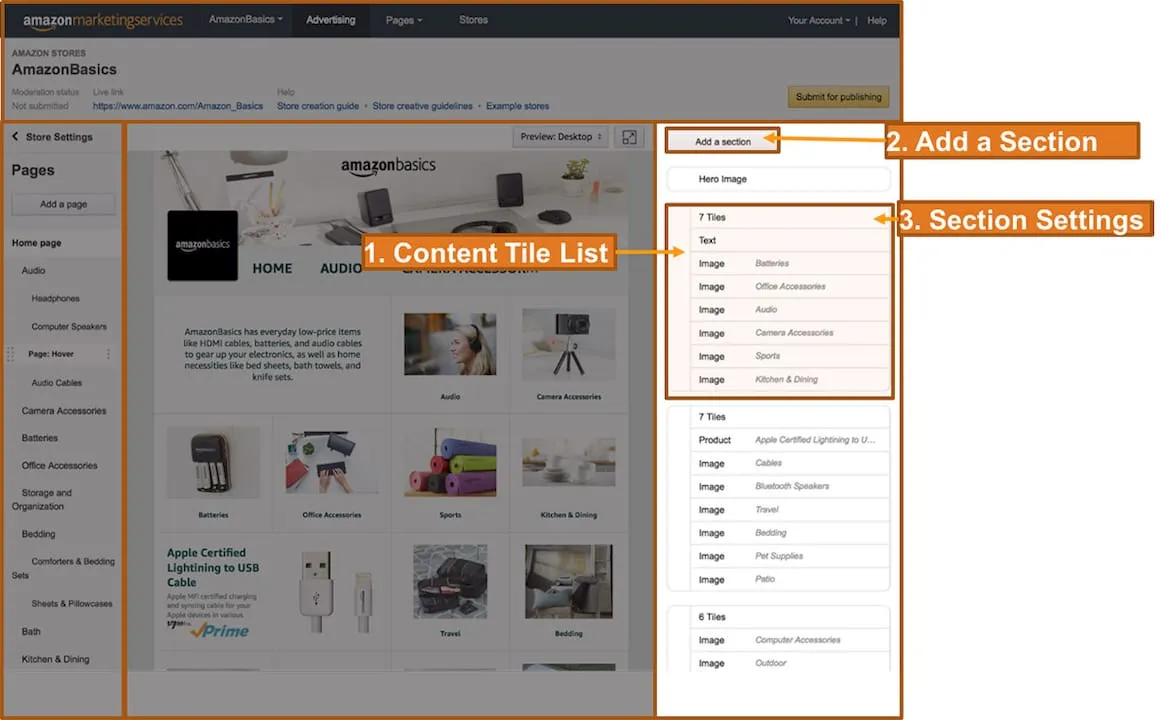
Evaluate A+ Content and images. Listings with A+ Content consistently outperform standard listings on conversion rate. If your brand is registered in Amazon Brand Registry and lacks A+ Content on top-revenue ASINs, that is a direct revenue gap.
-
Cross-reference your listing data with third-party tools. Platforms like Helium 10 or DataHawk surface keyword ranking drops and listing change alerts that Seller Central alone does not flag proactively.
Pro Tip: Set a recurring calendar alert to re-audit your top 20 ASINs by revenue every 30 days. Amazon’s algorithm updates and competitor activity can erode keyword rankings without triggering any Seller Central notification.
For brands running paid campaigns alongside organic listings, Nectar’s work on scaling Amazon Ads shows how listing quality directly affects ad efficiency. A weak listing converts poorly regardless of how much ad spend drives traffic to it.
What is the step-by-step audit workflow for Walmart Marketplace listings?
Walmart listing audits require a compliance-first mentality rather than focusing solely on copy quality or keyword optimization. Walmart’s search algorithm weights attribute completeness and policy compliance heavily, which means a keyword-rich title on an otherwise incomplete listing will not rank.
Follow this workflow for a structured Walmart audit:
-
Download the category-specific spec file from Walmart Seller Center. Each category has its own required and recommended attributes. The spec file includes built-in validation rules that flag errors before submission, saving you resubmission cycles.
-
Export your Listing Quality Dashboard data. Pull the full report monthly and segment SKUs into score bands: below 60, 60 to 79, and 80 and above. SKUs below 80 need prioritized fixes.
-
Sort by revenue impact within each band. A SKU scoring 65 that generates $10,000 per month deserves attention before a SKU scoring 55 that generates $200 per month. Score segmentation guides your maintenance versus targeted improvement decisions.
-
Identify the lowest-scoring attribute component for each priority SKU. Walmart’s dashboard breaks scores down by title, description, images, attributes, and ratings. Fix the weakest component first for the fastest score lift.
-
Choose your edit method based on issue scale. For structural gaps affecting 10 or more SKUs, use Walmart’s Bulk Attribute Editor or API-based updates. For unique SKU defects, one-by-one edits through Seller Center are faster and less error-prone.
-
Re-extract scores after fixes and validate. A monthly audit cadence with iterative fixes typically produces score lifts of 5 to 15 points per refresh cycle.
For deeper guidance on Walmart-specific requirements, Nectar’s resource on Walmart listing optimization covers attribute prioritization and compliance validation in detail.
Key compliance checks to run on every Walmart audit:
-
Verify that all required attributes in the spec file are populated, not just recommended ones
-
Confirm that product images meet Walmart’s white-background requirement for the primary image
-
Check that pricing in your feed matches the price displayed on the product page
-
Validate that item condition, fulfillment method, and shipping weight are accurate
How to audit your product data feed for Google Shopping
Google Shopping audits start in one place: the Diagnostics tab inside Google Merchant Center. Disapproved products are completely invisible in shopping auctions until the underlying errors are resolved. No amount of bidding or feed optimization recovers a disapproved product. Fix errors first, then address warnings.
Your Google Shopping audit should follow this priority order:
-
Errors first: These cause outright disapprovals. Common errors include missing required attributes like price or availability, GTIN mismatches, and landing page policy violations. Feed-related disapprovals typically resolve within 24 to 48 hours after corrections. Manual review disapprovals take 1 to 3 business days.
-
GTIN coverage and accuracy: High GTIN coverage with verified accuracy improves your product’s eligibility in Google’s Shopping Graph, which powers both paid and free listings. Use GS1’s verification tools to confirm your GTINs are correctly assigned.
-
Feed-to-page data synchronization: A mismatch between your feed’s price or availability and the structured data on your landing page causes suppression even when the feed itself looks complete. Cross-verifying feed and page data is a non-negotiable audit step.
-
Attribute completeness for top SKUs: Aim for 95% or higher attribute completion on your highest-revenue products. Missing attributes like color, size, or material reduce match quality and limit impression share.
-
Warnings: Address these after errors are cleared. Warnings do not cause disapprovals but they do reduce performance and impression eligibility.
Pro Tip: Use FeedOps for automated audit reports and AI-based attribute enrichment suggestions. It surfaces gaps across large catalogs faster than manual Merchant Center review and flags synchronization issues between your feed and landing pages.
What common mistakes should you avoid when auditing listings?
Most listing audit failures come from process errors, not knowledge gaps. The fix is a repeatable system, not a one-time cleanup.
-
Skipping the platform diagnostics tab and editing feed files directly. The biggest mistake in Google Shopping audits is trying to fix errors inside the feed file without first checking Diagnostics for severity and affected product counts. The same logic applies to Walmart’s Listing Quality Dashboard. Always start with the platform’s native reporting.
-
Ignoring brand and category normalization. Inconsistent brand strings and miscategorized products undermine identifier logic and reduce trust signals that platforms use for indexing. Many teams skip this step because it feels administrative. It directly affects whether your products appear in the right search results.
-
Pricing and availability mismatches between feed and landing page. This is the most common cause of suppression on Google Shopping and a frequent compliance failure on Walmart. Your feed can be perfect and your listing still disappears if the page data does not match.
-
Treating audits as one-time projects. Platform requirements change. Amazon updates its style guides. Walmart revises category spec files. A listing that passed your audit six months ago may fail today’s standards. Build a monthly audit cadence into your operations calendar.
-
Delaying responses to manual review disapprovals. Manual reviews on Google take 1 to 3 business days. Submitting a fix request the same day you receive a disapproval notice cuts your visibility loss window significantly.
A systematic audit cadence with clear ownership across catalog, marketing, and data teams prevents the compounding revenue losses that come from undetected suppression and ranking decay.
Key takeaways
A product listing audit is only as effective as the system behind it. Treat it as an ongoing operational function, not a quarterly fire drill.
Start with platform diagnostics, not feed files
Every audit begins in Amazon Seller Central, Walmart’s Listing Quality Dashboard, or Google Merchant Center’s Diagnostics tab. Native platform reports show you what is actually suppressed or penalized, not what looks wrong in a spreadsheet.
Prioritize by revenue impact, not error count
A catalog with 500 warnings and 5 suppressions on top-revenue SKUs needs those 5 suppressions fixed first. Score segmentation and revenue filtering are the tools that make this prioritization systematic rather than intuitive.
Synchronize feed data with on-page structured data
Price, availability, and identifier mismatches between your product feed and landing page are a leading cause of suppression on Google Shopping and compliance failures on Walmart. Audit both sources together, not separately.
Use bulk tools for structural gaps, individual edits for unique defects
Walmart’s Bulk Attribute Editor and API-based updates handle shared attribute gaps across large SKU sets efficiently. One-by-one edits in Seller Center are faster and more accurate for isolated, SKU-specific issues.
Build a monthly audit cadence
Platform requirements update continuously. A monthly review cycle with iterative fixes produces consistent score lifts and prevents the compounding visibility losses that come from treating audits as one-time events.
Why listing audits are a catalog management discipline, not a project
I have worked with enough e-commerce brands to know that the teams who treat listing audits as a project, something you do once before a big sales event, are the same teams who spend the week after that event troubleshooting suppressions they could have caught in advance.
The brands that consistently outperform on Amazon and Walmart have one thing in common: they have made listing quality a shared operational responsibility. Catalog managers own attribute completeness. Marketing owns copy and creative compliance. Data teams own feed synchronization and identifier accuracy. When those three functions work from the same audit framework, issues get caught before they become suppressions.
The other thing I would push back on is the instinct to automate everything immediately. Automation is valuable, but it needs clean validation rules underneath it. I have seen brands deploy feed management tools on top of messy, unnormalized data and end up with automated errors at scale. Get your normalization and governance right first. Then automate.
Finally, revisit your audit criteria every quarter. Amazon updated its image requirements in 2025. Walmart revised several category spec files in early 2026. The audit that passed your listings last year may not reflect what the platform expects today. Build a quarterly criteria review into your process alongside the monthly execution cadence.
— Dan Katona
Let Nectar audit and optimize your listings

If your team is spending more time troubleshooting suppressions than scaling revenue, the problem is usually a listing quality gap that a structured audit would surface in hours. Nectar’s fully managed approach to Amazon listing optimization and Walmart marketplace management combines platform-specific audit workflows with in-house creative and data capabilities. From diagnosing feed errors to rebuilding A+ Content and attribute sets, Nectar handles the full scope of listing quality work so your team can focus on growth. Brands working with Nectar gain access to the iDerive analytics platform, which surfaces listing performance gaps and prioritizes fixes by revenue impact automatically.
FAQ
What does auditing product listings mean?
Auditing product listings means systematically reviewing your product pages against platform requirements, SEO standards, and data quality benchmarks to identify errors causing suppression, low ranking, or poor conversion.
How often should you audit product listings?
A monthly audit cadence is the standard for active catalogs, with a quarterly review of audit criteria to account for platform requirement updates on Amazon, Walmart, and Google Shopping.
What is the first step in a Walmart listing audit?
Download the category-specific spec file from Walmart Seller Center and export your Listing Quality Dashboard data. SKUs below a score of 80 need prioritized fixes, sorted by revenue impact.
Why do Google Shopping products get disapproved?
Products are disapproved in Merchant Center due to data errors like missing required attributes, GTIN mismatches, or landing page policy violations. They remain invisible in shopping auctions until the errors are corrected.
What tools help with product listing audits?
Amazon Seller Central, Walmart Seller Center, Google Merchant Center, FeedOps, and LynkPIM are the primary tools for diagnosing and fixing listing quality issues across major e-commerce platforms.
Recommended












.png)