Category targeting lets you show Sponsored Products, Sponsored Brands, or Sponsored Display ads across an entire Amazon product category, such as women’s running shoes, rather than a single item or keyword. It works best for awareness and early-funnel discovery, not the final push toward a sale. The playbook that follows shows how to launch a category campaign, harvest the winning ASINs and search terms it surfaces, and migrate that spend into tighter, conversion-focused targeting.
Nectar
Turn Amazon Data Into Growth
Nectar combines Amazon advertising, creative services, and proprietary analytics to help brands manage campaigns and scale smarter.
How category targeting works on Amazon
Category targeting places your ad in front of shoppers browsing a whole product category instead of a specific search term. According to Amazon’s guide to effective targeting with Sponsored Products, this type of targeting lets advertisers display ads across entire product categories, and it is available within Sponsored Products and Sponsored Brands.
Ads can appear in several places once a category is targeted:
Amazon lets you narrow that reach with filters for brand, price range, star rating, and Prime eligibility. Amazon’s guidance on product targeting confirms these refinements are available across Sponsored Display and Sponsored Products, which helps cut down on impressions served to shoppers unlikely to convert.
The practical difference comes down to precision. Product, or ASIN, targeting puts your ad on specific listings you choose, which gives you control but a smaller pool of impressions. Keyword targeting matches ads to what shoppers actually type into the search bar, which captures intent but depends on guessing the right terms. Category targeting sits above both: broader reach, less precision, and a useful testing ground before you commit budget to narrower tactics.
Setting up a category-targeting campaign step by step
Launching a category campaign inside Campaign Manager follows a predictable sequence, and the setup choices you make early shape how clean your data looks later.
Pro Tip: Keep your first category test narrow by picking one subcategory and one price band, then widen only after you see which combination actually converts.
Early signals worth watching include impression volume (a sign the category is being matched at all), click-through rate by placement, and which specific ASINs in the search term report are generating clicks within the first few days.
When category targeting fits your strategy
Category targeting earns its place in a few specific situations and becomes a liability in others.
A simple way to map this: assign category targeting to the awareness stage of a campaign and reserve ASIN or keyword targeting for the conversion stage. Pairing a category campaign for discovery with a tighter retargeting or ad retargeting layer for return visitors often closes that loop without extra manual work.
Refining category signals into ASIN and keyword winners
A category campaign’s real value shows up after it has run long enough to generate a search term report. That report lists every query and ASIN placement that triggered an impression or click, and it is the raw material for everything that follows.
Start by sorting the search term report for rows with strong click-through rate and conversion signals, even on small sample sizes. Amazon’s best-practices guide for Sponsored Products recommends this exact motion: use broader targeting for discovery, then use the search term report to identify winners worth targeting manually. The same logic applies to keyword targeting, where balancing broad terms against long-tail specifics protects both reach and ROAS.
Among the most reliable signals in a category campaign is a search term or ASIN placement that converts at a meaningfully higher rate than the category average. Pulling that signal into a dedicated campaign, rather than leaving it buried in a broad target, is what turns awareness spend into profitable spend.
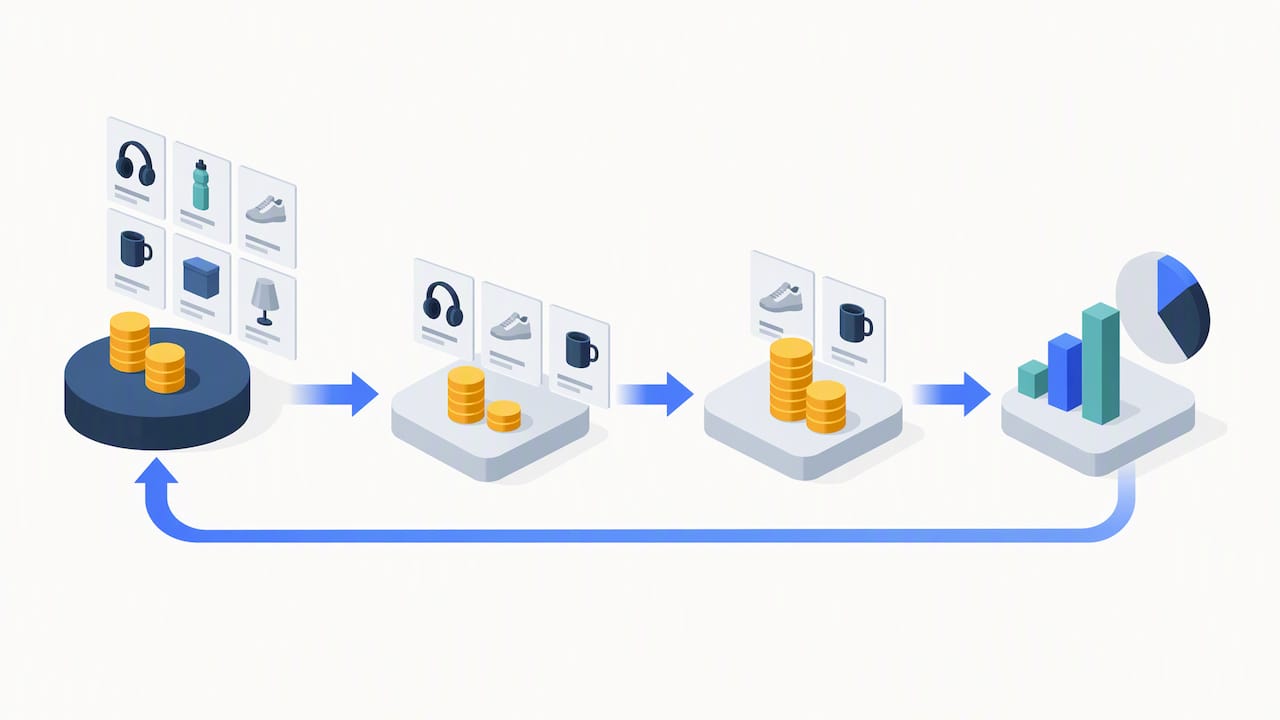
The workflow looks like this:
This cycle, run every one to two weeks, is what keeps a category campaign from becoming a permanent cost center. Nectar’s own Amazon Ads setup guidance walks through a similar structuring approach for advertisers building out ad groups from scratch.
Avoiding wasted spend: pitfalls, KPIs, and quick fixes
Category campaigns fail in predictable ways. The most common mistake is grouping dissimilar ASINs in one ad group, which muddies the bid and makes it impossible to tell which product is actually driving results. A close second is skipping negative targeting entirely, letting irrelevant brands or price tiers consume budget indefinitely. A third is running full bids in categories with naturally high cost-per-click, which drains budget before the search term data has a chance to mature.
Tracking the right metric at the right funnel stage matters more than tracking everything at once.
Key performance indicators by funnel stage
Awareness stage (category campaigns):
Conversion stage (ASIN and keyword campaigns):
Three-step troubleshooting checklist
Nectar’s approach: pairing creative and iDerive data with category targeting
Category campaigns generate more data than most teams can act on manually. Nectar’s Amazon Growth & Optimization work layers its iDerive analytics platform on top of that data to surface which ASINs and search terms inside a category are worth promoting, faster than a manual spreadsheet review would allow. Creative produced through Nectar’s Full Creative Studio is tested specifically for category and Sponsored Display placements, where a sharper image or headline can lift click-through rate before a single bid changes.
Profit-first advertising means the campaign budget follows what the data proves is working, not what looks promising in week one.
Reading category targeting performance the right way
Category targeting produces a different performance profile than ASIN or keyword campaigns, and judging it by conversion-stage benchmarks alone leads to premature cuts.
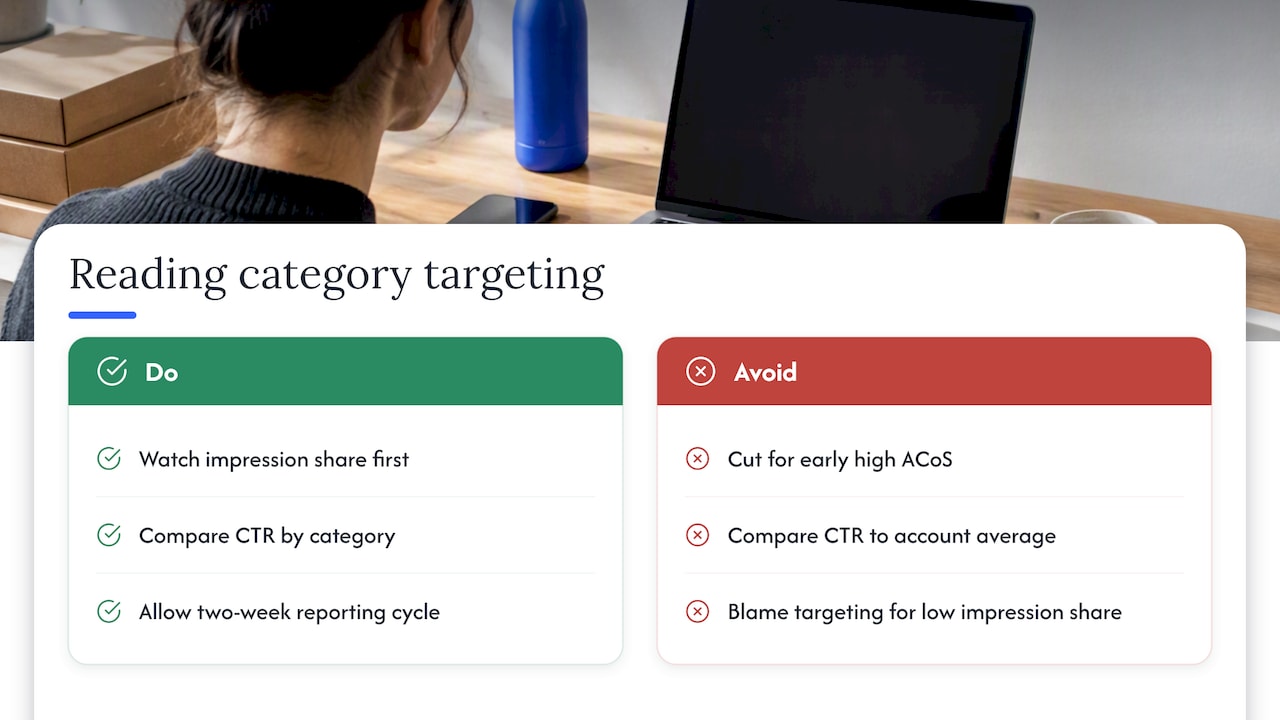
Impression share is the first number worth watching, since it shows how much of the available category inventory your ad is actually winning. A low impression share usually points to a bid that is not competitive within that category, rather than a targeting problem. Click-through rate, by contrast, varies meaningfully by category: a high-consideration category like kitchen appliances tends to produce lower click-through rates than an impulse category like phone accessories, simply because the shopper’s decision path is longer.
Comparing click-through rate across your own categories, rather than against a single account-wide average, gives a more honest read on which placements are working. A category campaign with below-average conversion rate but strong impression share and click-through rate is often doing its job correctly: building visibility and feeding the search term report with data, even if it is not the campaign converting the sale.
The mistake to avoid is judging a category campaign purely on ACoS in its first week. Early ACoS is almost always inflated because spend precedes the conversions that arrive after repeat exposure. Giving the campaign a full reporting cycle, typically two weeks, before drawing conclusions avoids cutting a campaign that was simply still warming up.
Testing and scaling category campaigns over time
Treat a category campaign’s first run as a test, not a commitment. Start with one subcategory, one price band, and a conservative bid, then widen only the dimension that shows a clear signal: more categories if impression share is strong but reach is capped, a wider price band if conversion holds steady across price points, or additional refinements like Prime-only if that filter already outperforms the unfiltered set.
Scaling works best in small increments. The same logic applies to bids: incremental increases on targets that are already converting well tend to outperform broad bid hikes across an entire ad group.
Once a category campaign has produced two or three rounds of ASIN and keyword winners, it has usually done its core job. At that point the category campaign itself can run at a steady, lower budget purely for ongoing discovery, while the bulk of spend lives in the conversion campaigns it fed. Revisiting the category campaign every quarter, rather than letting it run unexamined for months, catches new entrants to the category and any shift in competitor pricing that might change the refinement filters you originally set.
What strategic category targeting looks like in practice
A new entrant into a crowded category, such as a kitchen gadget competing against established brands, often gets the most value from category targeting early on, since there is no purchase or keyword history to build from yet. Running a category campaign against the relevant subcategory, filtered to a competitive price band and a minimum star rating, gives that product its first real exposure to shoppers who are already browsing with intent to buy something similar.
A seller expanding into a new marketplace tier, or a brand launching a seasonal line, tends to use category targeting the same way: as a bridge between having no data and having enough data to run a precise ASIN or keyword campaign. The category campaign’s job in both cases is to generate the search term report that makes the next campaign possible.
Brands building category share rather than launching something new use category targeting differently, often running it continuously at a modest budget specifically to stay visible against competitor ASINs inside their category, even after their own conversion campaigns are well established. This is less about discovery and more about maintaining presence in a category where a competitor’s price drop or new listing could otherwise erode share without the brand noticing.
Where category targeting runs into limits
Category targeting is not available everywhere, and assuming it works the same way across every ad type or marketplace leads to setup mistakes. Availability depends on the specific combination of ad type and category: not every product category has a corresponding targetable category in every marketplace, and the categories Amazon exposes for targeting do not always map one-to-one with the browse categories shoppers see on the site.
Sponsored Brands support for category-level targeting is narrower than Sponsored Products, so a campaign structure that works in one ad type may need to be rebuilt rather than copied when moving to another. Refinement filters like brand, price, and star rating are not universally available on every category either, which means the level of control you have can vary from one category to the next within the same account.
Category targeting also cannot guarantee relevance the way ASIN or keyword targeting can. Because the ad is matched to the category rather than a specific product or search query, some portion of impressions will always go to shoppers browsing for reasons unrelated to a purchase, which is a structural limitation rather than a setup error. Budgeting for that inefficiency, rather than expecting category campaigns to perform at the same efficiency as tightly targeted ones, keeps expectations realistic from the start.
Agency owner’s launch-and-learn checklist
Run this in the first two weeks of any new category campaign:
Pro Tip: Test two creative variants in your category campaign from day one. The placement rewards a sharper image faster than it rewards a bid change.
Nectar’s Amazon Sponsored Ads management
Running category campaigns well takes constant search term review, creative testing, and bid management, work most internal teams squeeze in between other priorities. Nectar’s Amazon Sponsored Ads management service handles that cycle directly, pairing campaign management with in-house creative production and iDerive analytics to identify ASIN winners faster than manual review allows.

Brands managing Amazon, Walmart, or Shopify alongside Amazon can also lean on Nectar’s marketplace expansion and management services for a single team handling the full retail media program. Request a consultation to see how a managed category-targeting strategy could fit your account.
FAQ
What are the top categories on Amazon for advertisers?
Amazon’s top-level browse categories span departments such as clothing, electronics, home, and beauty, but which categories matter most for advertising depends entirely on what you sell. The more useful question is which subcategory within your department has enough search volume and competitive density to justify a dedicated campaign.
What is the difference between ACoS and ROAS?
ACoS measures ad spend as a percentage of ad-attributed sales, so a lower ACoS means more efficient spend. ROAS measures the inverse, sales generated per dollar spent, so a higher ROAS indicates stronger returns. Both describe the same relationship between spend and sales, just expressed in opposite directions.
Can I pay Amazon to promote my products?
Yes, through Sponsored Products, Sponsored Brands, and Sponsored Display, all of which let advertisers pay for placement across search results, product pages, and category or browse placements. Category targeting is one option within these ad types, alongside product and keyword targeting, as outlined in Amazon’s guide to Sponsored Products targeting.
Is manual targeting available for Sponsored Products?
Yes, manual targeting is available for Sponsored Products and includes both product targeting, which covers category and ASIN selection, and keyword targeting. Amazon’s best-practices guide recommends starting with automatic targeting to discover terms, then moving confirmed winners into manual campaigns for tighter bid control.
Recommended














.png)