Ecommerce teams should run Google Performance Max, but only when a clean product feed, diverse creative assets, and independent measurement are already in place. Performance Max works as an intent-capture layer across Search, YouTube, Display, and Shopping, pulling in demand that already exists rather than building a brand from scratch. Skip the feed and measurement groundwork, and the same automation that drives growth for a prepared retailer will waste budget for one that isn’t.
Nectar
Make Ecommerce Growth More Measurable
Nectar combines creative services, advertising strategy, and analytics to help ecommerce brands manage growth across Amazon, Walmart, and Shopify.
What Performance Max is and how it operates across Google inventory
Performance Max is a goal-based campaign type that gives advertisers access to Search, YouTube, Display, Discover, Gmail, and Maps from one campaign, with Google’s machine learning deciding where and when to serve each ad. Instead of building separate campaigns per channel, you feed the system a set of inputs and let it allocate spend toward whichever surface is converting at a given moment.
Those inputs come in two forms. Asset groups hold your headlines, descriptions, images, logos, and video, organized around a theme (a product line, a seasonal push, a customer segment). The Merchant Center feed supplies the product-level data for Shopping ads and dynamic retail placements. Signals, which we cover in more depth later, tell the algorithm who tends to convert so it can find more people like them.
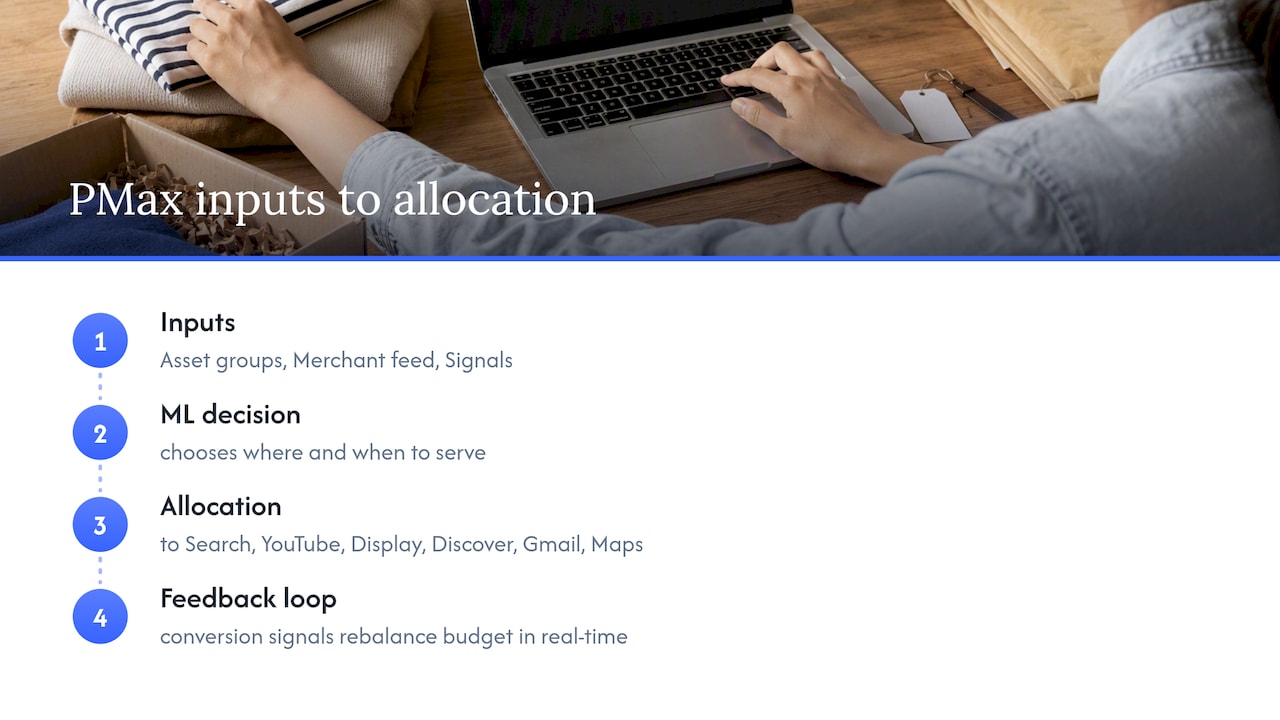
Google rebalances budget across channels continuously based on real-time conversion signals, which is both the appeal and the frustration of PMax: you get cross-channel reach without managing five campaigns, but you lose the granular channel-by-channel levers that older campaign types offered.
That opacity narrowed somewhat in 2026. Google added a channel performance report beta, expanded search terms reporting, and new diagnostic tools, giving advertisers a clearer view into which surfaces are actually driving results and which search queries are triggering ads. For ecommerce teams who previously had to guess whether YouTube or Shopping was carrying a campaign, this is a meaningful shift toward accountability.
Feed and creative asset requirements for ecommerce
Performance Max for retail lives or dies on the Merchant Center feed, which highlights the importance of point-of-sale security for SMBs in safeguarding transactional data and ensuring campaign integrity. Google’s own guidance is direct: a high-quality feed paired with diverse creative assets is the baseline for the system to work, and a weak feed degrades performance across every channel PMax touches, not just Shopping.
Before launching or troubleshooting a campaign, check these feed attributes first:
On the creative side, build out full headline and long headline variations, multiple description lengths, and images across square, landscape, and portrait aspect ratios so the system has room to assemble ads for each surface. Short vertical video, even unpolished, tends to unlock more YouTube and Discover inventory than leaving the video field empty.
Common feed errors worth checking weekly include GTIN mismatches, expired promotional pricing still live in the feed, and out-of-stock items still marked available. A quick Merchant Center diagnostics pass catches most of these before they quietly suppress spend.
Pro Tip: Run your feed through Merchant Center’s diagnostics tab before blaming the campaign. Most ecommerce PMax underperformance traces back to a feed issue, not a bidding issue.
Campaign setup: goals, bidding choices, and conversion tracking
Your campaign goal should match the business outcome you’re actually optimizing for, not a default setting left over from setup.
Conversion tracking gaps are the most common reason ecommerce PMax looks worse than it performs. Unknowns in attribution get smoothed over by Google’s modeling, but a validated enhanced conversions setup gives the algorithm cleaner signal and gives you more confidence in what you’re seeing. Nectar’s guide to advanced bidding strategies walks through how to translate margin targets into realistic tROAS settings.
Audience signals, search themes, and controls to guide PMax
Performance Max isn’t a black box you set and walk away from. You can and should seed it, and you can restrain where it spends.
That last point matters more than it sounds. Branded query capture is one of the most common ways PMax inflates its own reported ROAS. Without exclusions, PMax will happily “win” conversions on searches for your own brand name, searches that were never at risk of going elsewhere, and report that spend as incremental success.
Measurement and attribution: why platform ROAS can lie and what to do about it
Platform-reported ROAS in Performance Max tends to run optimistic, and independent analysis has flagged this directly: industry commentary on PMax performance cautions that platform-reported ROAS can be misleading and recommends pairing it with marketing mix modeling, multi-touch attribution, or incrementality testing to see the real business impact.
The gap usually comes from three places: branded query cannibalization, cross-channel credit that would have converted anyway, and view-through attribution on YouTube and Display inventory that overstates causal impact.
Practical steps to close that gap:
Pro Tip: Treat Google Ads’ own ROAS number as a directional signal, not a scoreboard. Validate it monthly against an independent measurement source before shifting budget. Nectar’s piece on performance metrics in ecommerce covers how to build that validation layer without overbuilding your reporting stack.
Prioritized optimization playbook for ecommerce teams
Once the feed, goals, and measurement guardrails are in place, optimization becomes a matter of structure, creative cadence, and disciplined review.
Threshold triggers worth setting in advance: a sudden drop in Shopping impression share often points to a feed disapproval, not a bid problem. A spike in branded search spend share usually means your negative keyword list needs updating. And a sustained gap between platform ROAS and independent measurement, once it’s been stable for a few weeks, is the signal to pause spend growth until you understand the cause rather than optimizing on a number you don’t trust yet.
Pro Tip: Build your weekly checklist around diagnostics first, bids second. Most PMax “performance problems” are feed or creative problems wearing a bidding costume.
How Nectar approaches PMax for ecommerce clients
The workflow for ecommerce PMax clients often starts before the campaign does: feed cleanup and Merchant Center remediation first, conversion measurement validation second, creative production third, then campaign orchestration layered on top of clean signals. Sequencing it any other way can mean optimizing a campaign that’s reporting on an unverified foundation.
Our proprietary iDerive analytics platform unifies marketplace and advertising data so we can run incrementality checks against platform-reported numbers rather than taking Google’s ROAS at face value, which shortens the loop between spotting a problem and fixing it.
When to favor PMax versus a multi-channel split strategy
Performance Max earns the primary-channel role when a brand has a clean feed, diverse creative, and an existing search presence to capture, particularly at higher average order values where YouTube and Search inventory convert at meaningful value. Early-stage brands with thin branded search volume or very low AOVs often get more out of running demand-generation channels in parallel rather than funneling everything into PMax, since there’s less existing intent for the algorithm to capture. The deciding factor for going in-house versus hiring managed execution usually comes down to whether your team has the bandwidth to run weekly feed diagnostics and monthly measurement reviews, not whether PMax itself is the right tool.
How This approach helps run PMax without the guesswork
This ecommerce practice addresses the gaps that make PMax underperform: messy feeds, thin creative libraries, and measurement that lacks full trust. It pairs hands-on campaign management with the inputs PMax actually needs to work.

That means:
If your feed, creative, or measurement setup needs a second look, reach out through our solutions overview to talk through what a managed setup would look like for your catalog.
FAQ
What is Google PMax?
Performance Max is a goal-based Google Ads campaign type that automatically serves ads across Search, YouTube, Display, Discover, Gmail, and Maps from a single campaign. You supply the goal, budget, feed, and creative assets, and Google’s bidding system decides where to allocate spend.
Are Google Shopping ads better than PMax?
Standalone Shopping campaigns offer more manual control over bids and placements, while PMax trades that control for broader reach across YouTube, Display, and Search in addition to Shopping. Neither is universally better: brands with strong feeds and diverse creative often see PMax outperform standalone Shopping, while those needing tight manual control over specific product bids may prefer Shopping alone.
What is Google ecommerce?
Google ecommerce refers to the tools Google Ads and Merchant Center provide for retailers to list, advertise, and sell products across Google’s network, including Shopping ads, Performance Max campaigns, and the product feed infrastructure that powers them. It covers the advertising and listing layer rather than a standalone marketplace.
Is Google Performance Max any good for retail?
Performance Max can be effective for retail when paired with a clean, well-maintained product feed and a diverse set of creative assets, which Google identifies as the baseline requirements for the campaign type to perform. Without that foundation, the same automation that drives growth for prepared retailers tends to waste budget for those that skip the groundwork.
Sources
Recommended














.png)