Your main image needs a pure white background, the product alone with no text, logos, or watermarks, and a minimum of 1,000 pixels on the longest side to unlock zoom. JPEG in sRGB color space is Amazon’s preferred format. Everything beyond that first image, the lifestyle shots, the infographics, the size charts, live in your secondary gallery slots, where the compliance rules loosen and the conversion work begins.
Nectar
Turn Product Images Into Growth
Nectar combines in-house photography, videography, design, and data-driven advertising to build stronger Amazon storefronts.
What Are Amazon’s Image Requirements for the Main Photo?
Amazon’s official main-image rules exist to make search results and product pages look consistent across millions of listings, and the platform enforces them with automated checks rather than human reviewers. That matters, because automated systems don’t judge intent. They judge pixels.
The background has to be RGB 255,255,255, true pure white, not off white, not cream, not a slight gray cast from a poorly calibrated monitor. Amazon’s checker reportedly samples the corners of an image to verify this, and a background that looks white to your eye can still fail if it reads as 250,250,250 or similar. That’s why so many sellers get suppressed for images they were certain met spec.
The product has to be the only thing in frame. No props, no text overlays, no watermarks, no logos beyond what’s printed on the product itself, and no mannequins unless your category explicitly allows them. Amazon also recommends the product fills most of the image frame, since a product that’s too small reads as a tiny, hard-to-see thumbnail in search results, which can reduce your click-through rate before a shopper reaches your listing.
On formats, JPEG is Amazon’s preferred choice, though PNG, non-animated GIF, and TIFF are all accepted. Stick to sRGB color space, since CMYK files uploaded straight from a print workflow will render with dull, shifted colors online.
Amazon’s own guidance ties the 1,000 px zoom threshold directly to shopper behavior, and Seller Labs’ analysis of the spec notes that images built for crisp zoom at 1,600 to 2,000 px consistently outperform bare-minimum uploads in buyer engagement, since zoom lets shoppers inspect texture, stitching, and fine print they can’t get from a size chart.
What Belongs in Your Secondary Gallery Images?
Your main image has one job: get past the compliance gate. Your secondary images, slots two through nine, have a different job entirely. They answer every question a shopper would ask if they were holding the product in a store.
A useful way to think about it: separate your creative workflow into two lanes. One lane produces the compliance-safe hero shot. The other produces the sales story. Treating them as the same task is a common reason listings ship slower than they need to.
Here’s a sequence that tends to convert well, based on what Amazon’s own help documentation permits in non-main slots:
Text overlays, arrows, and callout boxes are fine in these secondary slots. That freedom doesn’t exist in the main image, so keep any infographic work strictly out of slot one. Most sellers who get suppressed for text-on-image violations made that mistake by treating the main photo like a marketing slide instead of a catalog photo.
Do Image Rules Change by Product Category?
Yes, and this trips up more sellers than any other part of the spec. Amazon’s main-image rules have built-in exceptions for specific categories, and assuming the general rule applies everywhere is a fast way to get a listing flagged.
Before finalizing any shoot, check the specific category style guide inside Seller Central. General rules are the default, but category guides override them, and they change more often than most sellers expect.
Why Do Amazon Listings Get Suppressed for Images?
Image suppression almost always traces back to one of a handful of automated triggers, and the most common causes are remarkably consistent across categories.
The fix workflow is straightforward once you know where to look. Locate the suppressed ASIN in Seller Central’s inventory dashboard, identify the specific image flagged in the account health or listing quality notice, replace only that image (not the whole gallery), and re-upload. Reinstatement is usually automatic once the corrected file passes the checker, though it can take a few hours to reflect.
Pro Tip: Before you ever upload, sample the four corner pixels of your main image in any free editor like GIMP or even the Windows color picker tool. If any corner reads anything other than 255,255,255, that’s your suppression risk sitting right there before Amazon ever sees it.
What’s the Right Export and Upload Checklist?
Getting from finished photo to live listing without a rejection comes down to a few settings decided before export, not after.
One detail that surprises new sellers: Amazon strips and rewrites your filenames on upload, and there’s no alt-text field for standard gallery images, a pitfall highlighted in The Biggest Mistake Online Comic Sellers Make: Showing Too Much Inventory. Naming your file “product-name-main-image.jpg” for your own organization is smart practice, but it won’t do anything for Amazon-side search visibility.
Pro Tip: Batch-process your exports in Photoshop’s Image Processor or a free tool like XnConvert so every image in a listing set gets identical dimensions, color profile, and compression in one pass, instead of manually exporting nine files nine different ways.
If your team is shooting in-house, a structured product photography guide helps standardize lighting and background setup before you ever get to export settings.
How Does Alt Text Work for Amazon Product Images?
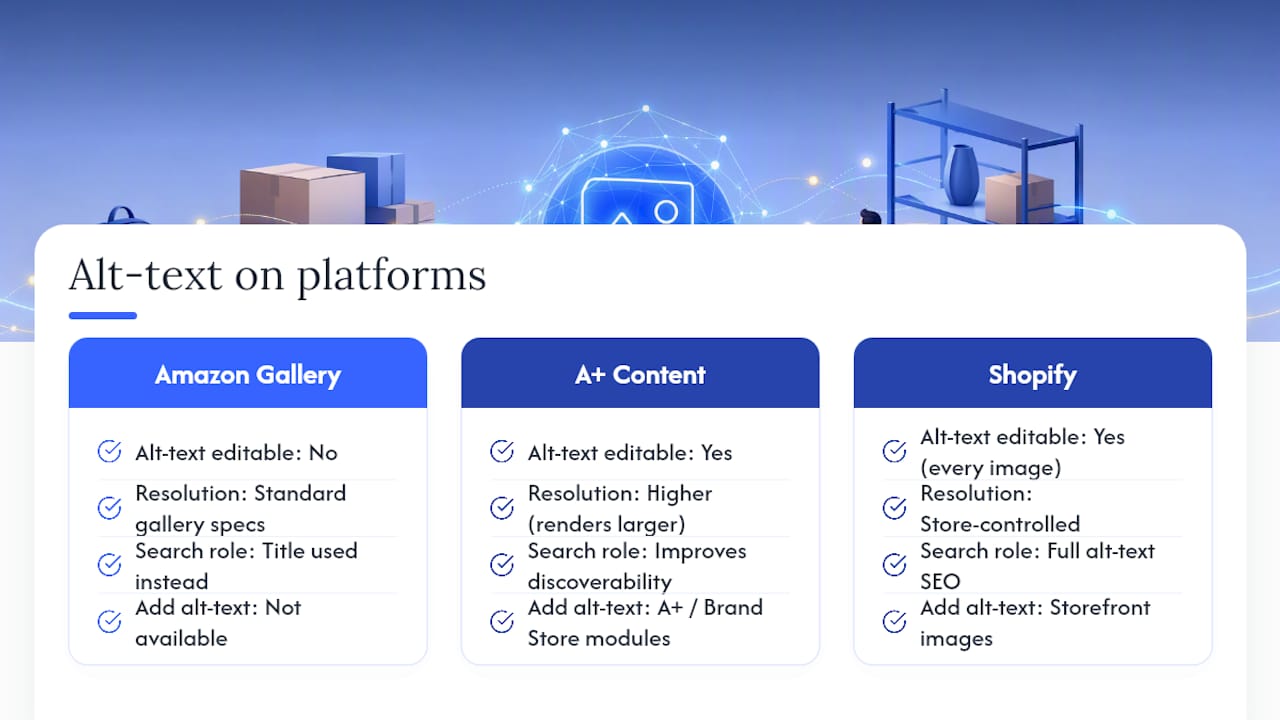
Amazon doesn’t give sellers an alt-text field for standard gallery images, which is different from how image SEO works on a Shopify store or a blog. There’s no box to type descriptive text into for slots two through nine, and the platform doesn’t expose one to third-party sellers.
What you do control is A+ Content. Enhanced Brand Content and Brand Store modules include editable alt-text fields, and these modules also carry their own resolution requirements that run higher than standard gallery specs, since they’re rendered larger on the page. If accessibility and on-platform discoverability matter to your brand, A+ Content is where that effort actually pays off, not the standard gallery.
Your product title still does heavy lifting for search relevance, since Amazon’s algorithm reads title text alongside backend search terms rather than image metadata. Descriptive, keyword-relevant titles function as a partial substitute for the alt text you can’t add elsewhere.
For sellers managing catalogs across multiple channels, this is worth noting: a Shopify storefront gives you full alt-text control on every image, which is a meaningful accessibility and SEO advantage that Amazon’s structure simply doesn’t offer. If your brand sells on both, don’t assume the same accessibility strategy transfers between platforms.
What Content Is Prohibited Beyond the Main Image?
Amazon’s content policies extend well past the white-background rule, and violations here can trigger account-level enforcement, not just a single suppressed listing.
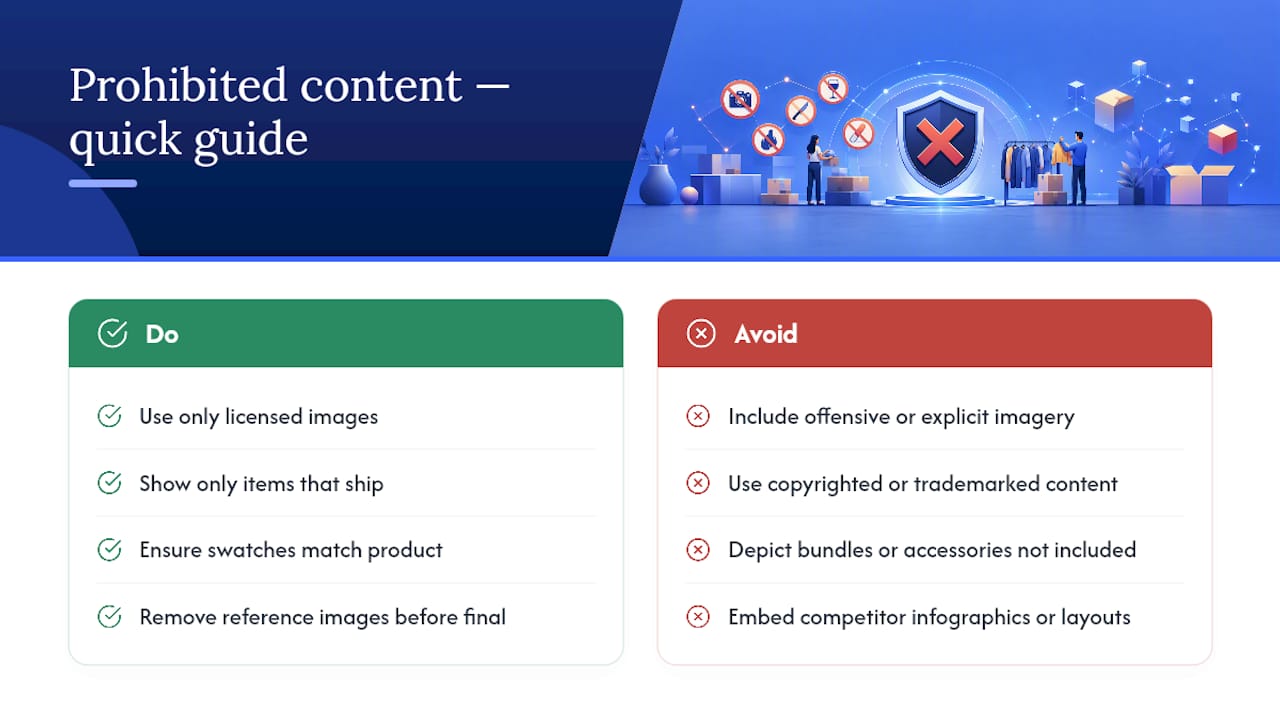
Offensive, violent, sexually explicit, or discriminatory imagery is banned across every image slot, including secondary and A+ images, regardless of whether the product itself is legal to sell. Copyright and trademark infringement is a separate and frequently underestimated risk. Using a manufacturer’s studio photo without a license, lifting a competitor’s infographic layout, or including a licensed character or brand logo without authorization can result in listing takedowns and, for repeat violations, account suspension.
Misleading imagery is its own category of violation. Showing a product bundle in the main image when only a single unit ships, using a color swatch that doesn’t match the actual product, or displaying accessories that aren’t included in the purchase all count as deceptive content under Amazon’s policies, separate from the technical image spec entirely.
Sellers running private-label products should be especially careful with reference or inspiration images pulled from competitor listings during the creative brief stage. It’s easy for a “for reference only” image to end up embedded in a final design file by accident, and Amazon’s enforcement doesn’t distinguish between intentional and careless infringement.
How Should You Optimize Images for Mobile Shoppers?
Amazon’s mobile app traffic makes up a substantial share of purchases, and mobile screens compress your carefully composed image into a fraction of its desktop size. A detail that reads clearly on a 27 inch monitor can disappear entirely on a phone.
Test every main image at actual thumbnail size, not just full screen, before finalizing. If your product’s key differentiator (a texture, a small logo, a proportion detail) vanishes at thumbnail scale, it needs to move to a close-up secondary image instead of relying on the main shot to carry it.
Infographics need bigger, bolder type for mobile than they do for desktop. Text that looks appropriately sized on a laptop screen often becomes unreadable once compressed into a phone’s product carousel. Keep infographic text short, high contrast, and limited to one key point per image rather than cramming several specs into a single dense graphic.
Centered, well-lit product photography also survives the crop-to-square treatment that some mobile placements apply better than an image with important detail near the edges. Building in a small buffer of white space around the product protects against unexpected cropping across different device layouts.
Do Amazon’s Image Rules Apply to Sponsored Products Ads?
Yes, and this is where sellers most often get caught off guard. Sponsored Products ads pull directly from your existing main image; there’s no separate ad-specific image to upload for standard sponsored campaigns. Whatever image sits in slot one is what shows up in search ad placements, category pages, and product detail page ad units.
That means a compliant, high-fill, well-lit main image isn’t just a listing requirement. It’s your ad creative, whether you planned for that or not. A product photographed too small or too dimly for organic search will underperform in paid placements for the exact same reason, and you’re often paying per click for that weaker impression.
Sponsored Brands and Sponsored Display campaigns give you more creative room, including custom headline images and lifestyle creative that don’t have to follow the strict white-background rule. That’s the flexibility budget worth putting effort into if a significant share of ad spend flows through those formats rather than standard Sponsored Products.
Sellers running heavier advertising budgets should treat image quality and ad performance as one connected system rather than two separate projects, since conversion rate work and image quality compound each other directly in ad efficiency metrics like ACOS.
When Managed Creative Services Actually Pay Off
Most sellers can handle basic compliance with a lightbox, a decent camera, and patience. Where it gets harder is scale: a 200 SKU catalog, a rebrand across every listing, or repeated suppressions eating into sales velocity during a peak season.
That’s the point where a managed creative studio earns its cost, producing compliant master files and A+ ready assets in one coordinated pass instead of piecemeal fixes. Nectar’s in-house photography and analytics work through iDerive typically shows up in faster re-upload cycles after suppression, more consistent compliance across large catalogs, and measurable lifts in conversion once imagery moves from bare-minimum spec to genuinely persuasive creative.
How Nectar Helps You Get Images Right the First Time
Getting a single image compliant is a checklist problem. Getting two hundred SKUs compliant, on brand, and converting across Amazon, Walmart, and Shopify at the same time is an operations problem, and that’s the gap Nectar’s creative studio was built to close.

Nectar pairs in-house photography and videography with Seller Central account management, so image production and listing compliance run through the same team instead of getting handed off between a freelancer and whoever manages your catalog. For brands dealing with recurring suppression issues or planning a full brand refresh, the Amazon Growth & Optimization service builds the image program strategy alongside A+ Content production, backed by iDerive’s reporting on how creative changes move conversion.
A typical engagement starts small: an audit of your current image set against Amazon’s spec, a handful of sample assets built for your top SKUs, then a scoped production plan from there. If your catalog needs that level of attention, start with a look at Nectar’s Amazon services and request a sample audit before committing to a full production run.
FAQ
What Are the Rules for Amazon Images?
The main image must show only the product on a pure white background with no text, logos, or watermarks, filling roughly 85% or more of the frame, while secondary images allow lifestyle shots, infographics, and close-ups.
What Size Image Is Needed for Amazon?
Amazon requires at least 1,000 pixels on the longest side to enable zoom, though most agencies recommend exporting at 1,600 to 2,000 pixels for sharper results on high-resolution screens.
What Are the Specs for an Amazon Store Image?
Amazon Brand Store and A+ Content modules require higher-resolution assets than standard gallery images and include editable alt-text fields, unlike the standard product gallery, which has no alt-text option at all.
Why Did My Amazon Listing Get Suppressed for Images?
The most common causes are a background that isn’t truly pure white, a product that’s too small in the frame, text or watermarks on the main image, or a file under 1,000 pixels that disables zoom.
Can I Use the Same Main Image for Amazon and Shopify?
Technically yes, but Amazon’s strict white-background rule doesn’t apply to your own Shopify storefront, so reusing only the compliant Amazon shot often undersells your product on channels with more creative freedom.
Recommended


.png)






















.png)



































































