Sponsored Products match types decide how closely a shopper’s search has to resemble your keyword before your ad can enter the auction. Amazon gives you three for manual keyword targeting: broad, phrase and exact. Automatic campaigns use a separate set of four targeting groups instead. Pick them badly and you either starve a good keyword of impressions or pay for clicks from shoppers who never wanted your product.
This guide covers what each type does, where each one belongs in a campaign structure, how to bid across them, and the mistakes we see most often when brands hand us an account that has been running on autopilot.
TL;DR
- Broad gives the most reach and the least control. Use it to discover search terms, with a lower bid and negative keywords in place.
- Phrase is the middle ground: the shopper’s search has to contain your keyword’s words in order. Use it for proven themes you want to widen carefully.
- Exact gives the tightest control and the best conversion signal. Put your winning, high-intent terms here and bid most aggressively.
- Automatic targeting is not a match type. It has four groups (close match, loose match, substitutes, complements) and works best as a research engine feeding your manual campaigns.
- Run the same keyword in more than one match type only if you use negatives so your own campaigns do not bid against each other.
What a match type actually controls
A keyword is the word or phrase you bid on. A search term is what the shopper actually typed. Match types sit between the two and set the rules for when a search term is close enough to your keyword to trigger your ad.
That distinction matters because the money is spent on search terms, not keywords. You can have a tidy list of 50 keywords and still pay for hundreds of search terms you never chose. The match type determines how many of those you get.
Match types apply to manual keyword targeting in Sponsored Products and Sponsored Brands. In Sponsored Products, Amazon’s own targeting guide lists the three keyword match types as broad, phrase and exact, and separately describes automatic targeting, where Amazon chooses the matches from your listing.
The three manual match types
Broad match: widest reach, least control
Broad match is built to find searches you did not think of. In practice, a broad keyword such as “insulated water bottle” can show your ad on searches that include those words in a different order, add other words, or use related terms. The shopper might type “stainless steel bottle for hiking” and still be in play.
That reach is useful early in a campaign and expensive later. Broad match is the main reason accounts leak budget: the further a search drifts from your keyword, the lower the odds the shopper wants your exact product.
Use broad match when:
- You are launching a product and need real search term data fast.
- You are entering a new category and do not yet know how shoppers phrase their needs.
- You have a robust negative keyword list and the time to review search term reports weekly.
Avoid leaning on it when your product has a narrow use (a specific fit, size or compatibility) and a stray click is likely to bounce.
Phrase match: a controlled middle
Phrase match requires the search to contain your keyword’s words in the same order. According to Amazon’s guide, phrase match balances broad exposure against precise targeting, and the matched search terms contain all components of the keyword in the same order, including the plural form.
So with the phrase keyword “cotton sheet set,” a search for “queen cotton sheet set deep pocket” qualifies, because the phrase sits intact inside it. A search for “sheet set cotton” does not.
Phrase match is where most mature accounts do their steady work. It captures the long-tail variations around a proven theme (sizes, colors, materials, modifiers) without the drift of broad. It also pairs well with a modifier-heavy catalog, where shoppers add a size or a pack count to nearly every search.
Exact match: precision and the cleanest data
Exact match targets the keyword itself, with close variations. It has the lowest reach and the highest relevance. Shoppers searching a specific, well-formed term are usually further down the funnel, which is why exact match tends to be where you see your best conversion rate and the most predictable cost.
Exact is also where you can afford to bid hardest. When you know a term converts, a high bid buys top-of-page placement on the searches that pay you back.
The trade-off is volume. Exact match cannot find anything new. If it is your only match type, your account will slowly stagnate, because nothing feeds it new terms.
The three types side by side
Here is how they compare on the criteria that decide where a keyword should live.
Reach
Broad is highest, phrase is moderate, exact is lowest. If your goal is awareness or discovery, reach favors broad. If your goal is efficient conversion, exact wins.
Relevance
The order flips. Exact searches are closest to your keyword, phrase searches contain it, and broad searches only relate to it. Relevance usually shows up as click-through and conversion rate.
Typical bid
Bid highest on exact, in the middle on phrase, lowest on broad. The logic is simple: pay more where the odds of a sale are better and the data is cleaner. Amazon suggests testing all three match types with different bids to find what performs, and that is a sound default.
Best job
Broad discovers, phrase expands, exact harvests and defends. Most structural problems come from asking one match type to do all three jobs.
Automatic targeting is not a match type
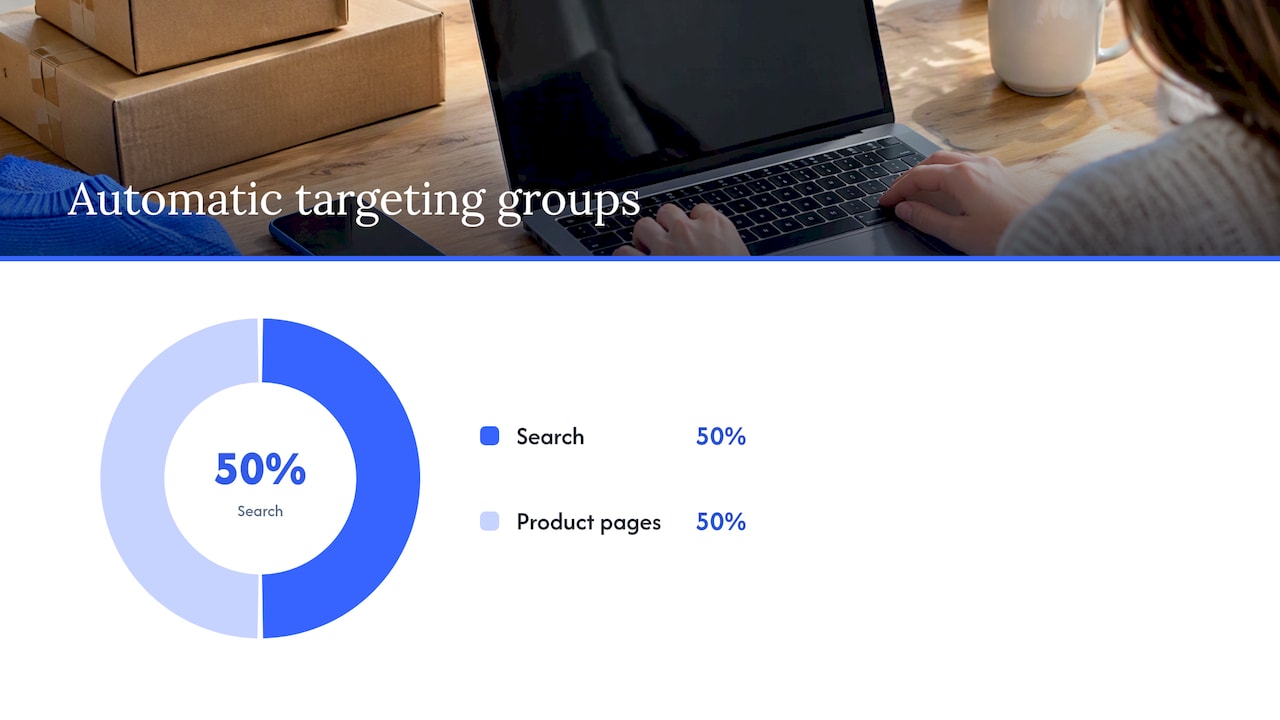
Search results and plenty of guides blur this line, so it is worth stating plainly. Automatic campaigns do not let you choose match types. Instead, Amazon matches your ad using your listing content, and you control bids by four groups.
- Close match: searches closely related to your product. Amazon’s example is a large stainless steel espresso maker showing for terms like “large espresso maker.”
- Loose match: searches only loosely related to your product.
- Substitutes: shoppers viewing the detail pages of similar products.
- Complements: shoppers viewing the detail pages of products that go with yours.
Those descriptions come from the Sponsored Products targeting guide. The practical value is that you can set a different bid for each group, or switch one off when it underperforms.
One point worth knowing: the four groups include two that target product pages rather than searches. If you only think in terms of keywords, you miss that half of automatic traffic arrives from competitor and companion detail pages.
A campaign structure that uses all of them
A workable structure separates discovery from performance. Here is a version we use as a starting point, then adapt per brand and category.
- Automatic campaign. Runs with all four groups on, at moderate bids. Its job is to surface search terms and ASINs you would not guess.
- Broad discovery campaign. A short list of your core category terms in broad match, with lower bids. Its job is to expand beyond what automatic finds.
- Phrase campaign. Keywords that earned their place from the discovery campaigns, plus your known modifiers. Its job is to capture variations at a fair bid.
- Exact campaign. Search terms with proven sales and acceptable cost, promoted here and bid up. Its job is to protect and scale your winners.
The movement runs one way: terms graduate from discovery into phrase and exact as the data supports them. Once a term graduates, add it as a negative in the campaign it came from, so the discovery campaigns do not keep competing for it.
Why negatives hold the structure together
Without negatives, the same search term can trigger several of your own campaigns, and your ads compete in your own auction, raising your cost. Amazon recommends using phrase or exact match for negative keywords. A negative exact blocks the specific query and close variations. A negative phrase blocks any query containing the complete phrase or close variations. Both are covered in the same guide, which also suggests adding low-performing keywords and shopping terms you do not want your ads next to.
Be deliberate here. A negative phrase is a blunt tool. Adding “free” or “used” is safe for most brands, but adding a core category word by mistake can switch off a campaign overnight.
Which match type should you start with?
It depends on what you know about the product.
New product with no history
Start with automatic plus broad on a tight set of category terms. You need search term data before you can make any smart choice. Keep bids modest and set a daily budget you can afford to lose while you learn.
Established product with real sales data
Start with exact and phrase on your known winners, and keep automatic and broad running at a lower share of budget to feed fresh terms. If you already have a search term report with months of conversions, the data is better than any guess.
Branded terms
Defend your own brand name in exact match. Competitors can bid on your brand, and this is usually the cheapest traffic you will buy. Keep branded and non-branded campaigns separate so branded performance does not flatter the numbers on the rest of the account.
Narrow or technical products
If shoppers must match a size, fit or compatibility, favor phrase and exact. Broad match will send you clicks from people with the wrong model, and those clicks cost the same as good ones.
How to read results and move keywords
The search term report is your steering wheel. Review it on a regular schedule: weekly for active launches, every two weeks for steady accounts.
- Promote search terms with orders at an acceptable advertising cost of sales into exact match, and set the bid based on their own results.
- Negate search terms with many clicks and no orders, using negative exact for specific queries and negative phrase when a whole theme is wrong.
- Hold terms with too few clicks to judge. A handful of clicks says very little, so wait for more data before you cut or promote.
- Re-check the bids on promoted keywords after a couple of weeks, since moving from broad to exact often calls for a higher bid.
Judge profitability against margin, not just ACoS. A target that looks fine at 25% can lose money on a product with thin contribution margin, which is why we tie targets to each product’s economics instead of one account-wide number. If you want a deeper look at the terms behind your ads, our guide to Amazon search terms walks through how to use them, and our Amazon PPC tips cover the wider optimization routine.
Common mistakes with Sponsored Products match types
Treating broad as a set-and-forget setting
Broad match without review is the most common source of waste. If nobody reads the search term report, nobody removes the bad terms.
Running one keyword in every match type with no negatives
Testing all three types is fine, and Amazon recommends it. Doing it without negatives means your campaigns bid against each other for the same click.
Judging a keyword on a few clicks
A keyword with 8 clicks and no sale has not failed. A keyword with 80 clicks and no sale probably has. Set a click threshold before you decide, and write it down so the team applies it consistently.
Ignoring listing quality
Match types control who sees your ad. They do not control whether the shopper buys. A weak main image, thin bullets or poor reviews will make every match type look bad. Automatic targeting in particular leans on your listing content, so listing optimization and Amazon SEO feed directly into ad efficiency.
Putting every term in one ad group
Mixing unrelated products and themes in one ad group makes it impossible to set sensible bids. Group by product and intent, so each bid reflects one situation.
Match types in other ad platforms
The broad, phrase and exact logic is not unique to Amazon. Search engines use similar concepts, and the habits transfer: start wide to learn, narrow as the data arrives, and keep a negative list. If your brand also sells through its own site, the same discipline applies to paid search, and resources on Google Ads for online sales show how that plays out outside the marketplace. Just do not assume the rules match: each platform defines its match types differently, so read each platform’s current documentation before porting a structure over.
Our perspective: match types are a data strategy, not a setting
We manage advertising across Amazon, Walmart and brand-owned sites, and the pattern we see in enterprise accounts is consistent. The match type itself is rarely the problem. The problem is that nobody owns the flow of data between campaigns.
A broad campaign finds a term. Nobody promotes it. An exact campaign keeps bidding on a term that stopped converting months ago. Two campaigns bid on the same query. Each decision is small and each is easy to miss, and together they add up to wasted spend across thousands of keywords.

Our approach is to treat match types as stages in a pipeline: discover, validate, scale, defend. We want to see that pipeline in the account structure, and we want reporting in business language, so a brand lead can see which stage a dollar of spend sits in and what it returned. That is where unified reporting, such as our iDerive analytics platform, earns its keep: it puts ad data next to the rest of the business rather than leaving it in a single dashboard export.
We also put profit before volume. A keyword that drives revenue at a loss is not a winner, and exact match does not make it one. When we plan bids, we start from margin and work backward.
— Dan Katona
When to bring in a managed team
A single product with a few dozen keywords can be managed in-house with a weekly routine. Things change when you have hundreds of ASINs, multiple marketplaces and several ad types running at once. Then the real cost is time: someone has to read search term reports, move terms, update negatives and reconcile it all with inventory and promotions.
That is the work our Amazon sponsored ads management team does for mid-market and enterprise brands, alongside Amazon growth and optimization covering listings, content and operations. If your account has grown past what one person can review each week, talk to us about an audit of your current structure.
For a broader view of how the ad formats fit together, see our piece on the full funnel in Amazon advertising, and for a primer on the format itself, what Sponsored Products are.
FAQ
Which is better, broad match or phrase match?
Neither wins outright, because they do different jobs. Broad match is better for finding new search terms, and phrase match is better for capturing variations of a term you already trust. Most accounts need both, with phrase carrying a larger share of spend once you have data.
What are the three match types in Sponsored Products?
They are broad, phrase and exact. Broad covers related searches, phrase covers searches that contain your keyword’s words in order, and exact covers the keyword itself and close variations. Automatic targeting is separate and uses close match, loose match, substitutes and complements.
Should I use the same keyword in all three match types?
You can, and Amazon suggests testing all three with different bids. Add negatives so the campaigns do not compete for the same search term. Give exact the highest bid, phrase a middle bid and broad the lowest.
Do match types apply to automatic campaigns?
No. Automatic campaigns use four targeting groups: close match, loose match, substitutes and complements. You can adjust the bid for each group or turn a group off, but you cannot assign broad, phrase or exact.
How often should I review search terms?
Weekly during a launch or a heavy spending period, and at least every two weeks on steady accounts. Review more often when you add broad match or raise budgets, because wasted spend accumulates fastest there.
Sources
Recommended



















.png)