
Amazon Marketing Stream is a push-based service that delivers hourly Amazon Ads metrics directly to your AWS account, replacing the wait for pull-based reports with near-real-time data. That shift lets technical teams act on campaign signals within the hour instead of the next day. To use it, you need Amazon Ads API access and an AWS destination, either SQS or Data Firehose, ready to receive messages.
TL;DR:
- To get started, you need an Amazon Developer account, an active Ads API token, and an AWS account configured with either SQS or Firehose, with proper IAM setup.
- Using Firehose simplifies data pipeline management by writing directly to S3, ideal for analytics, while SQS is better suited for application triggers requiring seconds-level response time.
- Onboarding involves confirming API access, provisioning a destination, subscribing to one traffic dataset, and verifying message delivery before expanding to messaging datasets.
- Hourly campaign data enables real-time bid adjustments, budget pacing alerts, and early detection of entity changes, with budget alerts providing the fastest ROI.
- Implementing a minimal setup with one dataset and straightforward automation allows teams to quickly validate data flow and automate basic alerts before scaling.
What Is Amazon Marketing Stream and What Data Does It Cover?
Marketing Stream splits into two categories: reporting datasets and messaging datasets. Reporting datasets cover traffic and conversion metrics, hourly summaries of impressions, clicks, spend, and sales. Messaging datasets capture events, budget usage alerts, and entity changes like a paused campaign or an ASIN losing eligibility.
Every message carries a consistent set of fields: timestamps, event type, and identifiers for campaign, ad group, ad, target, and ASIN where relevant. The official Data Guide lists exact schemas for each dataset, which matters because Sponsored Products, Sponsored Brands, Sponsored Display, and Amazon DSP each populate slightly different fields. Build your parsing logic around the documented schema, not assumptions carried over from bulk reports.

Should You Use SQS or Data Firehose for Delivery?
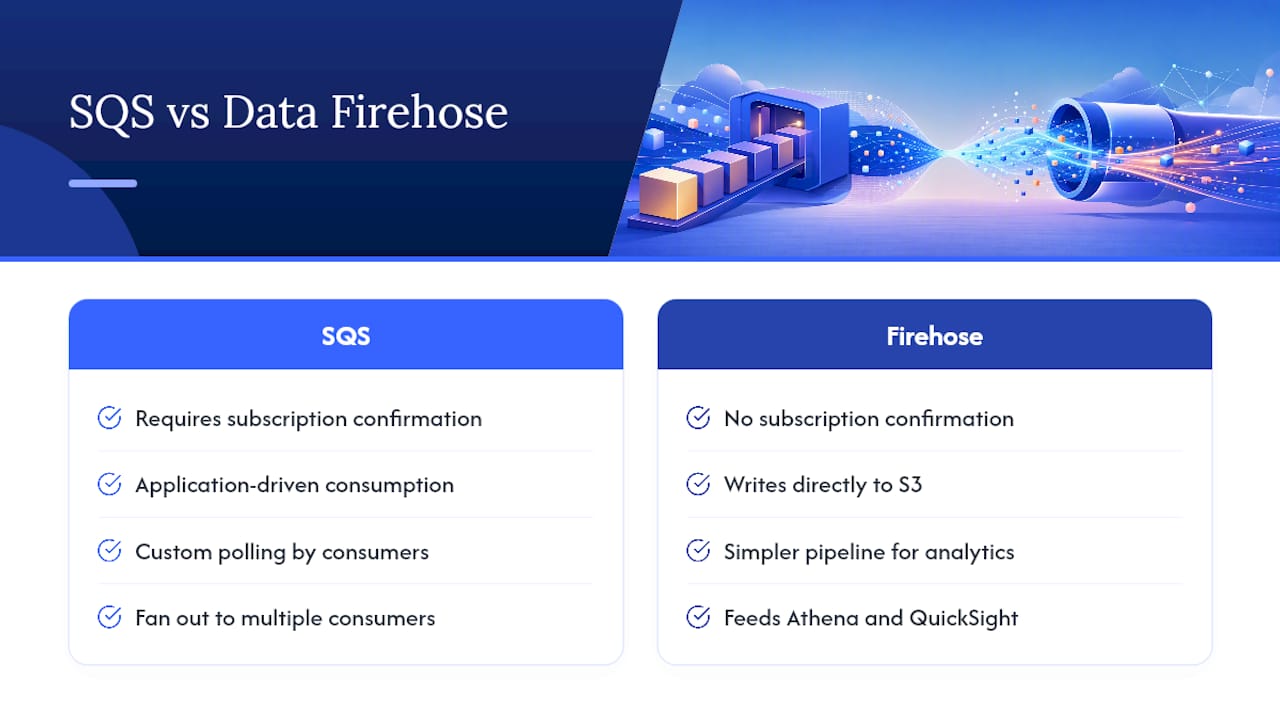
The destination you pick shapes your entire pipeline. SQS suits application-driven consumption: you write custom logic to poll the queue, fan messages out to multiple consumers, and control retry behavior yourself. It requires a subscription confirmation step before messages start flowing.
Data Firehose skips that confirmation and writes directly to S3, which simplifies the pipeline considerably if your end goal is analytics rather than live application triggers. Firehose tends to win when you’re feeding Athena or QuickSight. SQS tends to win when a Lambda function needs to react to a specific event within seconds. Weigh latency needs against how much orchestration your team wants to own.
Who Can Access Marketing Stream, and What Do You Need First?
Access is limited to agencies, tech providers, and direct advertisers already integrated with the Amazon Ads API. Before you subscribe to anything, you need three things in place: an Amazon Developer account, an active Ads API token, and an AWS account configured with either SQS or Firehose.
Beyond the accounts, you need someone who understands IAM. Cross-account role configuration is where most onboarding attempts stall, and infrastructure automation through CDK or CloudFormation saves real time once you’re managing more than one subscription.
How Do You Onboard and Confirm Your First Subscription?
Onboarding follows a predictable sequence, but each step has a failure point worth knowing in advance.
- Confirm Ads API access. Verify your token has the correct scopes before touching AWS.
- Choose a destination. Decide between SQS and Firehose based on the architecture trade-offs above, and provision it.
- Call the subscription API. Point it at your destination’s ARN for the dataset you want.
- Confirm the subscription. SQS requires an explicit confirmation message; Firehose does not.
- Verify delivery. Check your queue or S3 bucket for the first hourly batch.
Amazon’s reference implementation on GitHub provisions SQS, Firehose, Lambda functions, and S3 storage through AWS CDK templates, and a companion CLI helps manage subscriptions without writing raw API calls by hand.
Pro Tip: Start with a single traffic dataset and one destination before subscribing to messaging datasets. Isolating variables early makes it much easier to spot whether a broken pipeline is an IAM problem or a schema problem.
What Can You Actually Do With Hourly Campaign Data?
Hourly granularity changes what “optimization” means. Instead of adjusting bids once a day off yesterday’s numbers, you can react to what’s happening this morning.
- Intraday bid management: pull hourly CTR and conversion rate signals and raise or lower bids on a schedule, or trigger changes the moment a target crosses a threshold.
- Budget monitoring: watch spend velocity and automatically pause a campaign, or push a top-up, before it burns out midday.
- Alerting and auditing: use messaging data to catch entity changes, ASIN eligibility losses, or placement shifts before they quietly erode performance.
Teams running intraday bid optimization at scale generally build these as automated rules rather than manual checks, since checking hourly data by hand defeats the purpose of having it.
Pro Tip: Budget-pacing alerts tend to deliver the fastest return of any Stream use case. A campaign that exhausts its daily budget by 2 PM is losing afternoon and evening conversions you’ll never recover.
Stream vs. Amazon Marketing Cloud: Which One Do You Need?
Stream and Amazon Marketing Cloud solve different problems, and Amazon frames the distinction as tactical versus strategic. Stream is your cockpit: fast, hourly, built for triggers and in-the-moment decisions. AMC is your archive and lab: historical, cross-channel, built for clean-room audience modeling and attribution analysis that plays out over weeks or months.
A practical combined workflow looks like this: use Stream to capture signals and fire real-time triggers, persist that hourly data to S3, then periodically feed samples into Amazon Marketing Cloud for deeper audience and incrementality work. Don’t try to make Stream your long-term analytics warehouse. It’s built for velocity, not multi-year historical queries.
How Do You Turn Stream Messages Into Dashboards?
The typical path runs from raw JSON to a queryable table to a chart. Messages land in S3, partitioned by dataset and by date and hour, which keeps Athena queries fast and cheap as volume grows. From there, Athena runs standard SQL against the partitioned data, joining traffic and conversion datasets on hourly timestamps to reconstruct per-hour performance.
For dashboards, QuickSight connects directly to Athena, and Amazon Q adds natural-language querying on top, useful when a stakeholder wants an answer without writing SQL. The main engineering work is schema management: keeping your table definitions in sync as Amazon adds fields to a dataset over time.
What Does a Minimum Viable Marketing Stream Setup Look Like?
You don’t need a full enterprise pipeline to get value in week one. A minimal setup looks like this:
- Confirm Ads API access is live and scoped correctly.
- Provision either Firehose or SQS, whichever matches your immediate use case.
- Subscribe to one traffic dataset, not everything at once.
- Verify messages are actually landing in S3 or your queue.
- Run a sample aggregation query to validate the schema matches expectations.
- Set one automation rule, a budget alert is the easiest starting point, to prove the loop works end to end.
Once that loop runs cleanly, add monitoring for delivery errors and payload volume, plus basic cost tracking on your AWS resources. Skipping this step is how teams end up with a silently broken pipeline for weeks.
What Do Agencies Do Differently When Implementing Marketing Stream?
Agencies treat Stream as a tactical cockpit, not a data science project. At Nectar, we route Stream signals directly into iDerive, so budget and bid triggers sit alongside creative and catalog performance instead of living in a separate silo. In practice, that means standardized IAM role templates, a consistent S3 partitioning scheme across every client account, and reusable automation patterns for budget pacing and bid adjustments.
Self-serve onboarding works fine for teams with dedicated AWS developers. Enterprise brands without that bench usually get to value faster with a partner who has already solved the IAM and schema problems.
— Dan Katona
How Nectar Helps You Operationalize Marketing Stream
Nectar is the direct route to a working Marketing Stream pipeline without hiring an AWS team to build one. We handle the full implementation, infrastructure provisioning, IAM configuration, automation rule development, and connect it all into iDerive for unified reporting alongside your other marketplace data.

If your team is enterprise scale, needs fast time-to-value, or simply doesn’t have spare developer hours for CDK templates and error handling, that’s exactly where Nectar fits. We manage the ongoing operations too: monitoring, alerting, and tuning the automation rules built on top of Stream data, alongside broader Amazon growth and optimization work and Sponsored Ads management. Reach out through the Amazon growth and optimization page to talk through what your current setup is missing.
Where to Go for the Official Documentation
Start with Amazon’s onboarding guide and the CDK reference implementation on GitHub for working code.
Sources
- Unlock real-time advertising insights with Amazon Marketing Stream and AWS
- Amazon Marketing Stream reference implementation using AWS CDK
Recommended














.png)