Yes, a hazmat-flagged ASIN can go back on sale, and most flags clear within days. The fix almost always comes down to one thing: uploading a compliant Safety Data Sheet or exemption sheet through Seller Central’s dangerous goods classification tool. Amazon typically completes its review within two business days. While you wait, list the ASIN as merchant-fulfilled or under an alternate SKU so you don’t lose sales.
TL;DR:
- Uploading a compliant Safety Data Sheet or exemption sheet typically clears hazmat flags within two business days through Amazon’s classification tool.
- Correctness of the SDS, including matching product names and accurate chemical data, is crucial to avoid rejection and expedite classification.
- Listing products as merchant-fulfilled or using alternative SKUs can preserve sales during the two-day review process.
- Regular audits of product data, brand consistency, and SDS expiry help prevent future hazmat flags and listing pauses.
- Maintaining organized documentation and following Amazon’s hazardous goods guidelines reduces the risk of classification delays and shipment holds.
What Triggers an Amazon Hazmat Review?
Amazon’s system flags ASINs automatically, usually based on category, keywords, or product attributes rather than anything a human reviewed first. Certain product types get scrutinized almost every time.
- Lithium batteries, including anything with a built-in rechargeable cell
- Aerosols and pressurized containers, from spray paint to compressed air
- Flammable liquids or solids, including many cosmetics and cleaning products
- Corrosives and peroxide-forming chemicals
- Chemical-based consumer goods where the formula isn’t obvious from the title
Beyond the product itself, sloppy listing data causes plenty of unnecessary flags. If your bullet points mention “flammable” but your images don’t show a warning label, or your ingredient list contradicts what’s on the SDS, Amazon’s system treats that as a red flag worth a human look. Seller Forum threads are full of cases where a listing got paused simply because the brand name in the title didn’t match the brand name on file, not because the product was actually dangerous.
How Amazon’s Dangerous Goods Review Works
Once an ASIN gets flagged, it enters a review queue handled by Amazon’s Dangerous Goods team. They compare your submitted documentation against the listing and the product’s actual composition, and they typically finish that review within two business days, Monday through Friday, excluding public holidays.
Three outcomes are possible. Classified means Amazon assigned the correct hazmat category and, assuming packaging and quantity rules are met, your listing can move forward. Prohibited means the item can’t be sold on the platform at all, no matter what paperwork you submit. Not classified, sometimes shown as “unable to classify,” means Amazon couldn’t make a determination from what you gave them, and you’ll need to resubmit with better documentation.
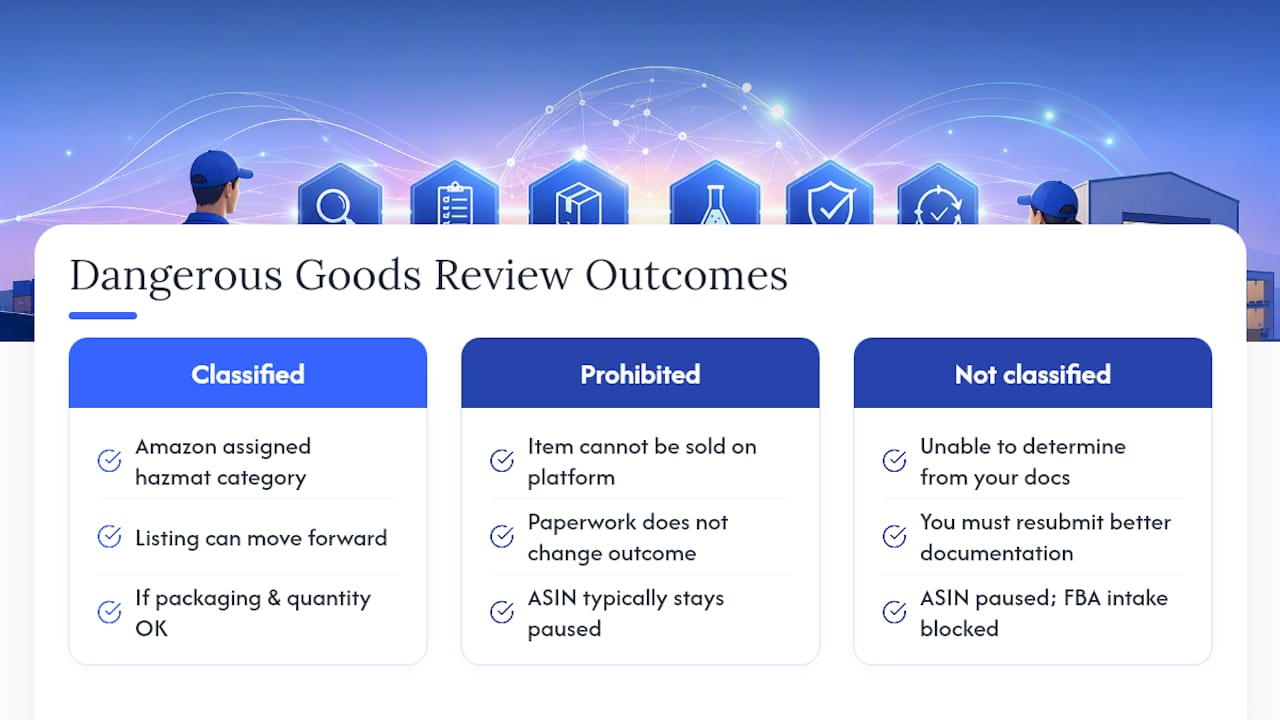
Until you get a classification, the ASIN typically stays paused and FBA intake gets blocked. Inventory already in a fulfillment center may get held rather than shipped out, so the review timeline matters more than it might seem when you’re staring at a paused listing.
How to Prepare and Submit an SDS or Exemption Sheet
Getting this right the first time is the fastest way through the process. Here’s the sequence that works:
- Pull the correct SDS from your manufacturer. It needs all 16 GHS sections, including hazard identification, and it must have been updated within the last five years.
- Check that the product name and manufacturer name match your listing exactly. Mismatches are the single most common reason submissions get rejected.
- Confirm CAS numbers and concentrations are listed where applicable, since forum reports consistently point to complete chemical data as the fastest path to a clean classification.
- Determine if an exemption sheet applies instead. These typically get prepared by the manufacturer or a compliance consultant when a product falls under a threshold that exempts it from full SDS requirements.
- Go to the Manage dangerous goods classification tool in Seller Central and select the ASIN, marketplace, and language tied to your submission.
- Upload the document. Amazon accepts PDF, DOCX, and JPG files, with size limits noted on the upload screen itself.
Pro Tip: Name your SDS files with the ASIN and revision date (e.g., “B08XYZ_SDS_2026-01.pdf”) so you’re never guessing which version you last submitted, especially if you manage documentation for more than a handful of SKUs.
Quick Fixes to Keep Selling During the Review
A paused ASIN doesn’t have to mean zero sales for two days or longer. A few workarounds keep revenue flowing while your documentation moves through the queue.
- Create a merchant-fulfilled alternative SKU so customers can still buy the product while the original ASIN sits in review.
- Open a support case requesting additional storage if inventory is piling up at a fulfillment center with no outbound movement.
- Hold shipping plans for the affected SKU rather than sending more inventory into FBA until classification comes back.
- Weigh the tradeoff: FBM alternatives mean handling fulfillment yourself, and storage requests aren’t guaranteed, so neither fix is free.
These are stopgaps, not solutions. The real fix is still getting a compliant SDS through the door.
Preventive Catalog Checks That Avoid Future Flags
The sellers who deal with hazmat reviews the least aren’t lucky. They audit before problems happen, not after.
- Check battery chemistry, ingredient lists, and pressure descriptors before converting any new SKU to FBA, not after it’s already live.
- Standardize brand and product names across your catalog so they match your SDS files character for character.
- Store SDS and exemption documents with version control, and refresh anything approaching the five-year mark before it lapses.
- Run this audit quarterly, and always stage new inventory for review before a mass FBA conversion, especially ahead of seasonal launches.
Integrating these checks into your Amazon FBA inventory management workflow, rather than treating them as a one-time cleanup, is what actually prevents the surprise pause right before a holiday sales push.
Pro Tip: Build your SDS audit into the same checklist you already use for listing content reviews — catching a hazmat mismatch alongside an image or bullet-point error saves a second pass through your catalog.
What Happens After You Submit Your Documentation
Amazon’s response usually falls into one of a few patterns. A clean classification comes back with no further action needed. A rejection often cites contradicting information, which almost always traces back to a name mismatch or an incomplete SDS.
In tougher cases, Amazon may ask for additional evidence: third-party test reports, detailed packaging specs, or clarification on concentration levels for a specific ingredient. If you’re shipping anything that needs specialized containment, referencing compliant storage equipment specs can help when Amazon asks about how a flammable product is stored or handled before shipment. Keep every version of your SDS, every case ID, and every message thread on file. If a resubmission stalls, that paper trail is what gets a stuck case escalated instead of ignored.

Why Hazmat Reviews Deserve a Permanent Place in Your Catalog Process
Treat hazmat checks like SKU hygiene, not a fire drill you run after a listing gets paused. Sellers running a handful of SKUs can manage SDS tracking manually. Once you’re juggling dozens of chemical-adjacent products across marketplaces, that manual process breaks down fast, and a managed operation catches mismatches before they cost you a sales week.
— Dan Katona
How Nectar Handles Hazmat Remediation and Prevention
Nectar’s Seller Central Management team treats dangerous goods compliance as part of everyday catalog operations, not a one-off scramble when a listing gets paused.

That means standardized SDS handling across your whole catalog, version tracking that flags documents approaching the five-year expiration, and a team that knows the difference between a fixable “unable to classify” response and a genuine prohibition. The result is fewer blocked FBA shipments and faster turnaround when something does get flagged, because the paperwork is already organized before Amazon asks for it. If your catalog includes batteries, aerosols, or chemical-based products and you’re tired of hazmat surprises derailing a launch, Nectar’s Amazon Growth & Optimization team can audit your current SDS coverage and set up the operational guardrails to keep it that way going forward.
Where to Verify These Rules Yourself
For the upload workflow and file requirements, check Amazon’s dangerous goods review process page. For the full SDS checklist and the eight-step compliance path, see the Sell on Amazon guidance on dangerous goods.
Sources
- Dangerous goods review process (hazmat)
- What Amazon FBA sellers should know about dangerous goods (hazmat) | Sell on Amazon
Recommended














.png)