An Amazon parent-child variation groups listings for the same product that differ by one consistent attribute, such as size, color or pack count, onto a single detail page. The parent ASIN is a container that shoppers never buy. Each child ASIN is the specific item they do buy. For a brand with dozens or hundreds of SKUs, the structure decides how reviews pool, which child shows in search and whether Amazon suppresses a listing. It deserves a deliberate design, not a quick upload. Nectar manages Amazon catalogs for mid-market and enterprise brands, and the guidance below is the routine we would hand a brand team.
TL;DR
- The parent ASIN cannot be purchased and has no offer. Children are the buyable items, and they must differ only by a valid variation theme.
- Only true variations belong together: same type, brand and style. Functionally different products, or newer models, belong on separate detail pages.
- To add to a family, use the Add Products workflow and its pre-filled spreadsheet. Amazon scheduled the Variation Wizard to retire by the end of August 2026.
- Wrong relationships risk suppression, removed products and, in serious cases, lost ASIN-creation or selling privileges.
- Treat the family as a brand asset: one owner, one naming standard, one audit routine.
What parent and child ASINs actually are
Amazon calls items that are the same product but differ by a consistent theme variations. The parent is an abstraction. Amazon’s developer documentation says the parent ASIN can’t be purchased and is not associated with an offer. A child is a specific variation, such as a blue shirt in size 16, sold by a merchant.
Amazon’s own seller guide describes the parent as the non-buyable product that appears in search results and ties the children together, and the children as the buyable products related to it (Sell on Amazon).
Three components make up every family, according to Amazon’s Clothing style guide:
- The parent product, the first thing the shopper sees on the detail page.
- The child products, shown when the shopper picks an option on that page.
- The variation theme, the attribute that separates the children, such as Size, Color or Size-Color.
In practice, that means one title, one set of images at the family level, one review pool and one row of option selectors. Shoppers compare and choose without leaving the page.
Why the structure matters to a brand
A variation family is more than a tidy catalog. It changes how the brand performs on Amazon in four ways.
Reviews and social proof
Shoppers see the family on one page, so a strong child lifts the whole page. A tight family consolidates feedback instead of splitting it across near-duplicate listings. A loose family, with unrelated items attached, puts irrelevant feedback in front of every buyer.
What shows in search
Amazon’s guidance says that in some categories, including Clothing, Accessories and Luggage, Sports and Outdoors, and Beauty, search and detail pages show best-selling parent products, with title and description drawn from parent data. Shoppers use drop-down menus to pick a child without loading a new page. Category behavior differs, so check how your own category displays families before you decide where to put your best content.
Content and creative
Because the family shares a page, the main image, title pattern and A+ content have to work for every child. Our image requirements checklist and step-by-step content optimization guide cover the creative side, and the Amazon title and item highlights tool helps you keep titles within the 75-character limit.
Inventory and advertising
Children carry the inventory and the offer. One out-of-stock child can leave a hole in the selector, and ad spend pointed at the family lands on whichever child the shopper sees first. Planning stock and ad targeting by child, not by family alone, avoids paying for clicks that cannot convert.
Which products belong in the same family
The test Amazon applies is simple: are these really one product in different versions? Amazon’s seller guide says parent and child products should be the same type, brand and style, and that functionally different products should be listed individually on separate detail pages. In the Clothing category, children may differ by size, color or both, and must be the same style rather than materially different.
Use these checks before you group anything:
- Same product, one difference. If the only change is a size, a color or a count, it is a candidate.
- Same function. If the internal features or intended use differ, it is a separate product.
- Same model. A new model is not a new color. Amazon’s guidance says different models should not be listed within a color theme.
- Clean attributes. Amazon advises that a color or size variation carry no other information beyond color and size.
Choosing the variation theme
For most Clothing products, Amazon indicates the preferred theme is Size-Color, with Costumes and Luggage as exceptions. Outside apparel, the themes available depend on the product type, so confirm the list for your category in Seller Central before you build. Keep the relationship simple. Every extra axis multiplies the number of children and the chance of a mismatch.
A worked example
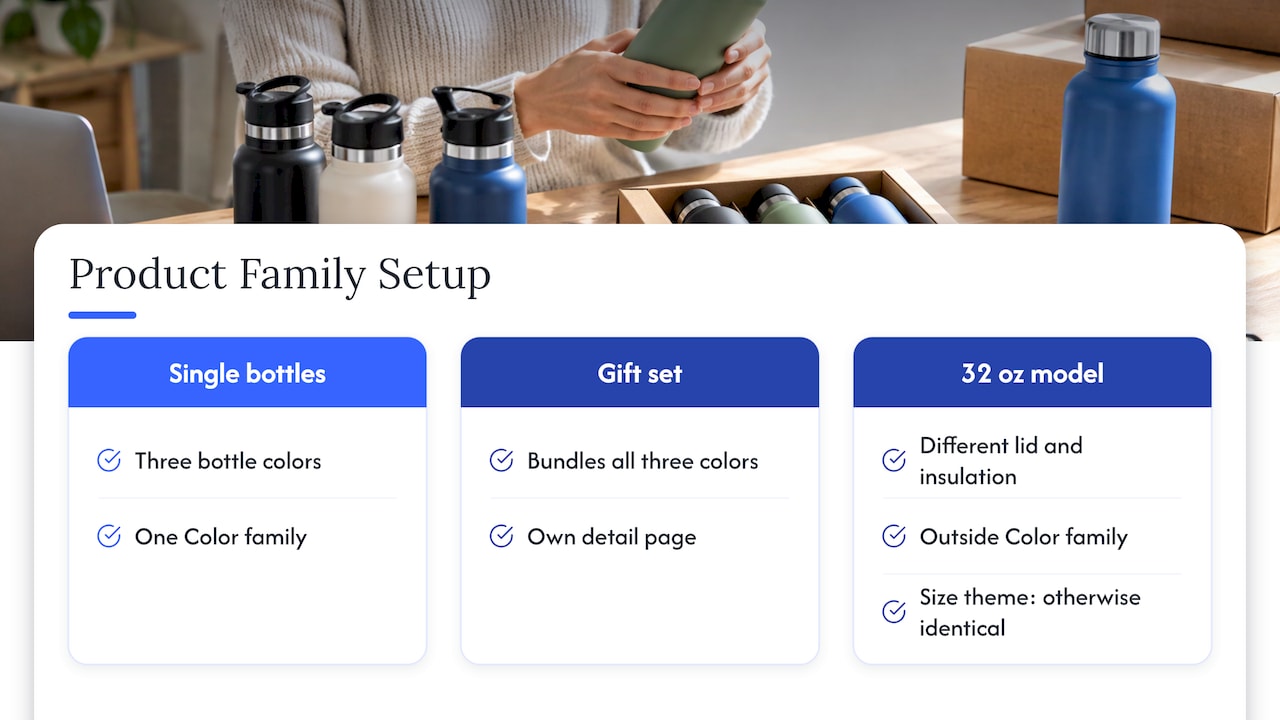
Imagine a brand that sells a stainless steel water bottle in three colors, plus a gift set that bundles all three. The three single bottles are one family under a Color theme. The gift set is a different product: it is a bundle, and one seller reported that treating it as a fourth color made it hard to manage. As a brand, the safer pattern is to keep the three single bottles as the family and give the set its own detail page. If the larger 32 oz bottle is a different model with a different lid and insulation, it also stays out of the Color family. Size can be a theme only when the product is otherwise identical.
How to create or extend a variation family
Amazon now steers sellers to the Add Products page. It says sellers can search for a product, view its variations, download a pre-filled family spreadsheet, fill in the required fields for new variants or standalone SKUs, and upload it. This workflow replaces the Variation Wizard, which Amazon scheduled to retire by the end of August 2026.
Step 1: Map the family before you touch Seller Central
List every SKU, the single attribute that separates each one, and the theme that describes it. Decide which SKU becomes the visual lead. Settle naming for sizes and colors once, so “Navy” is not “Dark Blue” on the next upload. This is where most enterprise catalogs go wrong, because several teams and agencies have added SKUs over the years.
Step 2: Search the product in Add Products
Search by keyword or product ID. If a family exists, view its variations. If you are adding to an existing family, you start from Amazon’s own record, not from a blank sheet.
Step 3: Download the pre-filled spreadsheet
The sheet already holds the family’s relationship information, so you complete only the required fields for the additional items. The point of the design is fewer errors: you are not rebuilding relationships by hand.
Step 4: Fill the required variation fields
Amazon’s Clothing guidance lists the fields you must provide: SKU with parentage, parent SKU for child SKUs, relationship type and variation theme. It warns that leaving required fields blank can lead to suppression. Check each child row against your Step 1 map before you upload.
Step 5: Upload, then verify the live page
Once the feed processes, open the detail page and click through every option. Confirm that each child shows the right image, price, stock status and title behavior. Check that no stray ASIN has joined the family. Verification takes minutes, and it catches the failures that otherwise surface as lost sales.
Step 6: Protect it
Assign an owner for the family. Any new SKU, pack size or relaunch goes through the same map. A brand that lets every team add children freely will see families drift.
Why Amazon rejects or suppresses variation relationships
Amazon’s ASIN creation policy prohibits mismatched parent and child detail pages and children that are not true variations, including fundamentally different products and newer models. Misuse can lead to ASIN-creation or selling privileges being removed. For apparel, Amazon says it can remove products that do not correctly establish variation themes.
The common failure patterns:
- Unrelated items attached to a strong parent to borrow its reviews.
- New models folded into an old family, so shoppers read reviews of a different product.
- Multi-packs added to an existing parent when they were not created by the manufacturer. The policy says that if the identical multi-pack page does not exist, the seller must create a new detail page with its own unique UPC (ASIN creation policy).
- Missing or inconsistent required fields, which lead to suppression.
How to correct an invalid family
Start with an inventory of every child and compare it to your Step 1 map. Move items that do not belong onto their own detail pages, and rebuild the relationship with a valid theme. If an appeal is involved, document what each ASIN is and why it fits. Our variation policy audit steps walk through that preparation.
A quarterly audit routine for brand teams
Families degrade over time as products launch and retire. A short routine keeps them clean:
- Export all parent-child relationships and compare them to your product master file.
- Flag children with no inventory, suppressed status or mismatched images.
- Check that each family uses one theme, with consistent attribute values.
- Review the search-facing content of the lead child, since it often represents the family.
- Confirm that new launches were added through the same process.
The work is repetitive, and it spans catalog, creative and advertising. That is why it tends to slip when the brand handles it alongside a full launch calendar.
How Nectar helps
Brands that sell across many SKUs, marketplaces and teams need the catalog, creative and ad data to agree with each other. Nectar is a fully managed e-commerce agency for mid-market and enterprise brands. Our Amazon Growth & Optimization service covers listing optimization, and our Marketplace Operations Management handles catalog, inventory and compliance. Our in-house studio produces the photography, video and PDP content that a variation page has to carry for every child, and iDerive, our analytics platform, brings marketplace data into unified reporting. If your families have grown messy, talk to Nectar about an audit and a clean rebuild.

Our view on variations
Most variation problems we see in enterprise catalogs are not technical. They are organizational. A family is built once by one team, extended by three others, and nobody owns the map. Amazon’s rules are clear that a family is for one product in different versions, so the best defense is a documented standard before the first upload.
We also think the family page is the highest-leverage creative asset in a catalog. Every child inherits the same page, so the images, A+ modules and title logic have to be built for the whole family, not for one hero SKU. That is why we pair catalog operations with an in-house creative studio and an analytics layer: structure, content and performance data are one job, not three.
Our approach is profit-first. Pooling reviews and consolidating traffic into a clean family matters because it makes advertising spend work harder, and it keeps your brand clear of the policy actions that can interrupt sales.
Dan Katona
FAQ
Can a parent ASIN be bought?
No. Amazon’s documentation states that the parent is an abstraction that cannot be purchased and has no offer. Shoppers buy a child ASIN, which is the specific size, color or count they select on the parent detail page.
Can I combine two existing ASINs under one parent?
Yes, if they are true variations of the same product that differ only by a valid theme. Use the Add Products workflow and its pre-filled spreadsheet, and fill in the required relationship fields. If the products differ in function, model or style, keep them separate.
Can I put a bundle or multi-pack in a variation family?
Only when it truly fits. Amazon’s ASIN creation policy prohibits adding non-manufacturer-created multi-pack variations to an existing parent. When the identical multi-pack page does not exist, the seller must create a new detail page with its own unique UPC.
What happens if my variations break Amazon’s rules?
Products can be suppressed or removed, and misuse can lead to ASIN-creation or selling privileges being removed. Fix the family by moving non-variations to their own detail pages and rebuilding the relationship with a valid theme.
Is the Variation Wizard still the way to add variations?
Amazon scheduled the Variation Wizard to retire by the end of August 2026 and points sellers to the Add Products workflow instead. Build new families and additions there.
Sources
- Amazon Creators API documentation: variations
- Amazon Product Advertising API: variation parents
- Sell on Amazon: how to create product variations
- Selling on Amazon: Clothing style guide
- Amazon ASIN creation policy
- Amazon Seller Central: Add to existing variation families from Add Products
- Amazon Seller Central: Quick Tip on variation display
Recommended