
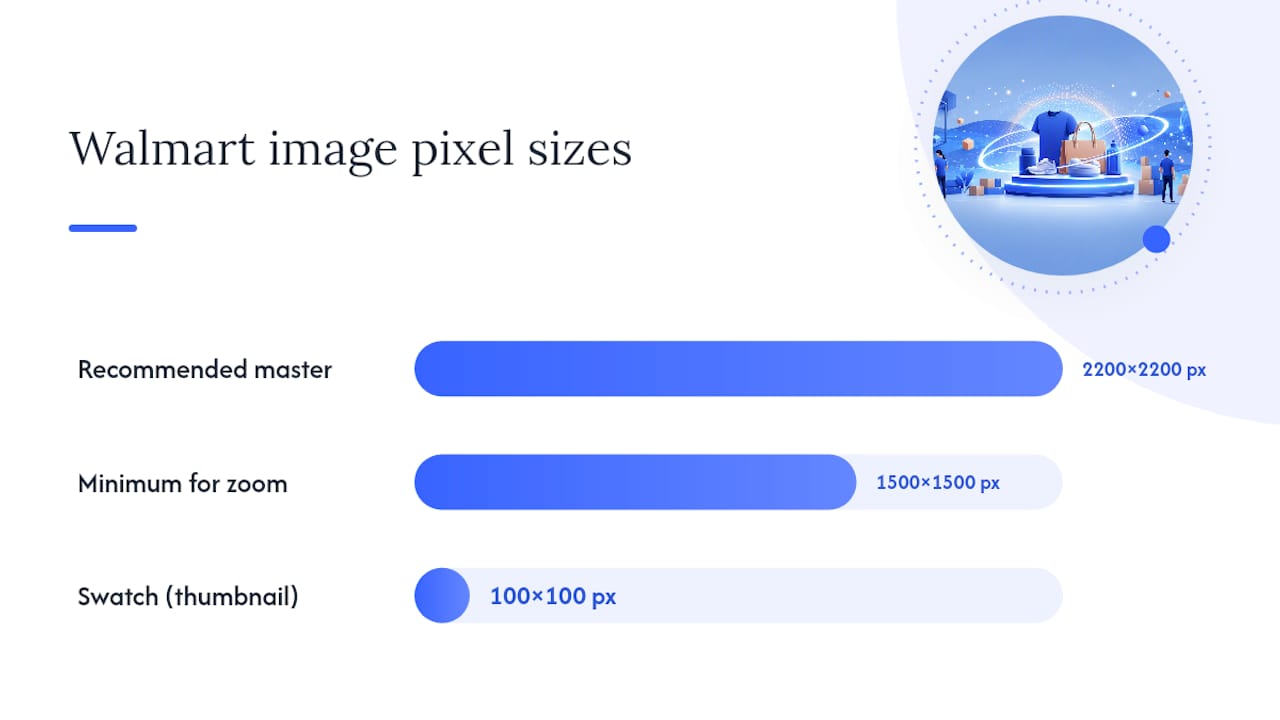
Walmart requires a square main image on a seamless white background, JPEG/JPG, PNG, or BMP format, 5MB or smaller, as per Walmart’s file size guideline, with a recommended 2200×2200 pixel master and a minimum pixel dimension for zoom to activate. If your listing has fewer than a recommended number of images or any image under that zoom threshold, fix it before you touch anything else on the page.
TL;DR:
Ensuring images meet the 1500×1500 pixel minimum for zoom activation is crucial, as lower resolutions significantly reduce conversion.
Main images must be in focus, on a white background, and free of overlays, with products occupying at least half the frame to maximize appeal.
Uploadings should include at least four distinct images, covering angles, details, packaging, and context, to fully inform buyers and boost listing quality.
Image URLs must directly link to publicly accessible, correctly formatted files in JPEG, PNG, or BMP; faulty links cause upload failures.
Maintaining consistent high-resolution master files and rechecking images regularly is vital for ongoing content quality and Walmart listing performance.
What Are Walmart’s Image Size and Format Requirements?
Before you shoot or export a single file, run it against Walmart’s technical checklist. These specs come straight from Marketplace Learn’s image guidelines, and missing even one usually means a rejected upload or a quietly suppressed listing.
File format and color specs:
-
Accepted formats: JPEG, JPG, PNG, BMP
-
No animated GIFs, no video files in the image slots
-
Color format: RGB (specifically sRGB for consistent screen rendering)
-
Bit depth: 8-bit
Pixel dimensions:
-
Recommended master size: 2200×2200 pixels
-
Minimum size to activate zoom: 1500×1500 pixels
-
Swatch images (color/variant thumbnails): 100×100 pixels
-
Aspect ratio: 1:1 (square) for the main image
File size and naming:
-
Maximum file size: limited to a certain threshold per image
-
Filename guidance: use the product’s 14-digit GTIN where possible, which speeds up catalog matching and reduces import errors
Here’s the number that trips up more sellers than any other: 1500×1500 pixels is the floor for zoom, not a nice-to-have. A main image sitting at 1200×1200 might look fine in the thumbnail and still tank your zoom function entirely, and zoom is one of the strongest conversion levers on a Walmart product page. If your shopper can’t zoom in on stitching, texture, or fine print, you’ve handed that sale to a competitor whose image does.
Before uploading anything, run four quick checks: confirm the resolution meets or beats 1500×1500, confirm the file extension matches an accepted format, confirm the color profile is RGB and not CMYK (a common export mistake from print-oriented design software), and confirm the export didn’t compress the file into visible artifacting just to hit the size limit.
What Content Rules Apply to the Main Product Image?
The main image is the one Walmart scrutinizes hardest, and it’s also where most compliance failures happen. Walmart requires main images to be in focus, professionally lit, and set on a seamless white background, with the product itself doing all the talking.
Run every main image through this sequence before it goes live:
-
Strip all overlays. No text, no badges, no “New!” or “Best Seller” callouts, no logos, no watermarks. The main image sells through the product alone.
-
Frame for dominance. The product should occupy roughly half the frame at minimum, front-facing whenever that’s the natural retail view.
-
Match reality exactly. No accessories, props, or bundled items that aren’t actually included in the purchase. No stock photography standing in for your actual product.
-
Check the text on the product itself. Any visible text in the frame, packaging labels included, needs to be in English.
-
Screen for prohibited content. No nudity, hate symbols, or sexual content, obviously, but sellers still get flagged for this more often than you’d expect on apparel and novelty categories.
-
Verify AI-generated images against the physical product. If you used generative tools for a hero shot, the output has to accurately represent what ships. Walmart holds sellers responsible for verifying that AI-generated imagery matches the real product, and a mismatch can trigger a policy violation and delisting, not just a rejected image.
Large or outdoor items, think patio furniture, grills, or oversized equipment, sometimes need an environmental setting to make sense visually. That’s allowed, but the product still needs to read clearly against its surroundings, without clutter competing for attention. Keep that environmental shot in the gallery, not the main slot, unless your category explicitly permits otherwise.
Pro Tip: Shoot your main image on a light box or seamless backdrop even if you plan to remove the background digitally in post. Physical lighting consistency is nearly impossible to fake convincingly with software alone, and Walmart’s reviewers can tell.
How Many Images Should You Upload Per Listing?
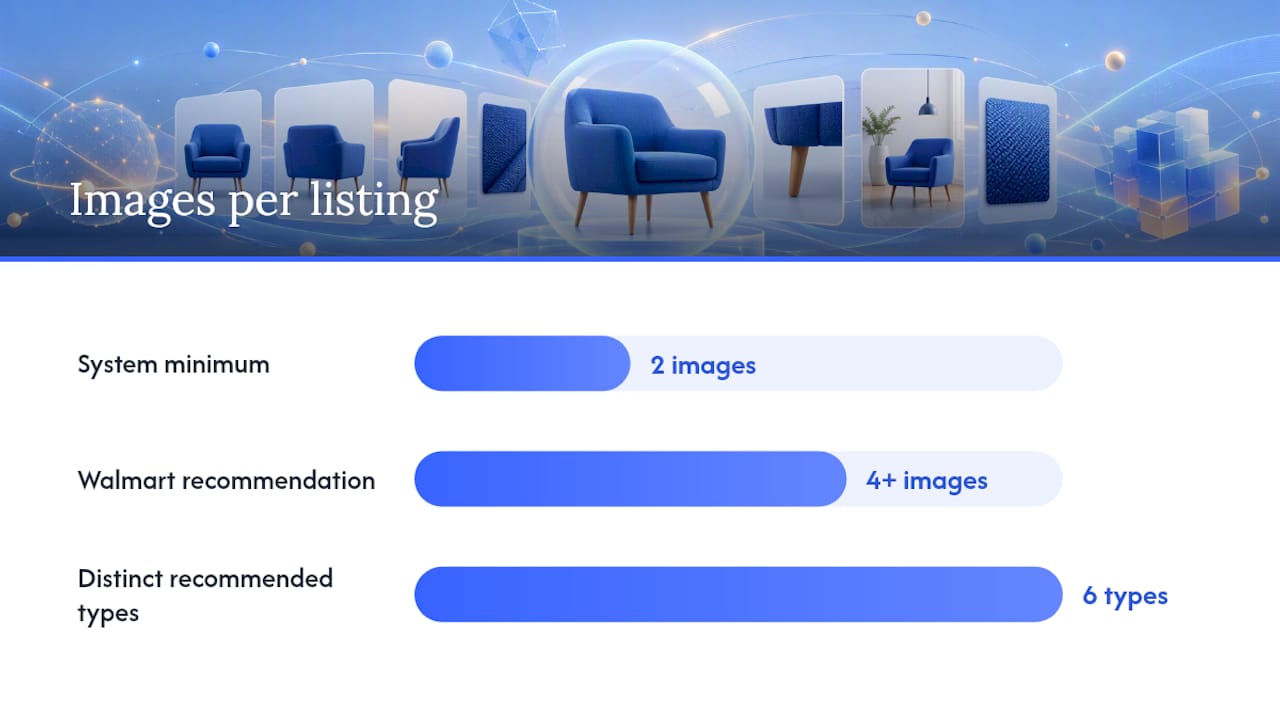
Walmart’s system technically enforces a minimum of two images per listing, but that floor exists for compliance, not performance. Walmart itself recommends uploading at least four images to improve content quality and give shoppers enough information to buy with confidence.
Build the gallery so each frame earns its place instead of repeating the same angle:
-
Primary compliance image: white background, front-facing, zoom-ready
-
Alternate angle(s): side, back, or three-quarter view depending on the product
-
Detail close-up: texture, hardware, stitching, or a feature that differentiates the product
-
Packaging and included components: what actually arrives in the box
-
Scale or size reference: a hand, a common object, or a dimension callout to kill sizing confusion
-
Lifestyle or context shot: the product in use, where the category allows it
Practitioner resources built specifically around Walmart’s marketplace echo this sequencing: compliance-first hero, then supporting detail and lifestyle. Apparel and color-variant products carry an added requirement: swatch images need to align precisely with each listed variant, or Walmart’s system will flag a mismatch between the visual and the attribute data. Never upload two images that show the same angle. If image three looks like image one with slightly different cropping, cut it and shoot something the shopper actually needs to see.
Why Do Walmart Image Uploads Fail on Import?
Most “my image won’t upload” support tickets trace back to the URL itself, not the image file. Walmart’s importer needs a direct, publicly accessible image file, and it will reject anything else outright.
Check your hosting against these rules before assuming the platform is broken:
-
The URL must point straight to an image file ending in a valid extension (.jpg, .png, .bmp), not an HTML landing page.
-
Accessible ports are limited to specific allowed ports for image serving(https://marketplacelearn.walmart.com/guides/Item setup/Item content, imagery, and media/Product-detail-page:-Image-guidelines-&-requirements); anything outside that range fails silently more often than it fails with a clear error.
-
URLs containing query strings, or links from consumer file-sharing services like certain Dropbox or Photobucket formats, frequently won’t import correctly.
-
Test the link with an HTTP HEAD request before uploading. If the server doesn’t respond directly with the image (some Amazon-hosted URLs fail this exact check), route through Walmart’s own hosting or a compliant server instead.
-
If you’re serving over HTTPS, confirm the TLS certificate is valid. A certificate error will block the import even when the image itself is perfect.
If you’ve verified the URL is direct, public, and responds correctly to a HEAD call and the image still won’t import, that’s the point to open a Partner Support case rather than keep re-uploading. Chasing a host-side issue with repeated resubmissions just burns time you could spend fixing the next listing.
How Do Images Affect Your Walmart Content Quality Score?
Your Content Quality (CQ) Score measures how complete and buyer-ready your listing content is, and images carry heavier weight in that score than most sellers assume. Low image count, poor zoom resolution, and excessive background whitespace all pull the score down directly.
Fix CQ-damaging image errors in this order for the fastest recovery:
-
Replace anything below zoom threshold first. A sub-1500×1500 image is the single most common flagged error, and it’s the fastest fix if you already have a higher-res master saved.
-
Add images until you hit at least four. Listings sitting at the bare two-image minimum consistently score lower.
-
Crop out excess whitespace. Walmart expects the product to occupy roughly half the frame or more; a tiny product floating in a sea of white background reads as low quality even when technically compliant.
-
Swap out placeholders and duplicates. Generic “coming soon” images or two nearly identical angles both count against you.
After fixing anything, preview the live listing, test zoom manually, and confirm swatch images align with their variants. Build this check into your workflow whenever you launch new variants, run a bulk catalog import, or prep for a major promotion. Nectar’s guide on Walmart listing optimization covers how these image factors interact with the rest of your CQ inputs.
Pro Tip: Set a recurring calendar reminder to re-check image zoom and CQ status every time you run a bulk price or inventory import. Bulk feeds occasionally overwrite image fields silently, and you won’t notice until the score drops.
Do Any Categories Get Different Image Rules?
Yes, and this is where a lot of sellers get burned by applying general specs to a category with its own overrides. Apparel sometimes allows pack or bundle imagery that would be disallowed on a standard single-item listing. Large furniture, outdoor equipment, and similar oversized products get more latitude for environmental or in-context shots, provided the product remains the clear visual focus.
Pre-owned and remanufactured items carry their own rule: Walmart requires actual photos of the item’s real condition, not stock photos standing in for it, and condition disclaimers must live in the listing text, never as text baked into the image itself. When a category feels like an edge case, check Walmart’s Content Standards and the specific category page before assuming the general rules apply as written.
How Should Sellers Build an Image Production Workflow?
Scaling image production across hundreds or thousands of SKUs needs a repeatable pipeline, not one-off photo sessions. A solid production checklist looks like this:
-
Shoot and export a 2200×2200 master in sRGB, then generate a 1500×1500 zoom-safe copy alongside it.
-
Name every file with the 14-digit GTIN to keep catalog imports clean and traceable.
-
Run automated QA on resolution, aspect ratio, and whitespace percentage before anything reaches Seller Center.
-
A/B test hero image variations, angle, crop, background brightness, since small compositional changes can shift click-through meaningfully.
-
When adapting Amazon or Shopify assets for Walmart, don’t just resize; check background compliance and re-export at Walmart’s exact specs.
-
Document AI-generated image provenance and rights before using them, since accuracy verification falls on the seller.
Pro Tip: Keep one master export preset per category, not per SKU. Consistent lighting and crop across a category makes your storefront look unified and cuts QA time dramatically at scale.
Nectar’s in-house creative team builds exactly this kind of production pipeline for mid-market and enterprise catalogs, pairing it with the rich media guidance that extends beyond static images.
Where Can You Verify Walmart’s Official Image Specs?
Bookmark these before your next catalog launch. Marketplace Learn’s image guidelines page is the definitive source for spec copy and should be your first stop for anything that looks like an edge case. Nectar’s Walmart product listing guide translates those specs into a launch-ready workflow, and the product imagery best practices guide covers production settings across Amazon, Walmart, and Shopify simultaneously. For conversion-focused page optimization once your images are compliant, Baby Love Growth’s guide on optimizing product pages is worth a read.
The Real Bottleneck Isn’t Compliance, It’s Consistency
Most sellers can pass a one-time image audit. The problem shows up six months later, after three catalog imports, two new hires on the creative team, and a dozen SKU launches where nobody rechecked the export preset. Walmart’s specs haven’t changed. Your production discipline has quietly slipped.
The conventional advice treats image compliance as a launch-day checklist you complete once. That’s backwards. CQ Score isn’t static, and Walmart’s algorithm re-evaluates your content continuously, which means an image stack that scored well in January can start dragging your visibility by summer if nobody’s watching zoom resolution or whitespace ratios on new variants.
What actually moves the needle at scale isn’t finding the perfect hero shot. It’s building a pipeline where the 2200×2200 master, the GTIN filename, and the whitespace check happen automatically, every time, for every SKU, whether you’re launching ten items or ten thousand. Enterprise brands that treat imagery as a one-time creative project instead of an ongoing operational system are the ones that end up rediscovering these rules the hard way, usually after a CQ Score drop they can’t immediately explain.
Start with the zoom threshold. It’s the single highest-leverage fix on this entire list, and it’s the one sellers skip most often because a non-compliant image still looks fine on a phone screen.
— Dan Katona
Sources
Recommended


.png)






















.png)



































































