Placement bid adjustments let you pay more or less per click in each of the three places a Sponsored Products ad can show: top of search, rest of search and product pages. You enter a percentage of up to 900% on top of your base bid. Set it from placement data, change one thing at a time, and judge the result on profit, not clicks. Set it by feel and it quietly inflates your cost per click.
This guide covers what each placement is, the exact math behind the final bid, how adjustments interact with dynamic bidding, and a repeatable routine for deciding when to raise, lower or leave an adjustment alone. If you run large catalogs and want the routine run for you, our team manages Amazon sponsored ads for mid-market and enterprise brands.
TL;DR
- A placement adjustment is a percentage increase to your campaign’s base bid for one placement: top of search, rest of search or product pages. Amazon allows up to 900% on each.
- The formula is base bid × (1 + adjustment). A $1.00 base bid with a 50% adjustment becomes a $1.50 maximum bid in that placement.
- Placement adjustments work together with your bidding strategy (fixed, dynamic down only, or dynamic up and down) to produce the final bid, so review both settings as a pair.
- Use the placement report to decide what to change, review on a steady cadence, and change one variable at a time so you can attribute the result.
What placement bid adjustments are
Every Sponsored Products campaign has a default bid. Amazon describes the setup this way: you set a default bid and any bidding adjustments you want, and your adjusted bid is the maximum amount you are willing to pay when a shopper clicks your ad. A placement adjustment is one of those adjustments. It says: when my ad is eligible to show in this location, bid more than the default.
That matters because the default bid treats every location as equal, and they are not. A click from the first row of results and a click from a product detail page of a competing item come from shoppers in different frames of mind, convert at different rates and cost different amounts. Placement adjustments let you reflect that in your bidding instead of averaging it away.
The three placements
Amazon lets you adjust bids across three placements:
- Top of search. Sponsored Products positions at the top of the first page of search results, according to Amazon’s placement terminology. This is the most visible slot and usually the most contested.
- Rest of search. Every other position in search results: lower on page one and on later pages. Amazon added a dedicated control here, and says you can adjust rest of search by up to 900%, like the other two placements.
- Product pages. Ads shown on product detail pages, typically next to or below another listing. Shoppers here are already looking at a specific item, which changes intent.
Amazon states that the rest of search control works the same way as the top of search and product page controls, and that it is available for all targeting types and both fixed and dynamic bidding strategies. Amazon also splits campaign performance by these three placements in campaign manager and in the Sponsored Products placement report, which is the data you will use to decide what to change.
Why a percentage, and why up to 900%
The adjustment is a multiplier on your base bid, not a new bid. That design keeps one campaign’s bidding logic in one place: you manage the base bid for the target and the modifiers for the locations. The 900% ceiling means a placement can be bid at up to ten times the base. Few campaigns should ever approach that. The ceiling is a technical limit, not a recommendation.
How the final bid is calculated
The formula for a placement-adjusted bid is simple:
Placement bid = base bid × (1 + adjustment percentage as a decimal)
Here are worked examples with a $1.20 base bid:
- No adjustment (0%): $1.20 × 1.00 = $1.20.
- 25% on product pages: $1.20 × 1.25 = $1.50.
- 50% on top of search: $1.20 × 1.50 = $1.80.
- 100% on top of search: $1.20 × 2.00 = $2.40.
- 900% on any placement: $1.20 × 10 = $12.00.
Three details trip people up.
- The result is a maximum, not a price. Amazon frames the adjusted bid as the most you are willing to pay for a click. What you actually pay per click can be lower.
- Adjustments apply to the base bid of the campaign. Lower the base bid and every placement bid falls with it unless you raise the modifiers to compensate. This is the most common source of accidental changes: someone trims the base bid to reduce cost, forgets the multipliers are riding on it, and top of search spend shifts in ways nobody planned.
- Adjustments are additive to a strategy, not a replacement. The bidding strategy still operates, as the next section explains.
How placement adjustments work with your bidding strategy
Sponsored Products offers three bidding strategies. Amazon describes them in its best practices guide:
- Dynamic bids, down only. Amazon lowers your bid in real time when a click looks less likely to convert.
- Dynamic bids, up and down. Amazon raises or lowers your bid in real time using the same kind of signals.
- Fixed bids. Amazon uses exactly the bid you entered.
Amazon states that placement adjustments work with the selected strategy to determine the final bid. In practice that gives you two layers of control. Dynamic bidding supplies auction-time adjustments based on the likelihood that an impression converts. Placement adjustments are your standing instruction about where you want to be more or less aggressive.
Budget for the combined effect
Amazon’s dynamic bidding guide says that with dynamic bids, up and down, you should be prepared to spend up to double your entered bid, because the strategy can raise a bid by as much as 100%. Put a placement adjustment on top and the ceiling on a given click is higher than either setting suggests on its own.
That has two practical consequences:
- Pick one primary lever per campaign. If dynamic up and down is already raising bids on relevant queries, a large top of search modifier on top can push cost per click past what the placement earns.
- Model the worst case, not the average. Check that your target margin still works at the highest bid the stack allows. If it does not, lower a modifier before you launch, not after the spend arrives.
Fixed bids give the cleanest read on placements, because the only variable moving your bid is the modifier you set. Teams that want to learn what a placement is truly worth often test with fixed bids first, then layer dynamic strategies once they know the numbers.
A routine for deciding what to change
A placement adjustment is a hypothesis: “clicks in this location are worth more (or less) than the average click on this target.” The routine below tests that hypothesis with your own data.
Step 1: Pull the placement report
Amazon recommends using the placement report to compare top of search performance with other Amazon placements, and says those results can inform your placement bid adjustments. For each campaign, look at impressions, clicks, spend, average cost per click, orders, sales and ACOS or ROAS by placement.
Where it goes wrong: reading a single campaign over a few days. Placement data is noisy with low volume. Wait until each placement has enough clicks to separate a real pattern from chance, and compare like with like, since a branded campaign and a generic discovery campaign should not share the same logic.
Step 2: Compare profit, not just conversion rate
A placement that converts twice as well but costs three times as much per click is a worse placement. Work out the maximum cost per click each placement can afford:
Break-even CPC = average order value × placement conversion rate × your target ACOS
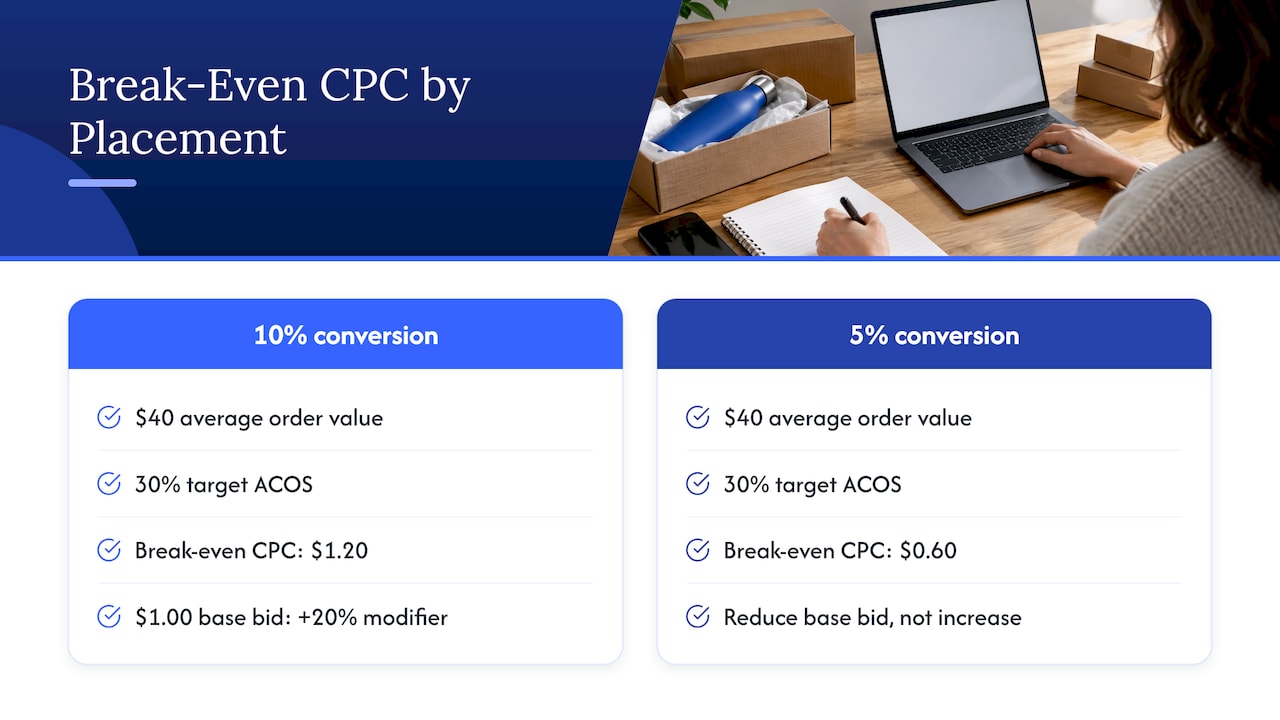
For example, if a product sells at $40, a placement converts at 10% and your target ACOS is 30%, the most you can pay per click there is $40 × 0.10 × 0.30 = $1.20. If your base bid is $1.00, the modifier that reaches that ceiling is 20%. If the placement converts at 5%, the ceiling is $0.60 and the right adjustment is a reduction of the base bid rather than an increase. Note that the adjustment field can only add to the base, so to favor one placement over another you lower the base bid and raise the modifiers where the data supports it.
Step 3: Choose the direction
Use the numbers from step 2 to sort each placement into one of three outcomes:
- Raise: the placement converts well enough that its break-even CPC is above your current placement bid, and you are losing impressions or position.
- Leave alone: profit is on target, or volume is too low to tell.
- Lower or remove: the placement’s cost per click exceeds what it can afford. Take the modifier back to 0% and, if the base bid itself is too high for that placement, reduce the base.
Step 4: Change one thing at a time
Amazon recommends reviewing dynamic bidding campaigns about every two weeks and limiting simultaneous changes so performance differences can be attributed to a specific change. Follow the same discipline for placements. If you change the base bid, the strategy and two modifiers on the same day, you will not know which one moved the result.
A clean sequence for one campaign: record the baseline, change a single modifier in modest steps, wait a full review period, compare against baseline, then decide on the next step. Large jumps are hard to reverse in an auction where competitors respond.
Step 5: Supplement the placement report
The placement report shows where. To understand why, use the supporting reports Amazon points to: the targeting report, which gives sales metrics for targets with at least one impression; the advertised product report; and the performance over time report, which shows clicks, spend and average CPC across the period. Amazon’s best practices guide lists these as inputs to bid changes. A top of search modifier that looks wrong at campaign level often turns out to be one keyword dragging the average.
Where to set the adjustment in Amazon Ads
You set placement adjustments while building or editing a Sponsored Products campaign. Amazon’s flow is to create the campaign, add products, define targeting and bidding, set campaign dates and a daily budget, and launch. The bidding section is where you pick the strategy and add the placement percentages. For existing campaigns, open the campaign settings in the console and edit the bidding section.
If you are setting up from scratch, our walkthrough on setting up Amazon ads step by step covers the structure that makes placement data readable: separating campaigns by objective so a modifier on one does not distort another.
Common mistakes with placement adjustments
Stacking every lever at once
A campaign on dynamic up and down, with a high top of search modifier and an aggressive base bid, can bid far beyond what the economics allow. Decide which lever is doing the job.
Using one setting for every campaign
A product launch, a defensive branded campaign and a catalog-wide auto campaign need different settings. Top of search matters most for terms where being first on the page earns the sale. Product page placements often matter more for complementary or competitive targeting.
Ignoring the base bid arithmetic
Because the modifier multiplies the base, any base bid change silently rescales all three placements. Write down the effective placement bids after every change, not just the percentages.
Judging on ACOS alone
Top of search can lift total sales and organic rank for a key term even when its ACOS sits above the campaign average. Whether that is worth it depends on your margin, inventory and goals. Define the target before you read the report, so the data tests a plan instead of justifying one.
Reviewing too rarely or too often
Daily tinkering chases noise. Quarterly reviews miss shifts in competition and seasonality. A review rhythm of about two weeks, in line with Amazon’s guidance for dynamic bidding, gives each change time to show up.
When you need more than standard reports
Standard reports are periodic. Amazon Marketing Stream delivers hourly campaign metrics and change information through the Amazon Ads API to eligible agencies, technology providers and direct advertisers. That level of detail suits teams that adjust placements across hundreds of campaigns. It requires an API integration and a data destination. Our guide to Amazon Marketing Stream setup explains the delivery options.
Perspective
Placement adjustments look like a small setting, and that is why they get mismanaged. One percentage in a campaign form can move thousands of dollars a month.
Our view is that the adjustment should come out of a profit model, not a feeling about visibility. We start from the margin on the product, work out what each placement can afford per click, and set modifiers to that number. Then we review on a schedule and change one thing at a time, so every move teaches something.
This is also why we pair advertising with our iDerive analytics platform. It is built to give unified reporting and incrementality measurement across marketplaces, so a placement decision can be read against what the whole business is doing, not one dashboard. For enterprise catalogs with many campaigns and many products, that discipline is what separates controlled spend from drifting spend.
Dan Katona
How Nectar manages Amazon bidding
Nectar is a fully managed e-commerce agency for mid-market and enterprise brands selling on Amazon, Walmart and their own sites. Our retail media team manages sponsored ads, including Sponsored Products, with a profit-first approach, and the work connects to creative, catalog and operations under one roof. For brands where placement tuning is one part of a larger Amazon P&L, our Amazon Growth & Optimization service puts it inside a broader plan.

If you want to see how that looks in practice, our case study on how LonoLife improved Amazon search visibility with smarter ad spend is a good place to start. To talk about your own account, start at thinknectar.com.
FAQ
What is the maximum placement bid adjustment on Amazon?
Amazon allows placement adjustments of up to 900% on each of the three Sponsored Products placements: top of search, rest of search and product pages. A 900% adjustment means a bid ten times the base. Most campaigns use far smaller percentages, set from placement report data.
How do I calculate my bid after a placement adjustment?
Multiply the base bid by one plus the adjustment as a decimal. A $1.00 base bid with a 50% adjustment gives a $1.50 maximum bid in that placement. The result is the most you are willing to pay for a click, not necessarily what you pay.
Do placement adjustments work with dynamic bidding?
Yes. Amazon says placement adjustments work with your chosen strategy (fixed, dynamic down only, or dynamic up and down) to determine the final bid. With dynamic up and down, Amazon advises being prepared to spend up to double your entered bid, so review the strategy and the modifiers together.
How often should I change placement adjustments?
Review on a steady rhythm, about every two weeks in line with Amazon’s guidance for dynamic bidding campaigns, and limit simultaneous changes. That way you can attribute any change in performance to a specific adjustment instead of guessing.
Which placement should I raise first?
Start with the placement where the placement report shows the strongest profit relative to its cost per click, usually tested on a campaign with enough click volume to read. Raise in modest steps, wait a full review period, then decide whether to go further.
Sources
- Best practices for your Sponsored Products ads, Amazon Ads
- Rest of Search Bid Adjustment for Sponsored Products, Amazon Ads
- Bids and targeting guide, Amazon Ads
- Guide to dynamic bidding, up and down, Amazon Ads
- Sponsored Products best practices (PDF), Amazon Ads
- Amazon Marketing Stream: Measure campaign performance, Amazon Ads
Recommended