
Storefront customization is any change you make to the customer-facing parts of your online store, from swapping a logo in a theme editor to building a fully custom front end that talks to your platform through an API. The range matters more than the definition. On one end, you’re clicking dropdowns in a visual editor. On the other, you’re briefing a development team on a headless build that could take months.
The first move is simple: figure out which category your project actually falls into. If you need new colors, a different homepage layout, or a tweaked product grid, that’s almost always a theme-editable job you can handle inside Shopify, Ecwid, WooCommerce, or BigCommerce without touching code. If you need something the theme wasn’t built to do, like a configurator that talks to inventory in real time or a checkout experience synced across five sales channels, you are in developer or headless territory.
-
Theme-editable: color and font changes, section reordering, banner swaps, basic layout tweaks.
-
Requires developer or headless work: custom checkout logic, multi-channel product data, complex filtering, or a front end that needs to run on more than one platform.
Check your platform’s theme editor or developer documentation first. Shopify and equivalent docs from BigCommerce, WooCommerce, and Ecwid all spell out exactly what’s editable through the UI versus what requires code. Five minutes there saves you from hiring a developer for a job the theme editor already handles, or worse, trying to force a theme to do something it was never built for.
Key Takeaways
Storefront customization works best when the technical approach matches the actual business need rather than the most impressive option available.
| Point | Details |
|---|---|
| Start with theme edits | Most visual and layout changes belong in the theme editor, not a custom build. |
| Reserve headless for structural gaps | Choose custom or headless builds only when a real feature, like omnichannel sync, demands it. |
| Maintenance burden grows with control | Template edits and headless builds both require ongoing engineering attention platform updates can disrupt. |
| Test before you launch | Stage every change, monitor Core Web Vitals, and keep a documented rollback plan ready. |
Where to Learn More About Storefront Customization
Readers who want to go deeper into the technical side should start with the platform documentation that governs whatever build they’re planning.
-
Shopify’s custom storefronts documentation covers the Storefront API and Hydrogen framework in detail, including code examples for common headless patterns.
-
Shopify’s comparison of headless versus traditional commerce breaks down the architectural trade-offs in plain terms before you commit engineering time.
-
WooCommerce’s plugin support documentation is the fastest way to check whether an existing plugin already solves a customization need before building something custom.
-
Oro’s storefront how-to guides offer a useful comparison point for how a different platform ecosystem documents the same theme-to-API progression.
What Is Storefront Customization, Exactly?
A storefront is the part of your ecommerce site that customers actually see and interact with: the homepage, product pages, category grids, search results, cart, and checkout. It sits on top of a back end that handles inventory, orders, payments, and customer data. Storefront customization changes what’s on the customer-facing layer without necessarily touching how the back end processes a transaction.
That distinction matters because a lot of confusion in this space comes from mixing up “changing how the store looks” with “changing how the store works.” Both count as customization, but they carry very different levels of risk and effort.
Changes that fall inside storefront customization include:
-
Visual branding: logos, color palettes, typography, imagery
-
Layout and navigation: menu structure, homepage sections, category page grids
-
Product page templates: how variants, reviews, and specs are displayed
-
Search and filtering behavior
-
Checkout appearance and flow (within platform limits)
-
API-driven surfaces: custom apps, mobile experiences, or headless front ends built on a platform’s Storefront API
Four platforms come up constantly in this conversation, and each handles customization differently. Shopify offers theme-based editing through its Online Store editor plus a full Storefront API and Hydrogen framework for headless builds. WooCommerce, built on WordPress, leans on a massive plugin ecosystem and direct PHP/template access. BigCommerce provides a similar theme-and-API split to Shopify, with its own headless options through the Catalyst framework. Ecwid is built for merchants who want to embed a store into an existing site, with lighter customization options but faster setup. Knowing which platform you’re on determines which of the approaches below is even available to you.
What Are the Main Types of Storefront Customization?
Most customization projects fall into one of five buckets, ranked roughly from lowest to highest effort:
-
Theme or visual editor changes. Point-and-click adjustments inside the platform’s built-in editor. No code required. Example use case: rebranding a store after a company-wide visual refresh, changing seasonal banners, reordering homepage sections.
-
CSS and JavaScript tweaks. Small code injections that adjust styling or add interactive behavior without replacing the whole theme. Example use case: adding a sticky “add to cart” bar on mobile, custom hover effects on product cards.
-
Template and theme file edits. Editing the actual theme code (Liquid for Shopify, PHP templates for WooCommerce) to change structure, not just style. Example use case: redesigning the product page layout to show a custom size chart or bundle builder.
-
Apps and plugins. Installing pre-built extensions that add functionality, like reviews, upsells, or advanced search. Example use case: adding a subscription option or loyalty program without custom development.
-
Headless or custom front-end builds. A completely separate front end that pulls data from the platform’s back end through an API, giving you full control over the customer experience across web, mobile, and other channels. Example use case: a brand running the same product catalog across a website, in-store kiosk, and app, all sharing one inventory system. Custom storefronts built this way use commerce primitives via API rather than a theme at all.
Each step up this list trades simplicity for control:
-
Theme edits: minimal developer effort, low flexibility, almost no maintenance burden, negligible performance risk.
-
CSS/JS tweaks: light effort, moderate flexibility, small maintenance risk if not documented.
-
Template edits: moderate to heavy developer effort, high flexibility within the platform’s limits, real maintenance burden during platform updates.
-
Apps/plugins: fast to implement, flexible in function, but every added app increases load time and creates dependency risk.
-
Headless/custom: highest developer effort and cost, maximum flexibility, and the heaviest ongoing maintenance since you’re now running two systems instead of one.
When Should You Choose Theme Edits vs. a Full Custom Build?
Run through this checklist before committing resources:
-
Do you have in-house developers, or is this project going to sit on one person’s plate along with everything else?
-
What’s your current GMV, and does the potential revenue lift justify a headless build’s cost?
-
Do you need one storefront experience, or the same catalog running across web, app, and in-store kiosks?
-
Are there specific features (complex configurators, B2B pricing tiers, real-time inventory sync across channels) that your theme genuinely cannot support?
If your answers point toward limited developer capacity and a single-channel store, starting with theme-based customization is the right call almost every time. It’s faster to ship and doesn’t require you to maintain a separate front-end codebase.
The trade-offs break down like this:
-
Speed to market: theme edits ship in days or weeks; headless builds take months.
-
Ongoing maintenance: theme edits update automatically with platform releases; headless builds need a dedicated engineering owner.
-
Cost: theme customization is a fraction of the cost of a full custom front end.
-
Marketing autonomy: theme-based stores let marketers change layouts and content without a developer; headless architectures often lock that ability behind engineering requests, since the front end is a separate codebase from the content and merchandising tools your team is used to.
The clearest signal you actually need headless or custom backend logic is when the same product data has to serve multiple distinct experiences, like a website, a native app, and a wholesale portal, and no theme can stretch across all three. Short of that, headless commerce decouples your front end from the back end specifically to solve that channel problem, at the cost of speed and simplicity that traditional theme-based commerce gives you for free.
How Do You Implement Common Storefront Changes?
Here’s a practical field guide to where common tasks actually get done, mapped by platform layer:
-
Logo, colors, fonts: theme editor UI on every platform. No code needed.
-
Homepage layout and section order: theme editor UI, sometimes with drag-and-drop section builders (Shopify’s Online Store 2.0, BigCommerce’s Page Builder).
-
Product page templates (custom variant selectors, bundle displays): template file edits, usually Liquid or theme PHP files.
-
Search and filtering: often handled by an app or plugin for advanced faceted search, though basic filtering lives in theme settings.
-
Checkout branding: limited to what the platform allows in its checkout settings; deeper checkout logic changes typically require Shopify Plus checkout extensibility or a similar enterprise tier.
-
API-driven features (custom configurators, cross-channel sync): Storefront API or platform-specific SDKs, requiring actual development work.
Platform documentation is worth bookmarking here rather than guessing. Vendor docs consistently show appearance changes handled through the admin UI first, with file or command-line edits reserved for anything the UI can’t reach. That same pattern holds across ecommerce platforms: try the UI, then the theme files, then the API, in that order.
Two platform limitations worth flagging: theme editors often restrict how deeply you can restructure checkout, and heavily customized template files can break silently when the platform pushes a theme update.
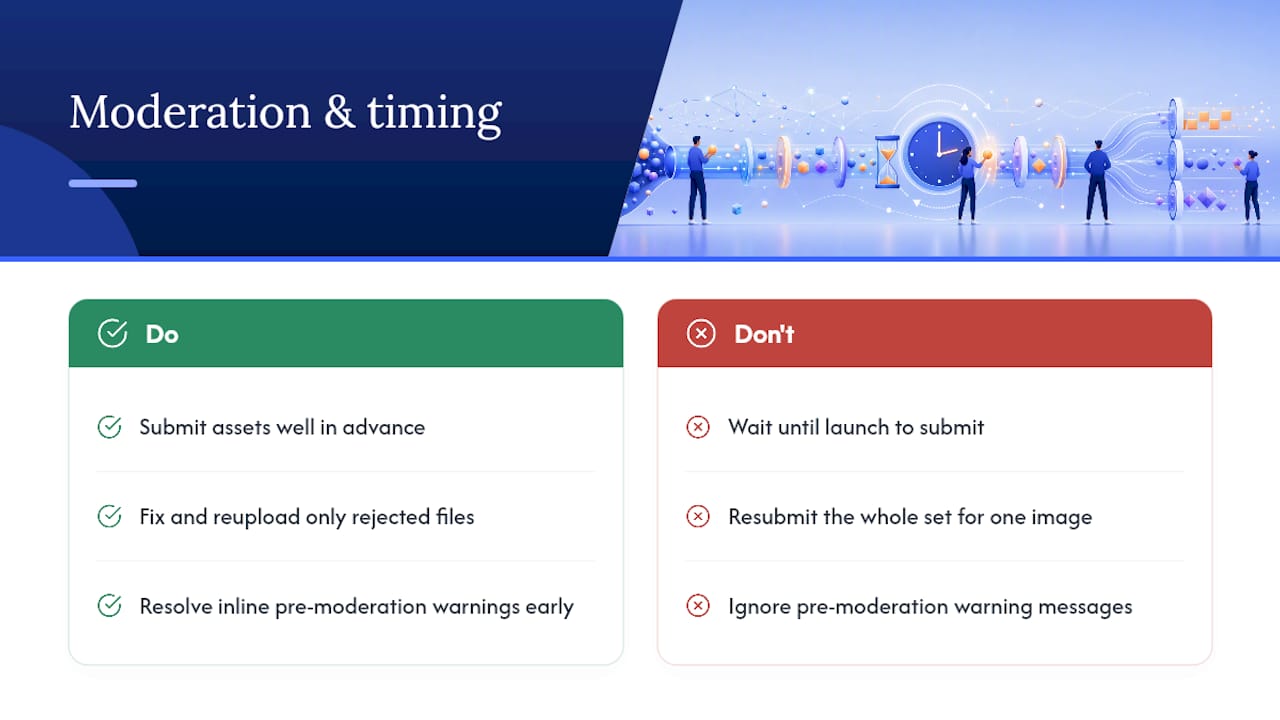
Pro Tip: Always test major storefront changes on a staging or duplicate theme first, and keep a documented rollback plan (a saved copy of the previous theme version) before pushing anything live. A five-minute backup can save you a multi-hour scramble if a template edit breaks checkout during a traffic spike.
What Does a Storefront Customization Project Checklist Look Like?
A scoped project moves through five stages, whether you’re doing a small theme refresh or a full headless build:
-
Requirements and discovery. Document exactly what needs to change, who it affects (customers, internal teams), and what success looks like. Set acceptance criteria upfront, not after development starts.
-
Design and technical planning. Wireframe the change, confirm which platform layer it touches (theme, template, API), and flag any third-party integrations involved.
-
Staging and build. Build on a duplicate theme or staging environment, never directly on the live store.
-
QA and testing. Test across devices, browsers, and user flows, especially checkout and mobile. Confirm the change doesn’t break existing apps or integrations.
-
Deployment and monitoring. Launch during low-traffic windows when possible, keep the rollback plan ready, and monitor performance and conversion metrics closely for the first week.
A few things worth building into that process:
-
Define acceptance criteria and success metrics (conversion rate, page load time, bounce rate on the changed page) before development starts, not after.
-
Keep a rollback strategy documented, not just assumed. Know exactly how to revert if something breaks.
-
Assign clear roles: someone owns design decisions, someone owns technical implementation, someone owns QA sign-off.
-
Bring in agency help when the project needs specialized skills your team doesn’t have in-house, particularly for headless builds, complex integrations, or when internal bandwidth simply isn’t there. Nectar’s Shopify site design and development work follows exactly this staged process for mid-market and enterprise brands.
What Do Storefront Customization Costs and Timelines Look Like?
Costs vary widely based on scope, but the ranges follow a predictable pattern tied to how deep the customization goes.
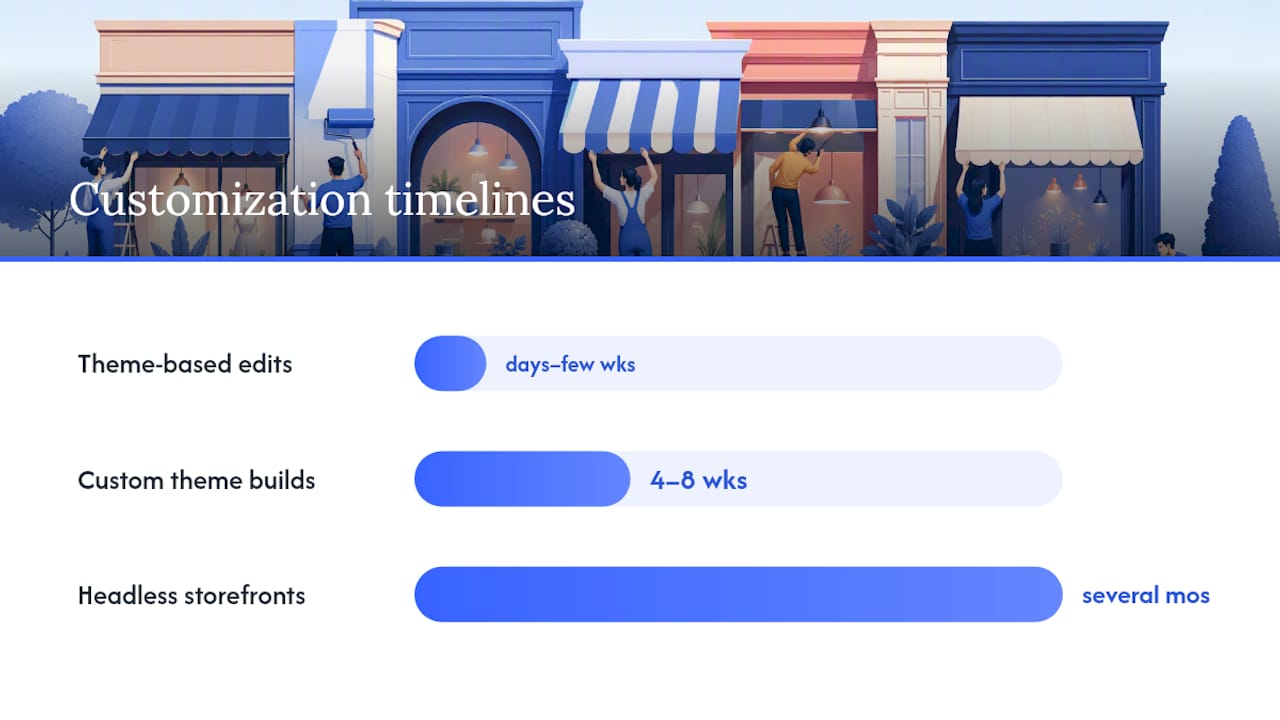
Theme-based edits, including color changes, section reordering, and light CSS work, typically run from a few hundred dollars for minor tweaks up to a few thousand for a full theme customization with a developer. Timeline: days to a few weeks.
Custom theme builds, where a developer restructures template files for a unique layout or feature set, tend to land in the low to mid five figures depending on complexity. Timeline: four to eight weeks is common.
Headless or fully custom storefronts sit well above that. Headless implementations typically carry higher upfront costs and longer timelines than theme-based builds, often stretching into several months of development before launch, because you’re building and maintaining an entirely separate front-end application.
The biggest cost drivers, regardless of approach:
-
Third-party integrations (ERP, PIM, subscription platforms, loyalty programs)
-
Data migrations, especially moving product catalogs or customer history between systems
-
Custom checkout logic beyond what the platform natively supports
-
Omnichannel requirements (syncing the same storefront experience across web, app, in-store)
-
Developer retention, since custom ecommerce development requires ongoing maintenance that doesn’t stop once the project launches
To manage risk, break the project into phases instead of trying to launch everything at once. Start with an MVP version of the customization, launch it, measure real customer behavior, then expand.
How Does Storefront Customization Affect Performance, SEO, and Conversion?
Every app, script, or custom feature you add carries a performance cost, and performance has a direct line to conversion. A storefront loaded with five review apps, a chat widget, and three marketing pixels can feel sluggish even with a beautifully designed theme sitting on top of it.
Watch these metrics after any significant customization:
-
Largest Contentful Paint (LCP): how fast the main content loads.
-
Time to First Byte (TTFB): server response speed, especially relevant for headless setups making multiple API calls.
-
Core Web Vitals overall: Google’s bundled performance signals that also factor into search ranking.
Headless builds carry specific SEO risks that theme-based stores don’t. Since the front end is decoupled from the platform, you need to actively manage server-side rendering (so search engines can crawl your content), sitemap generation, and canonical tags, none of which come free the way they do in a standard theme. Skipping this step is the most common reason a headless migration tanks organic traffic in the months after launch.
Accessibility and conversion testing deserve equal attention:
-
Test keyboard navigation and screen reader compatibility on any new template or component.
-
Check color contrast ratios after any rebrand, since accessibility complaints often surface right after a visual refresh.
-
Run A/B tests on major layout changes before rolling them out to 100% of traffic.
-
Build fallback states for any API-driven component in case a data call fails.
Pro Tip: Before adding any new app or script to your theme, check its impact on page load time using your browser’s network tab or a tool like Google PageSpeed Insights. A single poorly coded app can undo weeks of conversion optimization work elsewhere on the page.
A well-designed storefront also carries branding weight beyond raw speed. Visual consistency and load time work together, not against each other, in how customers judge whether a store feels trustworthy enough to buy from.
Which Platforms and Tools Support Storefront Customization?
Each major platform supports a different depth of customization, and picking the right one often comes down to matching your technical resources to the platform’s native strengths.
Shopify covers the widest range in one place. Its Online Store 2.0 editor handles drag-and-drop theme changes, while the Storefront API and Hydrogen framework let developers build fully custom, headless front ends when a merchant’s needs outgrow theme templates. A mid-market apparel brand running a standard theme today could migrate specific high-traffic landing pages to a Hydrogen-built experience later, without rebuilding the entire store.
WooCommerce, running on WordPress, leans on its plugin ecosystem for extending functionality without touching core code. Its plugin support documentation shows how far you can go using pre-built extensions before you need custom PHP development. It’s a strong fit for teams already comfortable in the WordPress ecosystem who want granular control over content and commerce in one place.
BigCommerce offers a theme-and-API split similar to Shopify’s, with the Catalyst framework available for headless builds and native multi-storefront support for brands running several brands or regions off one back end.
Ecwid trades some customization depth for simplicity, built for merchants embedding a store into an existing website rather than running a dedicated ecommerce site. It’s a reasonable starting point for smaller catalogs that don’t need deep template customization.
Platform vendor documentation, like Oro’s storefront how-to guides and Citrix’s UI customization API reference, follow a consistent pattern across the ecommerce industry: start in the admin UI, move to theme files for structural changes, and reach for the API only when you need behavior the platform wasn’t built to deliver out of the box.
How Does an Agency Scope a Storefront Customization Project?
A managed agency approaches storefront work differently than a single in-house developer working project by project, mostly because the process is designed to repeat across dozens of client stores rather than solve one problem in isolation.
The typical process runs through discovery (understanding the brand’s catalog, current storefront performance, and business goals), design (comps and wireframes reviewed before any code gets written), development (built and tested on staging), QA (cross-device and cross-browser testing plus load testing for headless builds), launch, and ongoing optimization based on real performance data.
Deliverables usually include design comps for stakeholder sign-off, a staging deployment for review before launch, analytics tracking configured from day one, and a documented rollback plan in case something needs to be reverted post-launch.
Hiring an agency makes the most sense when a project needs specialized skills a brand doesn’t have in-house, when internal teams are already stretched managing day-to-day operations, or when the storefront work is tied to a broader growth push across multiple marketplaces. Nectar’s creative studio produces the photography, video, and PDP content that pairs with storefront development work, since a redesigned template with weak product imagery rarely moves the conversion needle the way a redesign paired with strong creative does.
Budget for retained support beyond launch, too. A storefront isn’t a one-time project; platform updates, seasonal campaigns, and new feature requests all require ongoing attention, which is why most agency engagements structure around a retainer rather than a single deliverable.
What Are the Security Risks in Storefront Customization?
Every third-party app, custom script, or API integration you add to a storefront is a potential entry point for a security issue, not just a feature. This is one of the most overlooked parts of a customization project, especially when teams move fast to ship a visual refresh.

Apps and plugins carry the highest risk because you’re trusting code you didn’t write and often can’t fully audit. Only install apps from verified sources, review their permission requests carefully, and remove any app you’re no longer actively using, since an abandoned app with store access is a liability even if it isn’t doing anything visible.
Custom code, whether it’s a template edit or a full headless build, needs the same scrutiny. Never hardcode API keys or credentials directly into theme files or front-end JavaScript where anyone viewing page source can see them. For headless storefronts specifically, make sure your API calls use proper authentication scopes so a compromised front end can’t access more of your back end than it needs to.
A few practical habits reduce risk significantly: keep a documented inventory of every app, plugin, and integration connected to your storefront; review that list quarterly and remove anything unused; require two-factor authentication for anyone with admin or theme-editing access; and test any new integration in a staging environment before granting it access to live customer or payment data.
A Practical Take on Where Teams Get This Wrong
Most storefront customization mistakes come from skipping straight to the most technically impressive option instead of matching the fix to the actual business problem. A brand doesn’t need a headless rebuild because a competitor has one; it needs one when the current setup genuinely can’t support a real requirement, like syncing inventory across five sales channels or running a B2B pricing tier the theme has no concept of.
If there’s one piece of advice worth taking seriously, it’s this: chase incremental performance and usability wins before chasing visual novelty. A storefront that loads half a second faster and has a cleaner checkout flow will move more revenue than one with a flashy custom animation and a bloated app stack. Novelty fades. Speed and clarity compound every day the store is live.
Frequently Asked Questions About Storefront Customization
What is storefront customization in simple terms? It’s any change made to the customer-facing parts of an online store, ranging from adjusting colors in a theme editor to building a completely custom front end connected through an API.
Do I need a developer for storefront customization? Not always. Theme editor changes, like colors, layouts, and banners, typically require no code. Template edits, custom apps, and headless builds do require development work.
How much does storefront customization cost? Theme-based edits often run from a few hundred to a few thousand dollars. Custom theme builds land in the low to mid five figures. Headless builds cost significantly more upfront due to the separate front-end development and ongoing maintenance involved.
What’s the difference between a custom theme and a headless storefront? A custom theme still runs on the platform’s native theme engine with modified template files. A headless storefront is a completely separate front-end application that pulls data from the platform through an API, giving more flexibility across devices and channels at the cost of higher complexity.
Will customizing my storefront hurt my SEO? It can, particularly with headless builds, if server-side rendering, sitemaps, and canonical tags aren’t properly configured. Theme-based customization carries lower SEO risk since the platform typically handles those elements natively.
When should a growing brand consider hiring an agency for storefront work? When the project requires specialized skills the internal team lacks, when day-to-day operations already stretch internal bandwidth thin, or when the storefront work is part of a broader growth strategy across multiple marketplaces like Amazon, Walmart, and Shopify.
Sources
Recommended





































































.webp)