
A marketplace taxonomy is the governed classification system that makes products discoverable, shoppable, and reportable across channels. Get it right, and shoppers find what they need faster, filters work as expected, and your catalog maps cleanly to every channel you sell on. Get it wrong, and search breaks, feeds get rejected, and every new channel you add costs more to onboard than the last.
The three outcomes that matter most:
- Faster discovery: shoppers reach the right product type through browse or search without dead ends
- Reliable filtering: facets like size, color, and material behave consistently because the underlying attributes are structured, not free-text
- Cross-channel mapping: a single master model feeds Amazon, Walmart, Shopify, and any other channel without rebuilding the data from scratch each time
Shopify describes product taxonomy as a hierarchical classification that includes parent categories, subcategories, filters, and product attributes, with direct downstream effects on discovery, SEO, and internal reporting. The KPIs that tell you whether a taxonomy is working: search click-through rate (CTR), filter engagement rate, and conversion lift by category. Standards bodies like GS1 anchor the identifier layer with GTINs, which keep products traceable across every system that touches them.
Key Takeaways
A marketplace taxonomy is the governed classification system that determines whether products are found, filtered, and reported correctly across every channel you sell on.
Point | Details
- Define the master model first: build a single source-of-truth taxonomy before mapping to any channel schema to prevent per-channel data chaos.
- Enforce required attributes at the PIM level: gate publication on completeness so required fields are never empty in a live feed.
- Map to one channel at a time: translate master attributes to each marketplace schema separately, starting with your highest-volume channel.
- Schedule a quarterly governance cadence: review channel schema updates, KPIs, and structural changes on a fixed schedule to prevent taxonomy drift.
- Nectar for managed taxonomy work: Nectar audits, maps, and governs taxonomy across Amazon, Walmart, and Shopify, with iDerive analytics tracking impact at the category level.
What is marketplace taxonomy, exactly?
Taxonomy is not a navigation menu. It is not a merchandising campaign. It is the underlying data model that tells every system in your stack what a product is before any presentation decision is made.
Dyver as the system that structures how products are found, compared, and reported, and notes that most taxonomy problems only surface after catalogs scale or when you add a new channel. That timing is the trap: by the time the problem is visible, thousands of SKUs are already misclassified.
The components that make up a taxonomy
- Category tree: the parent-to-child hierarchy (e.g., Apparel > Men’s > Tops > T-Shirts)
- Subcategories: the leaf nodes where products actually live, specific enough to carry a consistent attribute set
- Product types: the named class within a subcategory that drives which attribute template applies (e.g., “Running Shoe” vs. “Dress Shoe” within Footwear)
- Required attributes: fields every product in a type must have (e.g., size, color, material for apparel)
- Optional attributes: fields that add richness but are not mandatory for feed acceptance (e.g., care instructions, country of origin)
- Facets and filters: the shopper-facing controls built directly from structured attribute values, not from free text
- Synonyms and term aliases: controlled vocabulary that maps “sneaker” to “athletic shoe” so search and browse stay consistent
- Mappings: the translation layer between your master taxonomy and each channel’s schema (Amazon Browse Node, Walmart category ID, Shopify product type)
Taxonomy vs. related structures
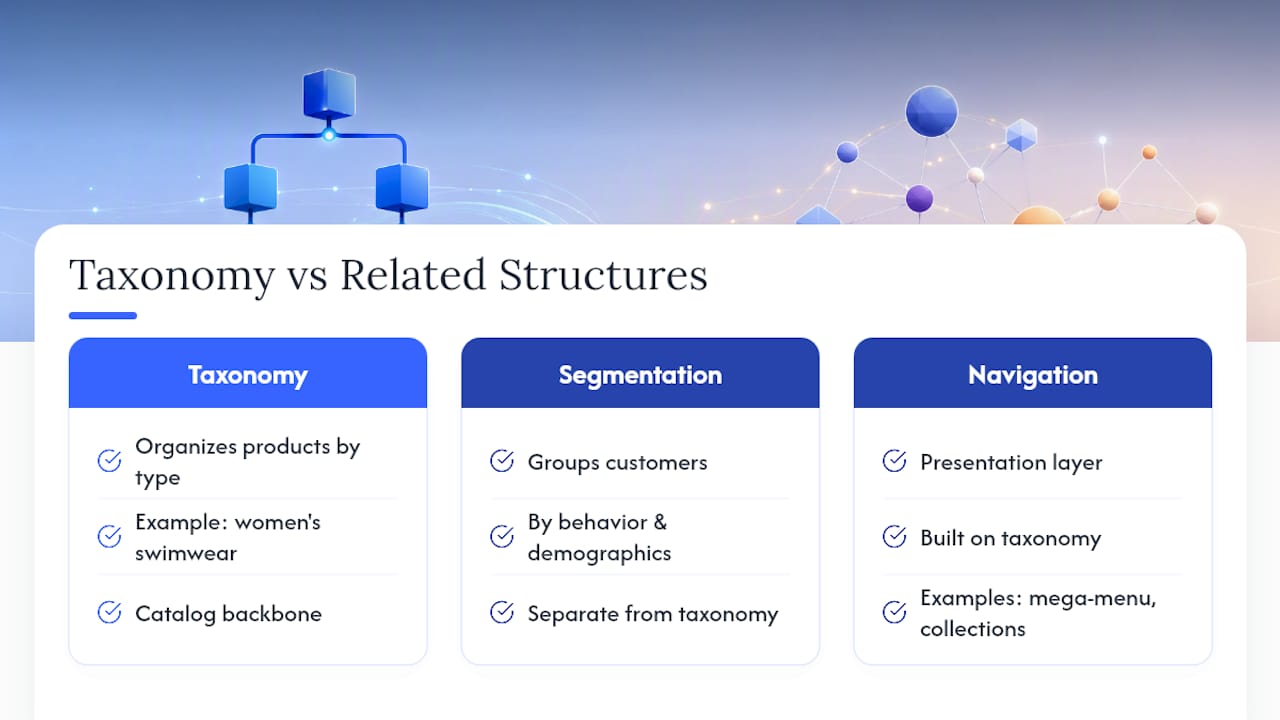
Taxonomy is often confused with two adjacent concepts. Market segmentation groups customers by behavior or demographics; taxonomy groups products by what they are. Navigation or presentation layers (mega-menus, curated landing pages, editorial collections) are built on top of taxonomy but are not the same thing. A seasonal “Summer Essentials” collection is a presentation decision. The fact that a product is a Women’s Swimwear > One-Piece > Solid is a taxonomy decision. Keeping these separate prevents the most common scaling failure: using a presentation structure as the product backbone.
Pro Tip: When scoping taxonomy work, write a one-line definition for each component and circulate it to every team that touches the catalog. Disagreements about what “product type” means will surface immediately, and resolving them before you build saves weeks of rework.
Why does taxonomy matter for your marketplace business?
A well-governed taxonomy is one of the highest-leverage investments a catalog team can make, because its effects compound across every channel and every team that touches the product data.
Netguru’s search and discovery playbook makes the case directly: taxonomy provides the deterministic backbone that makes facets and filters work. When taxonomy is correct, a majority of discovery paths run through structured browse rather than keyword search alone, which means lower dependence on paid traffic for product visibility.
The business impacts, by team:
- Catalog managers: fewer manual corrections, faster onboarding for new sellers or SKUs, and cleaner feed submissions
- UX and search teams: facets that behave predictably because attribute values are controlled, not free-text
- SEO: consistent attribute use and clear category naming improve discoverability across Amazon, Walmart, and Shopify, as Nectar’s own marketplace SEO research confirms
- Merchandising: reliable category-level reporting because every product sits in exactly one leaf node
- Marketplace ops: fewer feed rejections because required attributes are defined and enforced at the data model level
- Analytics: clean segmentation by category, product type, and attribute value without post-hoc data cleaning
Reduced returns is a less-discussed benefit. When shoppers can filter by the attributes that actually matter for fit or compatibility (inseam length, screen resolution, thread count), they buy the right product the first time.
What does a well-built taxonomy structure look like?
The building blocks are consistent across industries. What varies is the depth of the category tree, the strictness of required fields, and the number of facets exposed per category.
Primary building blocks
- Category tree: aim for three to five levels deep; shallower trees force product types to share attribute schemas they do not fit, deeper trees create maintenance overhead with little discovery benefit
- Product type: the key that selects the attribute template; one product type per leaf node, no exceptions
- Attribute schema: split into required (gate feed acceptance) and optional (enrich search and filtering)
- Facets: derived from structured attribute values; never built from free-text fields
- Synonyms and aliases: maintained in a controlled vocabulary file, not embedded in category names
- Product templates: the packaged combination of product type plus its required and optional attribute list, ready to hand to sellers or import into a PIM
Naming conventions and cardinality rules
Use singular nouns for category names (“Running Shoe,” not “Running Shoes”). Attribute names should be consistent across the tree: if you call it “Color” in Apparel, call it “Color” in Home Goods, not “Colour” or “Primary Color.” For cardinality, single-value attributes work for fields with one correct answer (Brand, GTIN, Country of Origin). Multi-value attributes are appropriate for fields where a product genuinely has more than one valid value (Material, Compatible Devices, Occasion).

Example attribute schema: running shoes
Required attributes: Gender, Size (US), Width, Color, Primary Material, Brand, GTIN
Recommended optional attributes: Closure Type, Cushioning Level, Surface Type (Road/Trail/Track), Weight (oz), Waterproof (Yes/No), Collection Name
Pro Tip: The stricter your required fields, the cleaner your data, but the higher your seller abandonment rate during onboarding. Start with the minimum set that makes a product findable and filterable, then add required fields incrementally as seller compliance improves.
How do you build a marketplace taxonomy from scratch?
The process runs in five stages. Skipping any one of them creates a debt that shows up later as misclassified products, broken facets, or a feed migration that costs three times what it should have.
Stage 1: Discovery audit
- Export your current catalog and map every product to its existing category path.
- Check data completeness: what percentage of products have values for each attribute field?
- Identify variant grouping issues: are color and size variants grouped under a parent, or listed as separate SKUs with no relationship?
- Flag attribute inconsistencies: the same concept expressed in five different ways (“Cotton,” “100% Cotton,” “cotton blend,” “CTN,” “natural fiber”).
- Document channel requirements for every marketplace you sell on or plan to sell on.
Stage 2: Stakeholder workshops
Bring catalog ops, search/UX, SEO, merchandising, and engineering into a single session. The goal is a shared definition of each taxonomy component and agreement on which team owns each layer. Without this, taxonomy decisions get made in silos and the master model fractures within six months.

Stage 3: Category modeling and attribute definition
Draft the category tree from the leaf nodes up, not from the top down. Start with your highest-volume product types, define their required and optional attributes, then build the parent hierarchy to group them logically. Validate the draft against your channel schemas before prototyping.
Stage 4: Prototyping and validation
Load a sample of 500 to 1,000 SKUs into the prototype taxonomy. Run sample search queries, check facet behavior, and submit a test feed to each target marketplace. The validation checklist:
- Do sample queries return products from the correct leaf node?
- Do facets filter correctly when multiple values are selected?
- Does the feed pass mandatory attribute checks on Amazon, Walmart, and any other target channel?
- Are there any leaf nodes with fewer than five products? (If so, consider merging them.)
Pro Tip: Gate migration on feed acceptance, not on internal sign-off. A taxonomy that passes your internal review but fails a marketplace’s mandatory attribute check is not ready. Run the feed test before you commit to rollout.
StartWithData recommends maintaining a flexible master model with formal mappings to each marketplace schema, which is exactly what this stage produces: a validated master plus a channel-mapping document.
Stage 5: Rollout and rollback
Migrate in batches by category, not all at once. Define rollback criteria before you start: if feed rejection rate exceeds a threshold or search CTR drops more than a defined percentage within the first week, pause and revert the affected batch. Document every change as a primitive (add, move, delete) so the rollback is a clean reversal, not a guessing game.
How do you map taxonomy into your systems?
The master taxonomy is the source of truth. Every other system gets a projection of it, not a copy.
Integration checklist
- PIM: load the full category tree, product types, and attribute schemas; configure required-field validation so incomplete records cannot be published
- Search index: map taxonomy attributes to facet fields; confirm that multi-value attributes index correctly and that synonym files are loaded
- Marketplace feeds: maintain a mapping document that translates your master attribute names and values to each channel’s schema (Amazon Browse Node IDs, Walmart category IDs, Shopify product types)
- Analytics: tag every product event with its taxonomy path so you can report by category, product type, and attribute value without post-hoc joins
Common mapping pitfalls and fixes
StartWithData documents what happens when a presentation-only structure is used as the product backbone: scaling across channels becomes costly and error-prone because the structure was never designed to carry attribute schemas or channel mappings.
- Pitfall: using the navigation menu as the master taxonomy. Fix: separate the master data model from the presentation layer; the menu is a view of the taxonomy, not the taxonomy itself.
- Pitfall: missing mandatory marketplace attributes at feed time. Fix: map channel-required fields to master attributes during the modeling stage, before rollout.
- Pitfall: unit and format mismatches (e.g., weight in pounds in your PIM, grams required by the channel). Fix: store values in a canonical unit in the master model and convert at feed generation.
The role of stable identifiers
GS1’s GTIN standard is the foundation for reliable cross-channel mapping. A GTIN ties a product to its taxonomy node across every system that touches it, from your PIM to a retailer’s receiving system to a marketplace’s catalog. Without stable identifiers, the same physical product can exist as multiple disconnected records across channels, and taxonomy mappings break every time a system is updated.
Pro Tip: Assign GTINs at the product-type level, not the variant level, unless your channel requires variant-level GTINs. This keeps your identifier space manageable and your mapping tables short.
Which tools help you manage and automate taxonomy work?
No single tool covers the full taxonomy lifecycle. The practical stack combines several categories.
Tool categories and when to use each
- PIM (Product Information Management): Akeneo, Salsify, and similar platforms store the master taxonomy, enforce attribute schemas, and manage publication workflows. Use a PIM when your catalog exceeds a few hundred SKUs or when you sell on more than two channels.
- Taxonomy management tools: dedicated tools or modules within a PIM that version the category tree, track changes, and manage synonym files. Critical once you have multiple teams editing the taxonomy.
- Automated classification and ML enrichment: machine learning models that suggest or assign categories and attribute values based on product titles, descriptions, and images. Netguru’s playbook describes the hybrid pattern as the current recommended approach: taxonomy provides the deterministic schema, ML adds probabilistic tags for relevance and enrichment.
- Feed mappers and validators: tools that translate your master attributes to channel schemas and flag missing or malformed values before submission. Reduces feed rejection rates significantly.
- Data syndication platforms: Syndigo operates in this space, managing content syndication and data quality across retailer and marketplace networks. Relevant when you need to push product content to a large number of retail partners simultaneously.
When to automate vs. when to validate manually
Automate attribute fill for high-volume, low-risk fields where the source data is clean (brand, GTIN, color from a controlled list). Validate manually for required fields that affect feed acceptance and for any attribute where an error causes a return or a compliance issue (size, compatibility, hazmat classification). The decision rule: if the error rate on an automated fill exceeds your feed rejection threshold, add a manual review gate.
How do you govern a taxonomy over time?
A taxonomy without governance degrades. New product types get added to the wrong parent. Attribute names drift. Channel mappings go stale when a marketplace updates its schema. The governance model below keeps this from happening.
Recommended roles
- Taxonomy owner: sets the master model, approves structural changes, owns the change log
- Catalog operations: executes day-to-day classification, flags anomalies, runs feed submissions
- Search/UX owner: validates that taxonomy changes do not break facets or navigation
- Data steward: monitors attribute completeness and value consistency across the catalog
- Engineering liaison: manages PIM configuration, search index updates, and feed pipeline changes
Cadence
- Daily: automated validation hooks check for new products missing required attributes or assigned to deprecated categories.
- Monthly: feed acceptance rate review; attribute completeness report by category; synonym file audit.
- Quarterly: full taxonomy review against channel schema updates; stakeholder sign-off on any structural changes; KPI review against baseline.
KPIs and thresholds
- Search CTR by category: a drop of more than 10% in a category after a taxonomy change is a rollback signal
- Facet use rate: the percentage of sessions that use at least one filter; a healthy rate varies by category but a sustained decline indicates broken or missing facets
- Feed rejection rate: target below 2% for established channels; above 5% requires immediate attribute audit
- Attribute completeness: track the percentage of products with values for each required field; below 95% completeness on a required field means the field is effectively optional in practice
Whatnot’s engineering team documents maintaining multiple overlapping taxonomies optimized for distinct surfaces (onboarding, browse, recommendations) and treating every change as a migration primitive (add, move, delete) so changes can be batched, scheduled, validated, and rolled back safely. That discipline is what separates a taxonomy that scales from one that becomes a liability.
What are the most common taxonomy mistakes and how do you fix them?
Most taxonomy failures are predictable. They fall into five categories, and each has a straightforward fix.
- Mistake: using the presentation model as the master. The navigation menu or a merchandising collection becomes the de facto taxonomy. Fix: separate the master data model from every presentation layer on day one and enforce that separation in your PIM configuration.
- Mistake: inconsistent attribute naming. “Color,” “Colour,” “Primary Color,” and “color_1” all exist in the same catalog. Fix: publish a controlled vocabulary document and configure your PIM to reject values not on the approved list.
- Mistake: under-specified required fields. Required fields are defined but not enforced, so products publish with empty values. Fix: gate publication on required-field completeness in the PIM; incomplete records stay in draft.
- Mistake: ignoring channel mappings until feed time. The master taxonomy is built without reference to Amazon’s or Walmart’s mandatory attribute lists. Fix: pull channel schemas during the modeling stage and map them to master attributes before the prototype is built.
- Mistake: no validation automation. Every taxonomy change is reviewed manually, which means errors slip through as catalog volume grows. Fix: implement automated validation hooks that run on every product save and every feed submission.
Scale is when these mistakes become expensive. A misclassified attribute on 50 SKUs is a morning’s work. The same error on 50,000 SKUs is a migration project. Plan for scale early, even if your current catalog is small.
Taxonomy templates for three common categories
These are starting points, not final schemas. Adapt required attributes to your channel’s mandatory field list before loading into a PIM.
Apparel: Women’s Tops
Category path: Apparel > Women’s > Tops > [Product Type: T-Shirt / Blouse / Sweater / etc.]
Required attributes: Gender, Product Type, Size (US), Color, Primary Material, Brand, GTIN
Recommended optional attributes: Fit (Regular/Slim/Relaxed), Sleeve Length, Neckline, Care Instructions, Country of Origin, Occasion
Adaptation note: Amazon requires a “Department” attribute that maps to Gender; Walmart requires “Age Group.” Map both from your master Gender attribute at feed time.
Consumer electronics: Wireless Headphones
Category path: Electronics > Audio > Headphones > [Product Type: Over-Ear / On-Ear / In-Ear / True Wireless]
Required attributes: Product Type, Connectivity (Wired/Wireless/Bluetooth), Brand, Model Number, GTIN, Color, Battery Life (hours), Compatibility
Recommended optional attributes: Noise Cancellation (Active/Passive/None), Driver Size (mm), Frequency Response, Microphone (Yes/No), Foldable (Yes/No), Warranty (months)
Adaptation note: “Compatibility” is a multi-value attribute; list each compatible device category separately rather than in a single free-text string.
Home and décor: Throw Pillows
Category path: Home & Garden > Bedding & Bath > Decorative Pillows > [Product Type: Throw Pillow / Floor Pillow / Bolster]
Required attributes: Product Type, Dimensions (inches, length x width), Fill Material, Cover Material, Color, Brand, GTIN
Recommended optional attributes: Pattern, Care Instructions, Insert Included (Yes/No), Set Size, Style (Modern/Bohemian/Traditional/etc.)
Adaptation note: Dimensions must be stored as separate length and width attributes in most marketplace schemas, not as a combined string. Store them separately in the master model.
Localization note: for international channels, store dimension values in the master unit (inches or centimeters, pick one) and convert at feed generation. Never store both units in the master model.
How do you validate that your taxonomy actually works?
Building the taxonomy is half the job. Proving it works in production is the other half.
Validation test checklist
- Run 20 to 30 task-based usability tests: give real users a product to find using browse only (no search bar). Note where they get stuck.
- Check facet behavior: select multiple values in the same facet (e.g., two colors) and confirm the results are additive, not empty.
- Run sample search scenarios covering head terms, long-tail queries, and edge cases (misspellings, synonyms, category-crossing queries like “waterproof running shoe”).
- Submit test feeds to each target marketplace and review the acceptance report for missing or malformed attributes.
Analytics KPIs and how to track them
- Search CTR by category: set up a category-level segment in your analytics platform; compare CTR before and after taxonomy changes.
- Time to first click: measure from session start to first product click in browse sessions; a shorter time indicates better category structure.
- Facet conversion rate: the conversion rate of sessions that use at least one filter vs. sessions that do not; a higher rate for filtered sessions confirms that facets are surfacing relevant products.
For major reorganizations, run an A/B test: expose a percentage of traffic to the new taxonomy while the rest sees the existing structure. Set rollback criteria before the test starts. If search CTR or conversion drops more than a defined threshold in the test group within the first two weeks, revert.
Nectar’s marketplace analytics research reinforces that platform-level measurement tied to taxonomy paths is what separates brands that iterate from brands that guess.
When should you hire an agency for taxonomy work?
Some taxonomy projects are straightforward enough for an in-house team. Others are not.
Scenarios where an agency makes sense
- Your catalog has more than 5,000 SKUs and no documented taxonomy or attribute schema
- You are expanding to a new marketplace channel and need channel-specific mapping built quickly
- Feed rejection rates are above 5% and the root cause is unclear
- You have a PIM but no governance process, and attribute completeness is below 80% on required fields
- A major category reorganization is planned and you need rollback infrastructure and validation support
What a managed agency should deliver
- Taxonomy audit: current state assessment with completeness scores and gap analysis
- PIM mapping: master attribute schema loaded into your PIM with required-field validation configured
- Channel mapping documents: master-to-channel attribute translation for each target marketplace
- Migration plan: batched rollout schedule with rollback criteria defined per batch
- Rollout support: feed submission monitoring and error resolution during migration
- Validation and analytics setup: KPI dashboards tied to taxonomy paths so you can measure impact
Nectar’s iDerive analytics platform feeds taxonomy-level reporting directly into the dashboards that brand managers use to track search CTR, conversion, and feed health across Amazon, Walmart, and Shopify.
Questions to ask any agency before signing
- Can you show a sample migration plan from a previous taxonomy project?
- What is your rollback process if a batch causes a drop in search CTR?
- How do you handle channel schema updates after the initial mapping is built?
- What KPIs do you commit to tracking, and at what cadence?
Good proof points: a documented migration plan with batch sizes and rollback criteria, a sample KPI dashboard, and a clear answer on who owns the taxonomy after the engagement ends.
Three rules that hold up in practice
Most taxonomy guidance reads like a textbook. Here is what actually matters when you are doing the work.
Rule 1: Govern the master model, not the channel outputs. Every team wants to “fix” the taxonomy in the channel where they see the problem. The fix belongs in the master model. If you let channel-specific edits accumulate, you end up with five versions of the taxonomy and no single source of truth. The master model is the only place where structural changes are made.
Rule 2: Automate low-risk mapping, validate high-risk fields manually. Automated classification is fast and scales well. It is also wrong often enough that you cannot trust it on fields that affect feed acceptance or cause returns. Brand, GTIN, and color from a controlled list are safe to automate. Size, compatibility, and hazmat classification are not. Draw that line explicitly in your governance document.
Rule 3: Validate with real queries, not internal logic. A taxonomy that makes sense to the team that built it often fails the moment a real shopper tries to use it. Run usability tests with actual users before rollout, and run them again after any major reorganization. The gap between internal logic and shopper behavior is where most taxonomy problems live.
Nectar can audit your taxonomy and map it to every channel you sell on
If your catalog is growing faster than your taxonomy can keep up with, or if feed rejections and broken facets are eating into your team’s time, Nectar’s fully managed marketplace services cover the full taxonomy lifecycle: audit, PIM mapping, channel-specific attribute translation, and ongoing governance for Amazon, Walmart, and Shopify.

Nectar’s proprietary iDerive analytics platform ties taxonomy-level data directly to search CTR, conversion, and feed health reporting, so you see the impact of every taxonomy change in the same dashboard you use to track revenue. The creative studio handles listing content alongside the data work, so your taxonomy improvements show up in listings that are actually built to convert.
If you are ready to turn a broken or undocumented taxonomy into a growth asset, request a catalog audit or explore Nectar’s full marketplace management solutions to see where the work fits.
Sources
- GTIN (Global Trade Item Number) – GS1
- Product Taxonomy: Examples and Best Practices — Shopify
- Search and Discovery Optimization: A Practical Playbook for Marketplaces — Netguru
- Dyver
- Product structure that won’t scale across channels — StartWithData
- Product Taxonomy 2026: Meaning, Examples & Best Practices for eCommerce — StartWithData
- How Whatnot’s taxonomy keeps pace with a marketplace that won’t sit still — Medium (Whatnot engineering)
Recommended









































































.webp)