Category approval is Amazon’s gate on listing certain products: until the account is approved, the listing cannot go live. For a brand with a launch calendar, the real cost is not the form, it is the weeks lost when an application fails on a mismatched address or a stale invoice. The approach that works is to treat approval as part of account operations: check every ASIN before the purchase order, prepare documents that match the account exactly, and keep the approved status healthy afterward. That is the way our team approaches Amazon account operations for mid-market and enterprise brands.
TL;DR
- Approval is set account by account and can apply to a category, a sub-category, a brand, a brand inside a category or a single ASIN, so check at the ASIN level before you buy inventory.
- The reliable test is Add Products in Seller Central: “Sell this product,” “Apply to sell” or “Not available.”
- Most applications turn on documents: invoices dated within 180 days, with your business name and address matching the account exactly.
- Plan lead time for a first purchase if the account has never bought the brand, and never miscategorize a product to get around a gate.
- Approval is not permanent. Account health, compliance and insurance changes can take it away.
What category approval and ungating mean
Amazon restricts some products so that what is sold in its store is safe, authentic and compliant. Sellers call the restriction “gating” and the approval that lifts it “ungating.” Gating is not a single list that applies to everyone. Amazon sets restrictions account by account, so two accounts can see different statuses for the same ASIN (an ASIN is the product’s catalog identifier). An account with a long clean history may be able to list something a newer account cannot.
According to SellSonar’s reading of Amazon’s help pages, gating happens at five levels: individual ASINs, brands, brands within a specific category, categories, and sub-categories. Some products need more than one approval. The classic example is athletic shoes from a major brand, which can require both Shoes category approval and approval for that brand.
That layering is why brand teams get surprised. A category can show as open at the category level while specific brands or products inside it still say “Apply to sell.” Amazon’s own seller guidance for categories makes the same point: even where a category does not require approval, certain products within it may.
How to tell whether a product is gated
Do not rely on a list you found online. Older lists still circulate with entries Amazon has since removed. SellSonar’s April-to-November 2026 review notes that its current reading of Amazon’s overview no longer includes several items many 2022-era lists still show, such as Made in Italy and streaming media players. Amazon itself tells sellers to consult the live list in Seller Central, because restrictions can change with store and business needs.
The check takes a minute per product:
- In Seller Central, open Add Products and search for the product by name, UPC or ASIN.
- Read the label on the result. “Sell this product” means no approval is needed. “Apply to sell” means approval is required. “Not available” means the product cannot be listed on that account.
- Click Show limitations to see what Amazon wants for that product.
Run this from the account that will list the product, not from a colleague’s account or a partner’s. Because status differs by account, the answer is only valid for the account where you checked it.
Categories that commonly require approval
Amazon’s pages name grocery and gourmet foods, luggage and travel accessories, medical devices and accessories, and shoes, handbags and sunglasses among common examples, and the list is not all-inclusive. Category-level gating also exists in collectibles and media. SellSonar’s summary of Amazon’s US overview lists Fine Art (not accepting new applications), Fine Jewelry, Collectible Coins, Entertainment Collectibles, Sports Memorabilia, Music and Video/DVD/Blu-ray as requiring approval. It also shows condition-based gating: Automotive only for “Used like new,” Tools and Personal Computers only for Collectible, and Software for Collectible and Refurbished.
Some categories carry performance requirements before you can even apply. For Video, DVD and Blu-ray, the same summary lists an order defect rate of 1% or less, a cancellation rate of 2.5% or less and a late shipment rate of 4% or less, plus at least three invoices or purchase orders from your largest sources. Collectible Coins and Sports Collectibles call for a Professional selling plan and a stricter order defect rate below 0.75%. Fine Jewelry applications likewise look at account performance, including a cancellation rate of 2.5% or less.
For most consumer brands, the more common friction is not these headline categories. It is brand-level and ASIN-level gating inside categories that look open, plus compliance-driven restrictions in areas such as batteries, hazmat and pesticide claims. If your catalog touches those, our guides on battery compliance, hazmat review fixes and pesticide claims cover the separate documentation those require.
How to apply for category approval in Seller Central
The application flow is the same for most categories. What differs is the evidence Amazon asks for.
Step 1: Start from the product, not the category
Search the product in Add Products, open Show limitations and click Apply to sell. Amazon saves a draft application as soon as you click, and you can track it under Selling Applications. If the Apply to sell button is missing, Amazon is not taking applications for that product right now, and no document will change that.
The common failure at this step is applying under the wrong account or the wrong legal entity. Enterprise brands often run several seller accounts for different regions, brands or agencies. Decide which account owns the listing before you apply, because the invoice and the account have to agree.
Step 2: Assemble documents that match the account
Amazon’s help guidance lists purchase invoices dated within 180 days, clear product photos showing all sides, brand authorization letters where applicable, safety certifications when required, and commercial liability insurance for certain categories. Amazon’s seller forum guidance on invoices adds the details that cause most rejections. The invoice must:
- come from the manufacturer or a distributor;
- be dated within 180 days of the application;
- show your business name and address exactly as they appear on the selling account;
- show the supplier’s name and address;
- cover the required combined quantity; and
- be a PDF, DOC, PNG, GIF or JPG file up to 10MB.
See Amazon’s own invoice requirement discussion and its category approval guide, which also notes that the invoice should show it has been paid. Quantity thresholds vary by category: SellSonar and other 2026 guides cite at least 10 units from authorized distributors in categories such as beauty and for most health and personal care and pet products, so read the Show limitations text for your exact product rather than assuming.
For grocery and gourmet foods, Amazon’s guidance says documents should trace the product back to the original manufacturer even if you did not buy from it directly. If you purchase through a distributor, expect to request supporting paperwork up the chain. The grocery ungating discussion explains the expectation.
A brand that owns its products faces a quirk here. If you are the manufacturer and sell your own goods, a distributor invoice does not exist. Brand-owned products usually take a different path, such as Brand Registry, authorization letters or manufacturer documentation, so read the limitations text closely and prepare what it names. Our write-up on invoice fixes for restricted products walks through the document-first approach in more detail.
Step 3: Submit, then track the case
After you upload the documents and submit, you receive a case ID. Amazon’s stated review time is 2 to 7 business days according to SellSonar’s walkthrough of the US help flow, and you can follow status in Selling Applications. Build that window, plus a buffer for a second attempt, into your launch plan. A brand that books inventory and creative production before approval lands can end up with product in a warehouse and nothing to sell.
Step 4: If Amazon declines, fix the one thing it flagged
Read the rejection message and correct only what it names. Never edit an invoice to make it fit: altered documents create a far bigger problem than a declined application. The recurring causes are straightforward:
- the bill-to address does not match the Seller Central account;
- the purchased quantity is below the minimum;
- a retail receipt was submitted where Amazon wants a wholesale invoice;
- Amazon cannot verify the supplier.
Resubmit through the same flow with new or corrected documents. Sending the same failed file again will not change the outcome. A response that says the account does not qualify is different: it is not something a better invoice fixes, and it points to account health or eligibility rather than paperwork. If two rounds fail and the reason is still unclear, a Seller Support case that references both application IDs is the next move.
Why approvals fail even with good paperwork
Account health works against you
Flagged accounts with policy warnings, falling metrics or open performance notices struggle with every future approval. Some categories have explicit thresholds, as above, but even where there are none, a weak account record makes Amazon’s review harder. Approval is also not permanent. Selling ability can change when restrictions, performance notifications, compliance requirements or insurance status change, so an approved account still needs monitoring.
Existing listings can become restricted
Amazon’s Selling Applications guidance says products you already sell can become subject to new restrictions. For a large catalog, this means approval is a recurring check, not a one-time task. A sudden “Apply to sell” on an ASIN that has sold for years needs the same document discipline as a new launch.
Miscategorizing to dodge a gate
Some sellers list a gated product under an open category. Amazon’s restricted products policy treats miscategorized listings as grounds for corrective action, and stranded-inventory guidance says items may not be categorized incorrectly to bypass restrictions. For a brand with a reputation and a long-term account, this is a risk with no upside.
Planning approvals across a catalog
At the scale of a mid-market or enterprise catalog, hundreds of ASINs can sit in different states. A workable routine looks like this:
- Audit before buying. Check every ASIN on the account that will list it, at the purchase order stage and again before the inbound shipment. Brand-level gating has kept expanding inside categories that are open at category level, so an old “Sell this product” result is not a guarantee.
- Map the documents. For each gated brand or category, list the invoice, certification, photo and insurance requirements and who in your organization owns each. Children’s products, for instance, need a Children’s Product Certificate, wireless devices need FCC authorization and cosmetics need FDA registration and listing, per a 2026 US seller setup guide.
- Budget a first purchase. If your account has never bought a brand, you may need an initial order just to generate invoices that meet the requirements. Count that time in the launch schedule.
- Keep names and addresses identical. Agree one legal entity name and address format across the account, your purchasing system and your suppliers’ invoices.
- Track statuses. Keep a log of case IDs, submission dates and outcomes so a second attempt references the first.
Image and data quality matter at the same moment. Photos on the application should show every side of the product, and listings that follow approval need to meet Amazon’s image rules, which our image requirements checklist covers. If your products lack standard barcodes, the GTIN exemption guide explains how to avoid a different kind of rejection.
What this means for your brand’s launch calendar
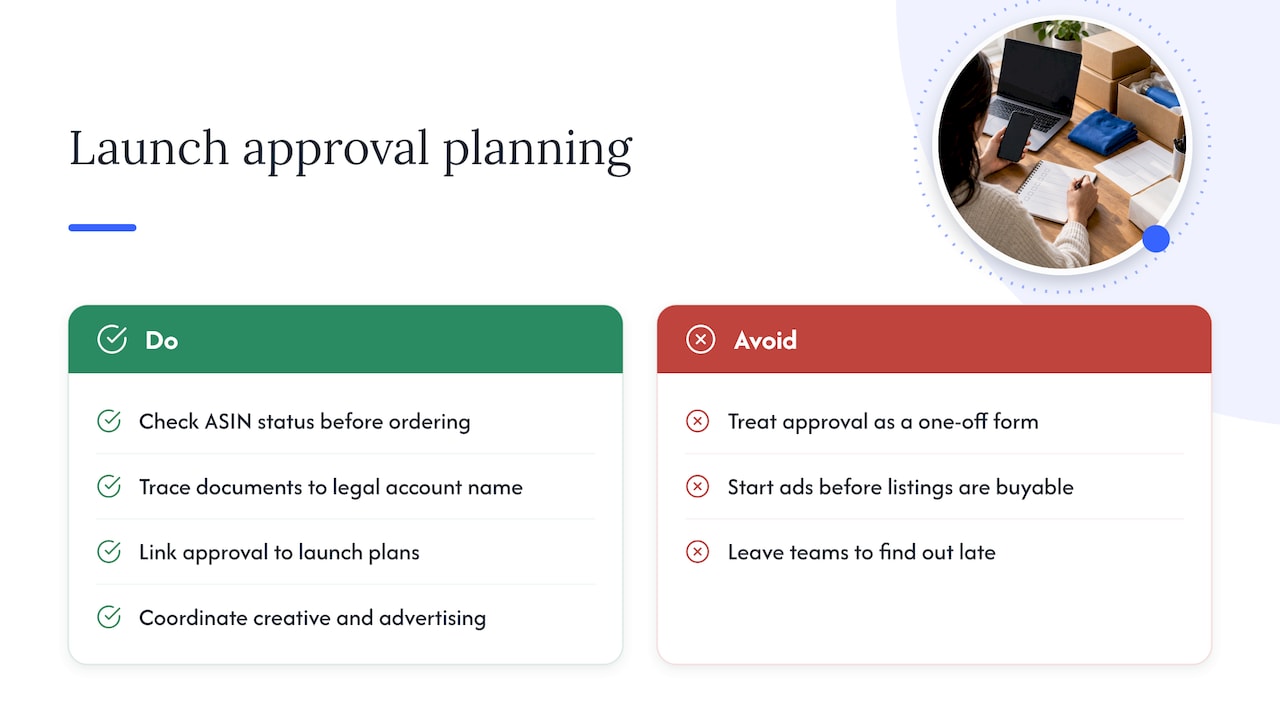
Approval timing touches every other workstream. Creative production depends on knowing what will go live. Advertising spend should not start until listings are buyable. Inventory forecasting needs to account for products that may sit idle during review. When approval is handled in isolation by whoever has Seller Central access, the other teams find out late.
We run marketplace operations as an integrated service, including catalog, inventory, forecasting and compliance, alongside creative and advertising. For a brand, that means approval status can be tied to the launch plan rather than discovered after the fact. If you manage several marketplaces, the same document habits apply when you expand; our Walmart Marketplace requirements guide shows the equivalent pre-launch checks there.
Our perspective
Brands tend to treat category approval as a one-off form. In our experience of running marketplace operations, it behaves more like catalog hygiene: the account, the supplier paperwork, the listing content and the launch date all have to agree, and approval is where any mismatch becomes visible.
That is why we start from the catalog, not the application. We want every ASIN’s status known before inventory is ordered, every document traceable to the account’s legal name, and every approval tied to the creative and advertising plan that depends on it. Our approach to marketplace operations covers catalog, inventory, forecasting and compliance in one place, so a gated product is a scheduled task rather than a launch-week surprise.
Approval also is not the finish line. A listing that gets ungated still has to convert, and that depends on content, advertising and measurement working from the same data. That is the reason we pair operations with in-house creative and our iDerive analytics platform for unified reporting.
Dan Katona
Where we can take the work off your team
If your brand sells physical products on Amazon and approvals are slowing launches, our Amazon Growth & Optimization service is the place to start. It sits alongside marketplace operations management, which covers catalog, inventory, forecasting and compliance, so the approval workflow, the listing content and the ad plan are run by one team.

Brands that also want creative built for newly approved listings can pair this with our full creative studio, which covers photography, video and PDP and A+ content. You can reach us through thinknectar.com.
FAQ
How long does Amazon category approval take?
Amazon’s stated review time is 2 to 7 business days, according to SellSonar’s summary of Amazon’s help flow. Allow extra time for a resubmission and, if your account has never bought the brand, for a first purchase that produces a qualifying invoice.
Can I appeal a declined application?
In most cases you fix the flagged issue and resubmit through the same flow with corrected documents. If the response says the account does not qualify, new paperwork will not change it. After two failed attempts with an unclear reason, open a Seller Support case that references both application IDs.
Does approval last forever?
No. Selling ability can change when restrictions, performance notifications, compliance requirements or insurance status change. Amazon also notes that products you already sell can become subject to new restrictions, so recheck statuses periodically.
Why does the same product show different statuses on two accounts?
Amazon sets restrictions account by account. Account history, performance and prior approvals all affect what each account sees, so always check from the account that will list the product.
Sources
- Amazon Seller Central forum: Toys & Games category specifications
- Amazon Seller Central forum: Ungating invoice requirement
- Amazon Seller Central forum: Category approval guide
- Amazon Seller Central forum: Ungate grocery & gourmet foods
- SellSonar: Amazon Restricted Products, Ungating, Categories and Hazmat
- YCL CPA: Selling on Amazon U.S. setup guide
Recommended