
If your hourly reports show significant variation in conversion rates between your best and worst hours, dayparting will likely cut wasted spend and lift ROAS. If conversion looks flat across the clock, skip it and fix something else first. Either way, the answer starts with exporting 28 days of hourly data. Nectar’s iDerive analytics work runs on exactly this kind of hour-by-hour signal.
Nectar
Turn Hourly Signals Into Growth
Nectar combines iDerive analytics with managed Amazon advertising to help brands act on performance patterns and scale smarter.
Explore Amazon growth optimization
What Is Dayparting on Amazon Ads?
Dayparting means adjusting bids or budgets by time of day, based on when your campaigns actually convert. On Amazon, this shows up in two very different forms: schedule-based budget rules and bid-level dayparting, and they are not interchangeable.
Amazon’s Campaign Manager added native schedule-based rules in late 2023, letting advertisers set time windows where budgets automatically increase. That is genuinely useful for a lunch-hour surge or a flash sale window, but the native tool has a hard limit: it raises spend, it doesn’t cut it.
What Amazon’s console can do:
What it generally can’t do without the Ads API or third-party tooling:
One easily missed detail: schedule rules run on your account’s set time zone, not the shopper’s local time. If your account time zone doesn’t match your primary customer base, your “peak hour” targeting can quietly miss the mark.
Does Dayparting Actually Improve ROAS?
Yes, but only when your hourly data actually shows a pattern worth acting on. The core benefits sellers report are lower ACoS during low-intent hours, higher conversion rates when you lean into peak windows, and less budget burned on clicks that were never going to convert.
Statistic Callout: Conservative practitioner guidance suggests starting bid or budget adjustments in the +15% to +25% range on your strongest hours, rather than jumping straight to aggressive swings.
Where dayparting tends to pay off:
Where it typically delivers little:
Is My Campaign a Good Dayparting Candidate?
Run this checklist before building anything:
If two or more of these point the same direction, the campaign is worth a full hourly analysis. If none do, your time is better spent on keyword or bid optimization instead.
How Do You Build an Hour-by-Hour Heatmap?
You don’t need paid software for this part. A spreadsheet and Amazon’s own reporting handle it in under half an hour.
Pro Tip: Before you trust any red or green block, check whether a lightning deal, coupon, or price change happened during that window. A single promo day can paint an entire hour red or green and lead you to “fix” something that was never actually broken.
This spreadsheet-first approach produces the same decision signal as paid dayparting tools, just with full visibility into every number behind it.
How Do You Actually Turn On Dayparting?
Once your heatmap points to real windows, you have two implementation paths, and the right one depends on what you’re trying to change.
Native schedule-based rules, built inside Campaign Manager, work well for straightforward boosts. You pick a campaign, define a time window, and set a budget increase for that window. It’s fast to configure and requires no outside tools. The catch, again, is that these rules are built to add spend during good hours and not suppress it during bad ones(https://wiseppc.com/blog/amazon-ppc-dayparting/).
Quick native wins you can execute today without any third-party access:
The Ads API or managed tooling becomes worthwhile when you need to reduce bids in weak hours, automate scheduling across dozens of campaigns, or make changes closer to real time. Third-party platforms and API-based systems can apply continuous hourly multipliers and bid decreases that native rules simply weren’t built for.
Pro Tip: If you’re only trying to capture more sales during a known good window, start native. Save the API route for when you need to actively cut spend somewhere.
How Long Should You Test Before Adjusting?
Give it structure, or you’ll end up chasing noise. Collect two to four weeks of baseline data before making a single change, then wait another three to four weeks before making the next meaningful adjustment. Anything faster and you’re reacting to random variance, not a real pattern.
Recommended adjustment sizing:
Watch these KPIs after each change:
If ACoS improves and organic visibility holds steady, keep the change. If ACoS improves but rank drops, iterate the adjustment size down. If nothing moves after four weeks, roll back and reassess whether the campaign was a real candidate at all.
What Mistakes Turn Dayparting Into a Liability?
The single most damaging habit is pausing and restarting campaigns hour by hour to mimic dayparting. Amazon’s algorithm treats pause and restart cycles as disruptions to its learning signal, and repeated pausing can quietly hurt placement and organic rank. Use bid or budget multipliers instead. They keep the campaign live while changing how aggressively it competes.
The second trap is overfitting to a handful of anomalous days. A single big spend day, a competitor stockout, or a random traffic spurt can look like a permanent hourly pattern when it’s really a one-off.
Safeguards worth building in from day one:
Pro Tip: Documenting every rule change, even small ones, is what separates advertisers who improve steadily from those who spend months undoing their own experiments.
How Nectar Approaches Dayparting for Client Brands
Nectar manages Amazon advertising for mid-market and enterprise brands using iDerive, its proprietary analytics platform built for exactly this kind of hour-level pattern detection across large account structures. That includes Sponsored Products, Sponsored Brands, and Sponsored Display management, plus DSP support for brands extending scheduling logic into programmatic buys.
One example of this in practice involves LonoLife, a protein snack brand facing the kind of visibility and spend-efficiency pressure that’s common in a crowded category. Working through a data-driven advertising intervention, informed by granular performance patterns rather than guesswork, the account saw improved visibility and more efficient spend allocation. The specifics vary by account, but the underlying method, pattern detection first, adjustment second, stays consistent.
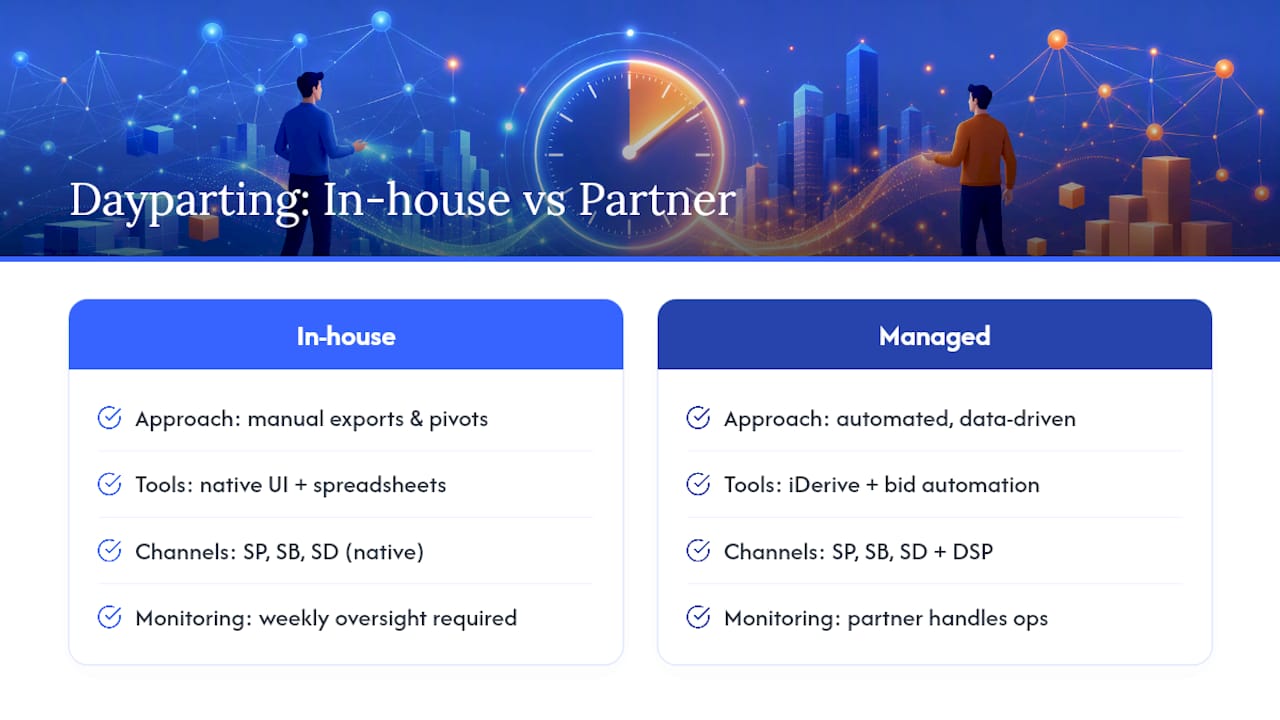
Running this in-house works well for sellers with the time to export, pivot, and monitor weekly. A managed partner becomes the better call when you’re managing dozens of campaigns across multiple categories, need bid-level automation the native tools don’t support, or simply don’t have a spare few hours a week for spreadsheet maintenance. Neither path is universally right. It depends on your account’s complexity and your team’s bandwidth.
What the Data Actually Says About Dayparting
Most of the dayparting advice circulating online treats it like a universal fix. It is not. The research supports a narrower claim: dayparting helps when hourly conversion data shows a real, persistent pattern, and it does nothing, or actively hurts, when applied to accounts that don’t have one.
The overrated part is the tooling conversation. Sellers spend weeks comparing bid automation platforms before they’ve even confirmed their own account has a usable hourly pattern. That’s backward. A pivot table and conditional formatting answer the “does this matter” question just as well as any paid dashboard. Spend the money on tooling after you’ve confirmed the signal, not before.
The underrated part is patience. A 28-day baseline followed by a three to four week wait between changes feels slow next to how eager most advertisers are to see results. But the accounts that get burned by dayparting are almost always the ones that reacted to a week of promising numbers instead of a month of consistent ones. Build the heatmap first. Trust the pattern only once it repeats.
Ready to Move Beyond Spreadsheets?
Once you’ve built your heatmap and confirmed a real hourly pattern, the next constraint is usually bandwidth, not strategy. Nectar is the option for brands that have outgrown manual dayparting but don’t want to hand campaign strategy to a black box. Through iDerive, Nectar’s team builds hour-level bid rules using Ads API access, layers in DSP where it strengthens peak-hour demand, and ties every adjustment back to full-funnel measurement instead of ad metrics in isolation.

The services relevant to dayparting specifically include managed Amazon advertising and PPC campaign management, API-based hourly rule implementation for accounts too large for manual spreadsheet tracking, and DSP management for brands extending scheduling logic into programmatic display. None of this replaces the diagnostic work covered above. It picks up once you’ve confirmed there’s a real pattern worth automating.
If your hourly data shows a pattern and you’d rather have a team execute and monitor it than build it yourself, visit Nectar’s Amazon solutions page to see how a managed engagement works, or reach out directly to talk through your account’s specific hourly data.
Sources
FAQ
How much hourly data do I need before making changes?
Collect at least two to four weeks of hourly data, and lean toward a full 28 days when possible, since Amazon’s native export caps at 14-day chunks that need combining.
Can I just pause my campaign during low-converting hours?
No. Frequent pausing disrupts Amazon’s learning signal and can hurt placement and organic rank; use bid or budget multipliers instead, which keep the campaign live.
Do I need paid software to do dayparting Amazon ads analysis?
No. A spreadsheet with pivot tables and conditional formatting produces the same decision signal as paid heatmap tools, using data exported directly from Seller Central.
When does dayparting Amazon PPC campaigns not make sense?
Skip it for low-volume campaigns without enough impressions for reliable hourly data, and for categories like replenishment or B2B supplies that typically show flat demand across hours.
Recommended


.png)






















.png)



































































