
If a product shows up as restricted on Amazon, you cannot list it until Amazon approves your application, and if it’s flagged prohibited, no amount of paperwork will get it listed. The immediate move is to open Seller Central, go to Add a Product, and click “Show limitations” or “Request approval” on the ASIN. Have your supplier invoices and any safety or regulatory documents ready before you start.
TL;DR:
- Many products are categorized as restricted or prohibited, requiring separate approval or blocking before they can be listed on Amazon.
- Approval involves submitting accurate invoices from authorized suppliers and category-specific documents, and inconsistencies lead to rejection.
- Gating status varies by product category, brand, and ASIN, and approval does not guarantee listing rights at every level.
- Rejected applications are often caused by invoice formatting errors, mismatched business details, or outdated documents, not the product’s risk level.
- Staying compliant after ungating requires ongoing documentation maintenance, careful inventory management, and understanding regional regulatory differences.
What Restricted Products on Amazon Actually Means
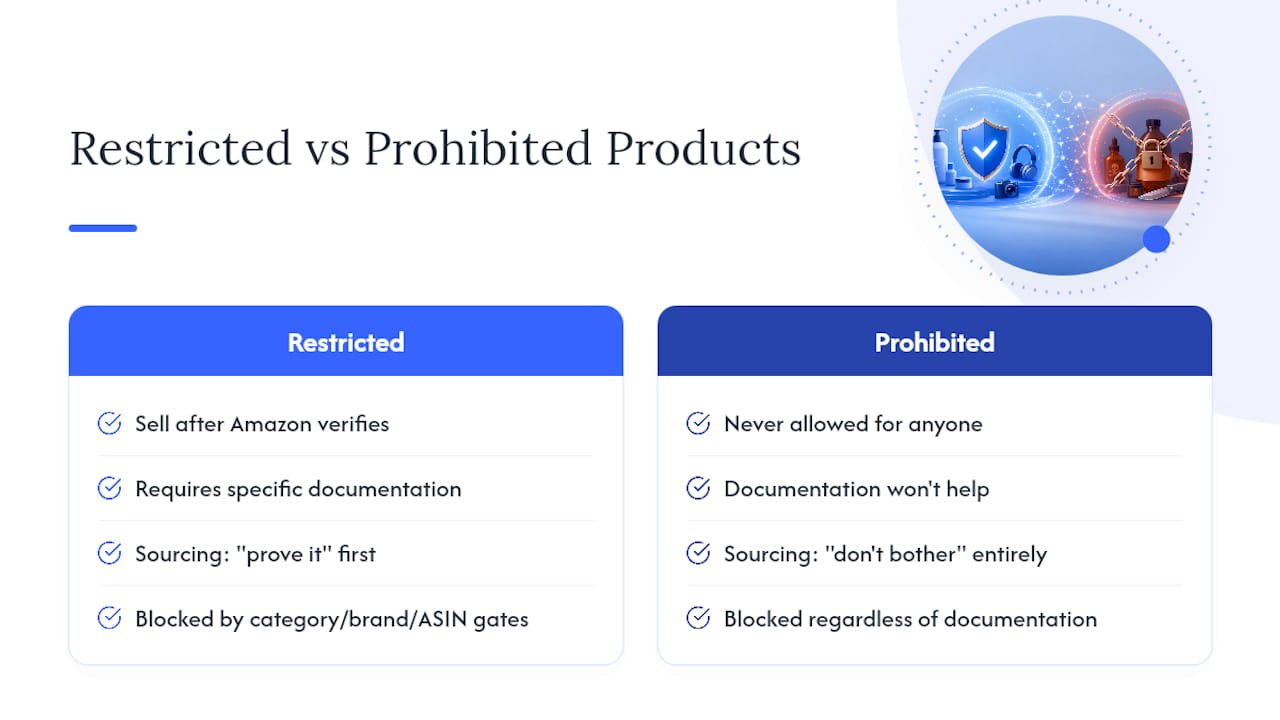
A restricted product is one you can sell once Amazon verifies you meet specific requirements. A prohibited product is one Amazon will not let anyone sell, period, regardless of documentation. That distinction shapes your entire sourcing strategy: restricted means “prove it,” prohibited means “don’t bother.”
Amazon enforces this through three separate gates, and clearing one does not clear the others. Category-level gating blocks entire departments (think Grocery or Jewelry) until you submit an application. Brand-level gating restricts specific brand names within an otherwise open category, often at the brand owner’s request to control counterfeits. ASIN-level gating locks individual listings, sometimes because of a prior safety complaint or a one-off compliance flag tied to that exact product.
This matters because sellers regularly get approved at the category level, source inventory, and then discover the specific ASIN or brand they picked is still blocked. Clearing a category gate does not guarantee listing rights for a given brand or product, and you need to check each layer independently before you commit to inventory.
Amazon runs this system for three reasons: consumer safety, counterfeit control, and legal exposure. The Restricted products help page is Amazon’s own framing of the policy, and it’s the first place to check status on any ASIN. Gating exists because Amazon, not you, carries liability when a hazardous product reaches a customer’s door, and the U.S. Consumer Product Safety Commission has made that liability concrete. A 2025 CPSC final order required Amazon to build out remediation plans for hazardous products sold through its marketplace, which explains why gating has only gotten stricter, not looser, heading into 2026.
Which Product Categories Are Restricted on Amazon?
Amazon’s gated category list changes over time, and status can vary by brand and even by individual ASIN within the same category. That said, a consistent set of categories has required approval for years, and knowing them before you source inventory saves you from buying stock you can’t list.
Categories that commonly require approval or documentation:
- Beauty and topicals — skincare, cosmetics, and anything applied to skin often needs ingredient documentation and sometimes FDA registration numbers.
- Dietary supplements — pills, powders, and gummies typically require a Certificate of Analysis (CoA) and label review.
- Health and personal care — items touching wound care, contraceptives, or diagnostic use trigger extra scrutiny.
- Medical devices — anything from thermometers to mobility aids can require FDA clearance numbers.
- Fine jewelry — precious metals and gemstones require invoices proving authenticity and sourcing.
- Grocery and gourmet food — perishables need shelf-life and storage compliance on top of category approval.
- Alcohol — heavily restricted and generally limited to licensed sellers in specific programs.
- Fine art and collectibles — high-value items often require provenance documentation.
- Collectible coins and currency — authenticity and grading documentation is standard.
- Automotive and powersports parts — safety-rated parts (brakes, airbags) require compliance proof.
- Pesticides — EPA registration is non-negotiable, no exceptions.
- Toys and children’s products — CPSIA testing documentation is required for anything marketed to kids under 12.
- Lithium batteries and battery-powered devices — hazmat classification and UN 38.3 test summaries are typically required.
Even within categories that are technically open, certain items are usually blocked outright: recalled products, weapons and weapon accessories, human body parts and fluids, and anything requiring a prescription without proper licensing. Sellers who assume “the category is open, so the item is fine” are the ones who end up with inventory they cannot move. Always confirm the specific ASIN, not just the department.
How Do You Check if a Product Is Restricted in Seller Central?
You check gating status through the Add a Product flow, not by guessing based on what competitors are selling. Amazon’s system evaluates category, brand, and ASIN independently, so the process below walks through all three layers.
- Search the exact ASIN or UPC. Go to Catalog, then Add a Product, and enter the specific identifier rather than a similar product. Small variations in packaging or formulation can carry different gating status.
- Look for “Show limitations.” If this link appears, the product has some restriction tied to it. Click through to see whether it’s a category requirement, a brand restriction, or a document request.
- Click “Request approval” if prompted. This opens the category-specific application, which usually asks for invoices, brand authorization letters, or safety certificates depending on the product type.
- Read the category-specific fields carefully. Toys ask for CPSIA testing summaries. Supplements ask for CoA documents. Electronics sometimes ask for FCC or UL certification numbers. Skipping a required field is one of the fastest ways to get an automatic rejection.
- Check for brand-level blocks separately. If the category clears but the listing still won’t go live, the brand itself may be gated. This shows up as a different error message, often referencing brand authorization rather than category approval.
- Confirm ASIN status again after approval. Category and brand approval do not always translate to an unblocked ASIN, particularly for products with a history of safety complaints.
The Ungating Process: A Document-First Approach That Works
Getting approved comes down to paperwork discipline more than anything else. Amazon’s reviewers, and increasingly its automated systems, are looking for a specific pattern in your invoices and supporting documents. Sellers who understand that pattern get approved on the first attempt far more often than sellers who submit whatever paperwork they happen to have.
- Assemble your supplier invoices first. You need invoices from an authorized distributor, not retail receipts. Amazon wants to see a real, traceable supply chain, and a receipt from a wholesale club does not establish that.
- Confirm quantity and date requirements. Industry guidance points to roughly 10 or more units per invoice line as a commonly cited threshold, and invoices dated within the last 90 to 180 days. Older invoices read as stale to reviewers even when the supplier relationship is current.
- Match business details exactly. The name and address on your invoice must match your Seller Central account precisely. A mismatch, even a suite number left off, is one of the most common reasons applications bounce back.
- Gather category-specific certifications. This might mean a CoA for a supplement, an SDS for a chemical product, or a brand authorization letter if you’re not the brand owner.
- Submit through the Seller Central application form. Attach documents as clean PDFs rather than photos of paper, upload each required field individually, and double-check that file names correspond to what the form asks for.
- Respond quickly to follow-up requests. Amazon sometimes asks for clarification or an additional document. Delayed responses can reset your position in the review queue.
- Keep every document on file after approval. Amazon can audit ungated accounts later, and losing access to your original invoices can cost you the approval you already earned.
Pro Tip: Keep at least three recent invoices per SKU on hand, even after you’re approved. If Amazon runs a compliance audit six months from now, you want documentation ready in minutes, not scrambling to call your distributor for a reissue.
There is no legitimate shortcut here. Services that claim to “buy” ungating approvals or sell pre-approved accounts violate Amazon’s terms, and sellers who go that route risk the entire account, not just the one listing.
What Documents Do You Need for Ungating, and Why Do Invoices Get Rejected?
The invoice is where most applications fail, and it’s usually a formatting problem rather than a sourcing problem. Amazon’s automated review systems scan for specific structural elements, and a document missing even one of them often gets rejected without human review.
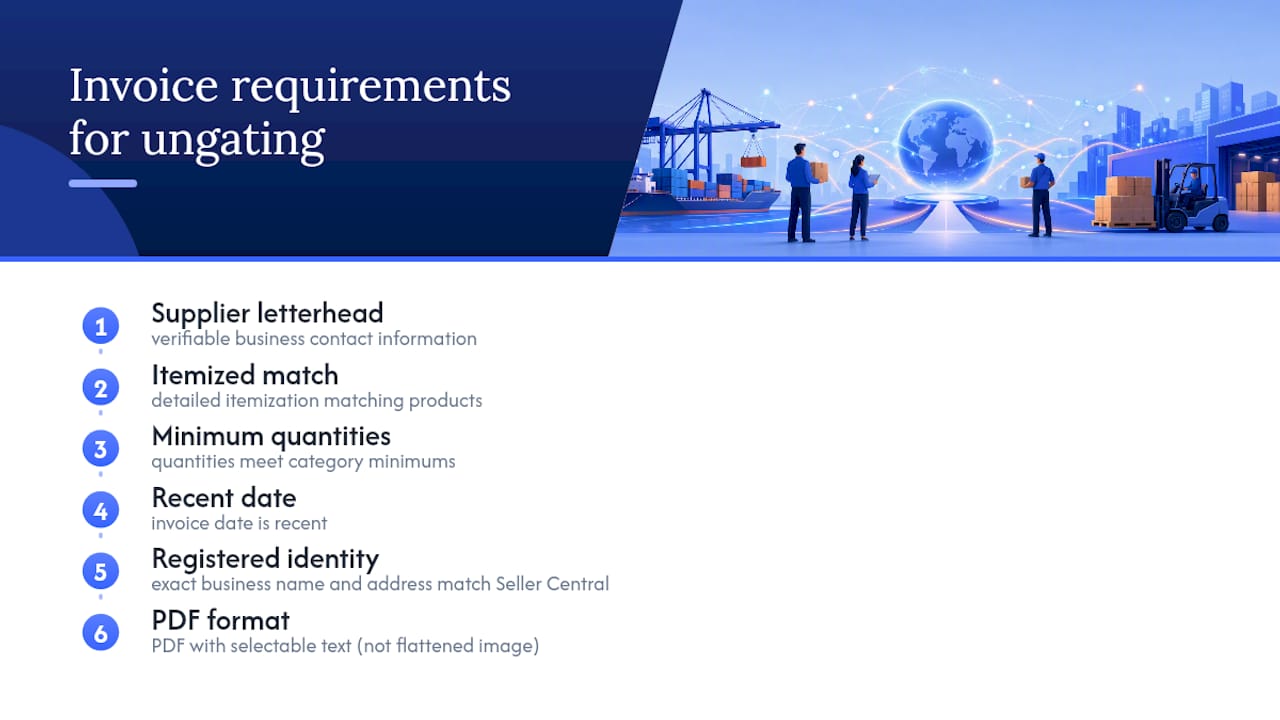
A compliant invoice generally includes supplier letterhead with verifiable business contact information, detailed itemization matching the applied products, quantities meeting minimum category requirements, a recent invoice date, exact business name and address matching Seller Central registration, and submission in PDF format.
Category-specific documents stack on top of the invoice. Chemical products need a Safety Data Sheet (SDS). Supplements need a CoA that matches FDA guidance on labeling and claims. Pesticides need proof of EPA registration, and skipping this one is not negotiable since selling an unregistered pesticide is a federal violation, not just a marketplace one. Electronics may need FCC or UL numbers, and food or medical products need labeling that matches regulatory formatting exactly.
Practitioner consensus points to a short list of failure modes that account for most rejections: retail receipts submitted instead of distributor invoices, business name mismatches, invoices that are too old, unit counts below the threshold, and scanned images that automated filters can’t parse. Pro Tip: Before you submit anything, open the PDF yourself and check whether the text is selectable. If it’s a flattened image, Amazon’s system may reject it before a human reviewer sees it.
How Long Does Ungating Take, and What Does It Cost?
Timelines depend entirely on category risk. Low-risk categories with straightforward documentation can clear in a few business days. High-risk categories, brand-specific gating, or anything requiring lab testing can stretch into several weeks, especially if your first submission gets kicked back and you have to resubmit.
Costs break down into a few buckets. You’ll likely need to purchase minimum inventory quantities from an authorized distributor just to generate a qualifying invoice. Lab testing or certification (CoA, SDS validation, CPSIA testing) can run from modest to significant depending on the product complexity. Some categories carry application-related costs tied to third-party testing labs rather than a direct Amazon fee.
The biggest hidden cost is a rejected application that snowballs into an account health issue. Repeated rejected submissions, or worse, an attempt to list a restricted item without approval, can trigger listing suspensions that affect your entire account, not just that one SKU. If that happens, you’re filing an appeal through Seller Central’s Account Health dashboard, which adds weeks and puts unrelated listings at risk in the meantime. Budget for the paperwork upfront. It’s cheaper than the alternative.
FBA, Hazmat, and Perishables: Operational Limits Beyond Approval
Getting ungated doesn’t automatically clear a product for Fulfillment by Amazon. Hazmat items, including lithium batteries, aerosols, and flammable liquids, require hazmat classification and often can’t ship through standard FBA channels at all, or need special carrier handling and packaging. Amazon’s hazardous and prohibited items page spells out which categories need this extra layer.
Battery-powered devices face airline shipping restrictions tied to UN 38.3 testing, and Amazon requires that documentation before accepting inbound shipments. Perishables and temperature-sensitive goods have their own inbound rules: expiration dating, shelf-life minimums at the time of receipt, and storage requirements that rule out standard FBA warehouses for some products entirely. Meltable inventory during summer months adds another seasonal wrinkle many sellers miss on their first FBA shipment.
Legal and Regulatory Compliance Behind the Gating System
Amazon’s restrictions map almost directly onto U.S. federal regulatory categories, which is worth understanding because it explains why some approvals feel bureaucratic. The Category, product, and listing restrictions page is Amazon’s internal policy layer, but the actual legal authority sits with federal agencies.
The CPSC governs toy safety, general consumer product hazards, and recall enforcement, and its 2025 action against Amazon shows regulators treating the marketplace itself as accountable for what third-party sellers list. The FDA governs supplements, over-the-counter drugs, cosmetics, and medical devices, with labeling and claims rules that exist independently of anything Amazon requires. The EPA governs pesticides and certain chemical products, and registration there is a federal legal requirement, not a marketplace preference.
This layering means Amazon’s document requests usually aren’t arbitrary. When the platform asks for a CoA or an EPA registration number, it’s asking you to prove compliance with a law that exists whether or not you sell on Amazon. Selling an unregistered pesticide or an unapproved medical device off-platform carries the same legal exposure. Amazon’s gating just happens to be the point where that exposure gets caught. Treating the ungating process as a compliance exercise rather than a marketplace hoop tends to produce cleaner, faster approvals, because you’re building documentation you’d need anyway.
Do Restricted Product Rules Differ Across Amazon Marketplaces?
Yes, and this trips up sellers expanding beyond their home marketplace more than almost anything else. Gating categories and required documents are set per marketplace, based on that country’s regulatory framework, not on a single global Amazon policy.
The U.S. marketplace ties its rules to agencies like the CPSC, FDA, and EPA. The EU marketplaces layer on CE marking requirements, REACH chemical regulations, and country-specific electronics standards that don’t exist in the U.S. framework at all. Japan’s marketplace applies its own safety certification standards (PSE marks for electronics, for instance) that have no direct U.S. equivalent. A product fully ungated and compliant in the U.S. can require an entirely new document set, sometimes translated and reformatted, before it clears the same category in another region.
Sellers expanding internationally often assume an approved U.S. listing transfers automatically. It doesn’t. Each marketplace runs its own gating logic, and Amazon’s regional Seller Central portals handle applications separately. If international expansion is on your roadmap for 2026, budget time for a second round of document gathering per marketplace rather than assuming one approval covers all of them.
How Do Restricted Products Affect Advertising and Promotions?
A restricted or gated product that hasn’t cleared approval typically can’t run Sponsored Products, Sponsored Brands, or Sponsored Display campaigns, because Amazon’s ad systems check listing eligibility before serving an ad. If the listing itself is suppressed or pending approval, ad spend on that ASIN is wasted or blocked outright.
This creates a practical sequencing problem for sellers launching in a gated category: get approval first, confirm the listing is fully live and buyable, and only then turn on advertising. Sellers who try to run ads simultaneously with an ungating application often find campaigns rejected or paused mid-flight, which wastes budget and skews performance data before the listing is even stable. Promotions, coupons, and deals face the same gate; a listing that’s suppressed for compliance reasons is generally ineligible for deal programs regardless of how strong the product’s sales history looks. Sequencing compliance ahead of media spend isn’t just good practice, it’s often the only way the ad system will let a gated listing run at all.
How Do You Stay Compliant After Approval?
Approval is a snapshot, not a permanent status. Amazon can re-review listings, and your compliance documentation needs to keep pace with your supply chain, not just the day you applied.
Keep every invoice and certificate on file well past the point of approval, since audits can happen months later and losing access to original paperwork is a common cause of sudden suspensions. Stick with the same authorized distributor relationships you used for approval, or reapply if you switch suppliers, because a new supplier means new invoices that need to meet the same standards. Watch for CoA or SDS expiration dates on supplement and chemical products, and refresh testing before the old documentation lapses. Monitor your Account Health dashboard regularly rather than waiting for a suspension notice, since early warning flags often appear before a full suspension hits. If you expand a gated product line to new variations or pack sizes, check ASIN-level status again. A new UPC on an already-approved brand doesn’t inherit clearance automatically.
Where Can Sellers Get Help With Restricted Product Issues?
Amazon’s own Seller Central Help pages remain the most current source for policy changes, since gating status and document requirements shift without much public announcement. Beyond Seller Central, Amazon’s Account Health dashboard surfaces specific reasons for suspensions and links directly to relevant appeal forms.
For category-specific questions, the regulatory agencies themselves publish plain-language guidance: the CPSC for toy and consumer product safety, the FDA for supplements and food labeling, and the EPA for pesticide registration. Independent resources focused on specific product categories, like ToylandEU’s breakdown of CPSIA toy rules, can help translate dense regulatory language into something you can actually act on before submitting a toy category application. Sellers managing frequent listing changes also benefit from reviewing their catalog periodically to catch flags early, an approach covered in more detail in Nectar’s guide to auditing product listings.
Why the Real Bottleneck Isn’t the Product, It’s the Paperwork
Most sellers assume ungating rejections come down to the product itself being too risky or the category being too tightly controlled. That’s rarely the actual cause. In practice, the rejection almost always traces back to an invoice that doesn’t match what Amazon’s system is scanning for: a retail receipt instead of a distributor invoice, a business name that’s off by a word, a date range that’s a few months too old.
That’s the part conventional advice glosses over. Generic guides tell you to “gather your documents” without explaining that Amazon’s automated review increasingly behaves like a pattern-matching system, not a human reading your paperwork with context. A flattened image PDF, a missing quantity field, an address that doesn’t match Seller Central exactly, these get rejected mechanically, often before anyone reads the substance of your application.
If you’re serious about scaling into gated categories in 2026, prioritize your invoice hygiene before you prioritize inventory sourcing. Build the paper trail first, confirm it matches the format reviewers expect, and only then commit capital to stock. Sellers who reverse that order end up holding inventory they can’t sell, which is a far more expensive mistake than a delayed launch.
— Dan Katona
How Nectar Helps Sellers Navigate Gated Categories
There are agencies that handle Seller Central applications, supplier documentation, and FBA intake to help ensure gated launches proceed smoothly.

That means fewer rejected applications and less inventory sitting idle while paperwork gets sorted out. Nectar’s team works directly in Seller Central account operations, handling the document assembly, invoice verification, and application filing that trips up sellers going it alone. For brands launching into restricted categories, operational support may include supplier verification, audit-ready recordkeeping, and coordination with FBA intake requirements for hazmat or perishable goods. Nectar also brings its proprietary iDerive analytics platform into the picture, giving brand managers visibility into how gated-category launches perform once they’re live, not just whether they cleared approval.
If your team is weighing whether to handle ungating internally or bring in outside expertise, the deciding factors usually come down to how often you launch into gated categories, whether you already have compliance infrastructure in place, and how much risk tolerance you have for upfront inventory and testing costs. For brands facing frequent or complex gating situations, working with a team that handles this regularly, informed by Dan Katona’s operational perspective on the process, can shorten the runway considerably. Visit Nectar’s Amazon Growth & Optimization page to request a consultation on your specific catalog and gated-category plans.
Sources
- Restricted products
- CPSC issues final order to Amazon.com outlining remediation plans for hazardous products
- FDA 101: Dietary supplements
- About pesticide registration
Recommended


.png)






















.png)



































































